
Nginx Build & Modules
nginx binary management (RPM or WSA build), HTTP/3, Brotli compilation and configuration.
The Nginx Build & Modules page centralizes management of the nginx binary and its dynamic modules — Brotli and HTTP/3. This is where the administrator:
- Chooses between the
nginxpackage from the standard RPM repository or a custom WSA build (with HTTP/3). - Compiles and enables Brotli compression.
- Enables or disables QUIC emission (HTTP/3) on SSL vhosts.
- Monitors pinned versions against installed versions.
- Chooses whether the HTTP/3 build rebuilds itself after a WSA update that changes a pinned version.
- Chooses whether a standard RPM server installs verified nginx updates on its own, at night.
Access: Sidebar → Nginx Build & Modules.
⚠️ Actions on this page modify the nginx binary or recompile modules. They take several minutes and may briefly interrupt the service. Preferably execute outside peak hours.
1. Tab organization
The page is divided into 2 tabs:
[ Nginx | Brotli ]| Tab | Content |
|---|---|
| Nginx | nginx binary choice, updates and automatic upgrades, HTTP/3, QUIC, pinned versions, auto-rebuild. |
| Brotli | Brotli module install/rebuild, compression settings. |
2. Nginx tab
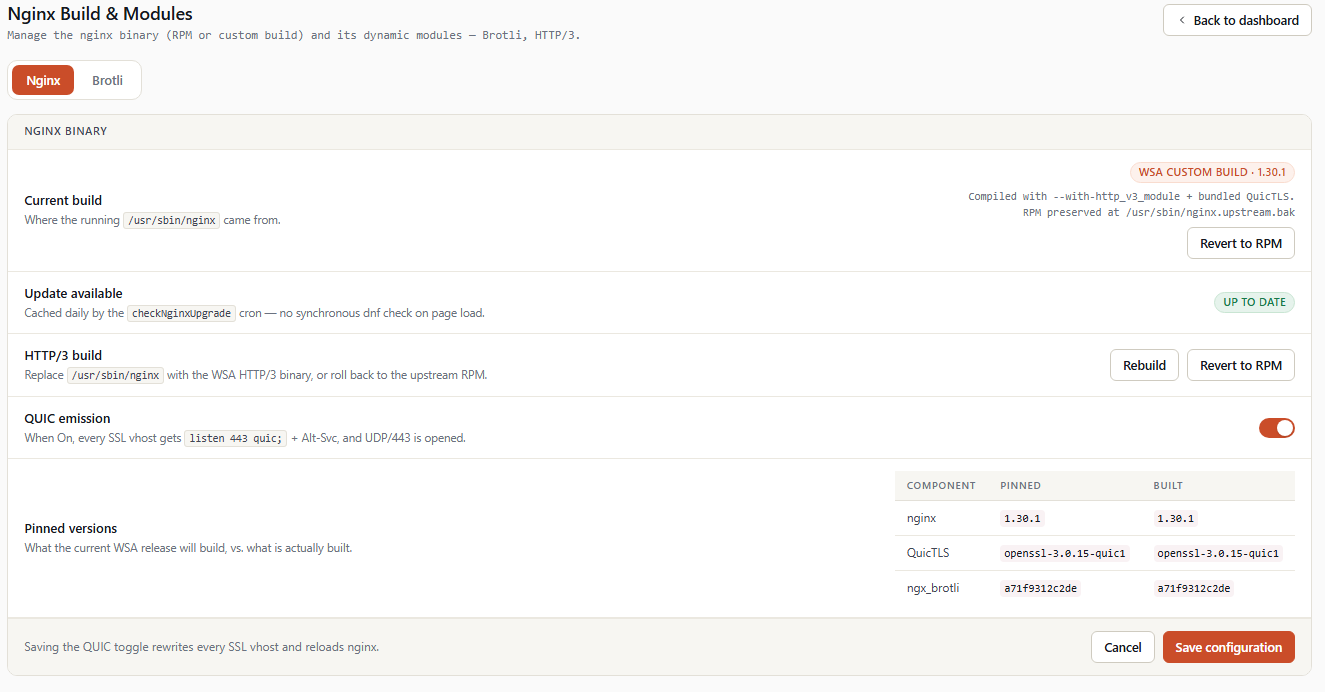
2.1 Nginx binary section
2.1.1 Current build
   Current build
   Where the running /usr/sbin/nginx came from.
   ┌──────────────────────────────────────────────────────┐
   │  [ WSA custom build · 1.30.1 ]                       │
   │  Compiled with --with-http_v3_module + bundled       │
   │  OpenSSL 3.5.                                        │
   │  RPM preserved at /usr/sbin/nginx.upstream.bak       │
   │                                       [ Revert to RPM ] │
   └──────────────────────────────────────────────────────┘
Displays the origin of the currently running nginx binary:
| State | Display |
|---|---|
| WSA custom build · 1.30.1 | Custom WSA build, contains HTTP/3 and OpenSSL 3.5 (QuicTLS up to WSA 2.3.30). The standard RPM is preserved as backup. |
| Stock RPM · 1.30.0 | Standard nginx binary from the RPM repository. No HTTP/3. |
Button Revert to RPM (visible only in WSA custom build mode) — Restores the standard RPM package:
- Disables HTTP/3 (SSL vhosts remove
listen 443 quic;). - Restores
/usr/sbin/nginx.upstream.bak→/usr/sbin/nginx. - Rebuilds configurations.
- Reloads nginx.
⚠️ Asks confirmation: "Roll back to the stock RPM nginx? The custom build will be removed and the original /usr/sbin/nginx.upstream.bak restored."
2.1.2 Update available
   Update available
   Checked in the background every 6 hours and after
   each WSA update — no dnf call on page load.
   ┌──────────────────────────────────────────────────────┐
   │  [ Update → 1.30.7 ]            [ Upgrade nginx ]    │
   │                          Last check: 2026-11-19 08:28 │
   └──────────────────────────────────────────────────────┘
Detection of a new nginx version available via dnf. Detection runs in the background — every 6 hours (cron checkNginxUpgrade) and right after each WSA update — never on page load. Up to WSA 2.3.34 it ran once a day only, so a check made just before nginx.org's package reached the server left the row on Up to date for almost a day. To check now: /etc/wsa/wsa --nginx-check-update.
Under the pill, Last check gives the date of that check.
State Up to date: green pill, no button — the check found nothing newer.
State Unknown (since WSA 2.3.35): the last check could not conclude — dnf did not answer in time, the nginx.org repository is missing, or no check has run yet. The row shows dnf's reason. Up to 2.3.34 this case also read Up to date. On an HTTP/3 build the row reads Via the HTTP/3 rebuild: that build is updated by the HTTP/3 rebuild, not by dnf.
State Update available: yellow pill with target version
- Upgrade nginx button:
- Checks that this WSA release has verified the target version (see below), before changing anything.
- Upgrades the package to exactly the version shown (streamed
dnf upgrade). - Recompiles Brotli automatically (the module is linked to nginx ABI — an upgrade would break Brotli without this step).
- Tests the configuration with
nginx -t, then restarts nginx (systemctl restart) — only if the test passes. - Locks the package again.
⚠️ Asks confirmation: "Run WSA-managed nginx upgrade? Will rebuild Brotli automatically."
Versions WSA has not verified yet (since WSA 2.3.35). WSA can only rebuild Brotli from an nginx source it has verified (NGINX_SOURCE_SHA256 in lib/bootstrap.php); installing another version first would leave nginx with a module it cannot load, and the next restart would fail. With Brotli installed:
- If the newest version is not verified but an older one, still newer than yours, is (for example 1.30.7 verified, 1.30.8 published today), the pill and the button offer that verified version, with the note "nginx 1.30.8: also released, waiting for the WSA update that verifies it".
- If no newer version is verified, the row shows waiting for WSA: yellow pill with the target version, no button, and the note "Waiting for the WSA update that verifies this nginx version". The button comes back with the WSA update that verifies it — usually within days of an nginx security release. The same check refuses
wsa --nginx-upgradein that state.
Without Brotli, the button offers the newest version as before.
💡 The Tier 2 mechanism (
dnf versionlocklock) preventsdnf-automaticupdates from replacing the WSA custom build binary without this procedure. That's why upgrade-via-WSA is the only correct way to advance versions.
Automatic nginx upgrades (standard RPM only, since WSA 2.3.35)
   Automatic nginx upgrades
   At night, install a newer nginx package once this WSA       [ ◯ ]
   release has verified that version, with the same steps   Window: 02:00–05:00
   as Upgrade nginx: …                                         server time
Off by default. When On, the server installs nginx updates on its own, with exactly the steps of the Upgrade nginx button above (Brotli rebuilt first, nginx -t, then a short restart).
- When: between 02:00 and 05:00, server time. The restart drops open connections for a moment, hence the night window. WSA checks every hour; a check outside the window does nothing. Inside the window, if the last dnf check is more than 3 hours old, it is redone first, so the night never acts on stale data.
- Which versions: only a version this WSA release has verified — the newest verified one when a newer release is still waiting. When nginx.org publishes a new version, the server waits for the WSA update that verifies it, then upgrades the next night. Servers thus follow the same rhythm as the HTTP/3 build.
- Never automatic: replacing a vendor nginx package (for example CloudLinux's) with the nginx.org one. That swap removes packages: run it once yourself with Upgrade nginx.
- If an attempt fails: the upgrade stops at the failed step (a failure before the restart leaves the running nginx as it was), the package is locked again, and a WHM alert shows what happened. Check
/var/log/wsa/module-build.logand fix the cause, then click Acknowledge on the alert (or run/etc/wsa/wsa --nginx-auto-upgrade=ack): the alert goes away and the next night may try that version again. Without an acknowledgement, the same version is not retried before the next WSA update. A successful Upgrade nginx also clears the alert. - The row shows the window and the last attempt (date, versions, result). Output goes to
/var/log/wsa/module-build.log.
The switch is saved as soon as you click it: nothing is upgraded at that moment. Command line:
/etc/wsa/wsa --nginx-auto-upgrade          # show the setting and the last attempt
/etc/wsa/wsa --nginx-auto-upgrade=on
/etc/wsa/wsa --nginx-auto-upgrade=off
/etc/wsa/wsa --nginx-auto-upgrade=ack      # after fixing a failed attempt
On an HTTP/3 build server this row is hidden: that build follows WSA's pinned versions through Auto-rebuild on WSA update (section 2.1.7).
2.1.3 HTTP/3 build
   HTTP/3 build
   Replace /usr/sbin/nginx with the WSA HTTP/3 binary,
   or roll back to the upstream RPM.
   ┌──────────────────────────────────────────────────────┐
   │  Installed                                           │
   │                            [ Rebuild ] [ Revert to RPM ] │
   └──────────────────────────────────────────────────────┘
Management of the custom HTTP/3 build. 3 possible states:
State 1 — HTTP/3 not installed (binary = standard RPM)
Single button: Build HTTP/3.
Starts the streamed compilation:
- Download nginx + OpenSSL 3.5 from official sources.
- SHA256 verification (tarball integrity).
- Compilation (~3 to 8 minutes depending on server).
nginx -ttest on the new binary.- RPM backup at
/usr/sbin/nginx.upstream.bak. - Switch active binary to the new build.
- Open UDP/443 port (CSF or firewalld detected).
- Reload nginx.
⚠️ Asks confirmation: "Build the WSA HTTP/3 nginx? Takes 3-8 minutes; the stock RPM stays running until the new binary passes nginx -t."
State 2 — HTTP/3 installed and up to date
Two buttons:
- Rebuild — Rebuilds even if no pinned version change. Useful after a manual pin change or to force a new build.
- Revert to RPM — Uninstalls the HTTP/3 build and restores the standard RPM package. Also disables QUIC on vhosts.
State 3 — Not supported on this server
Neutral pill "Not supported on this OS" with reason (e.g., "EL 8 requires manual OpenSSL 3.0 backport — not automated"). The button is disabled.
HTTP/3 requires EL 9 or EL 10. EL 7 and EL 8 are not supported.
2.1.4 QUIC emission (visible only when HTTP/3 installed)
   QUIC emission                            (Default: 0)
   When On, every SSL vhost gets listen 443 quic; + Alt-Svc,
   and UDP/443 is opened.
[ OFF ] ↺Type: toggle Default: Off
When On, WSA adds listen 443 quic; and Alt-Svc header to SSL vhost configurations. Visitors on modern browsers automatically switch to HTTP/3; others stay on HTTP/2.
When Off, the HTTP/3 binary is installed but no vhost emits QUIC. Useful for:
- Testing the build before enabling in production.
- Temporarily disabling HTTP/3 without uninstalling the build.
Enabling or disabling triggers a full vhost rebuild followed by an nginx reload — output streamed live in a Process status view.
2.1.5 Certificate key type (visible when HTTP/3 is installed or installable)
   Certificate key type
   cPanel's default key type for new certificates,     [ ECDSA P-256 ]
   AutoSSL included. ...                    Recommended: a compact
                                            certificate chain keeps
                                            the QUIC handshake to one
round trip ...Type: read-only
Shows the key type cPanel uses by default for new certificates, AutoSSL included. WSA reads it from /var/cpanel/cpanel.config (ssl_default_key_type). This row only reports the setting: you change it in WHM » SSL/TLS Configuration.
| Value | Indicator | Advice |
|---|---|---|
| ECDSA P-256 | green | Recommended. |
| ECDSA P-384 | blue | Works. P-256 is lighter for the same practical security. |
| RSA 2048-bit (cPanel's default) | blue | Works. Switching to P-256 is recommended. |
| RSA 4096-bit | orange | Heaviest option. Switching to P-256 is recommended. |
| Unrecognised value / Unknown | grey | WSA does not know the stored value, or could not read /var/cpanel/cpanel.config. |
· cPanel default after the value means the setting was never changed, so cPanel uses RSA 2048.
Why P-256 for HTTP/3. Until a QUIC server has validated the visitor's address, it may send only three times what it received: at least about 3.6 KB (three times the 1,200-byte minimum first packet). On a new connection, that first response carries the whole certificate chain. A smaller ECDSA chain helps it fit, while a large RSA chain is more likely to overflow and cost the connection an extra round trip. ECDSA signatures also cost the server much less CPU per new connection.
Before changing the setting:
- Compatibility. Every current browser accepts ECDSA certificates. Very old clients do not (Windows XP, Android before 4.0, some old devices and mail clients). The same AutoSSL certificate also serves mail and cPanel services.
- TLS 1.2 cipher list. WSA copies Apache's
SSLCipherSuite. It must containECDHE-ECDSA-*suites, as cPanel's default list does; with a custom RSA-only list, TLS 1.2 connections fail once the certificates are ECDSA. TLS 1.3 is not affected. - Saving the setting triggers an AutoSSL run that reissues every AutoSSL certificate following the server default with the new key type. The same setting is also in Tweak Settings » Security.
- A cPanel account can choose its own key type in its SSL/TLS page; that choice overrides the server default.
- Certificates installed by hand (commercial certificates) are not changed. At renewal, their key type depends on the key generated for the new certificate.
2.1.6 Pinned versions (table)
   Pinned versions
   What the current WSA release will build, vs. what is
   actually built.
   ┌───────────────┬──────────────────────┬──────────────────┐
   │ Component     │ Pinned               │ Built            │
   ├───────────────┼──────────────────────┼──────────────────┤
   │ nginx         │ 1.30.1               │ 1.30.1           │
   │ OpenSSL       │ 3.5.9                │ 3.5.9            │
   │ ngx_brotli    │ 53e0fb55f250         │ 53e0fb55f250     │
   └───────────────┴──────────────────────┴──────────────────┘
Compares pinned versions (what the current WSA release wants to build) with versions actually built on this server.
| Column | Source |
|---|---|
| Pinned | HTTP3_* constants in lib/bootstrap.php (updated each WSA release). |
| Built | SQLite state http3_state (updated on each successful HTTP/3 compilation). |
A divergence indicates that the build is stale — a WSA update bumped a pin but the server hasn't recompiled yet. The Brotli tile on the dashboard and the alert banner flag this case with a Rebuild CTA. With Auto-rebuild on WSA update on (next section), the server rebuilds by itself right after the update.
If fields are empty (—), HTTP/3 has never been built on this server (current binary = standard RPM).
2.1.7 Auto-rebuild on WSA update (visible only when HTTP/3 installed)
   Auto-rebuild on WSA update
   When a WSA update changes a pinned version (nginx,        [ ◯ ]
   OpenSSL or ngx_brotli), rebuild the HTTP/3 build in the
   background right after the update. …
Off by default. WSA updates (Auto Update or manual) bring new pinned versions, for example a security fix in nginx. Without this option, the HTTP/3 build keeps running the old version: the page and the dashboard flag it as stale, and you start the rebuild yourself with Rebuild.
When On, the update starts that rebuild by itself, in the background, as soon as it has installed the new WSA files:
- It only runs when a pinned version actually changed (nginx, OpenSSL or ngx_brotli). An update that changes no pin starts nothing.
- It covers Brotli too: in the HTTP/3 build, the Brotli module is compiled with nginx.
- The build takes a few minutes of CPU. The running nginx keeps serving until the new binary passes
nginx -t; if the build fails, nothing is swapped. - Output goes to
/var/log/wsa/module-build.log.
The toggle is saved as soon as you click it: no Save needed, and nothing is rebuilt or reloaded at that moment. The same setting is available from the command line:
/etc/wsa/wsa --http3-auto-rebuild          # show the current value
/etc/wsa/wsa --http3-auto-rebuild=on
/etc/wsa/wsa --http3-auto-rebuild=off
ℹ️ This option only concerns the HTTP/3 build. On a server running the standard RPM, the package is locked so that a plain dnf update cannot leave Brotli compiled for another version: use Upgrade nginx, which also rebuilds Brotli, or turn on Automatic nginx upgrades (section 2.1.2).
3. Brotli tab
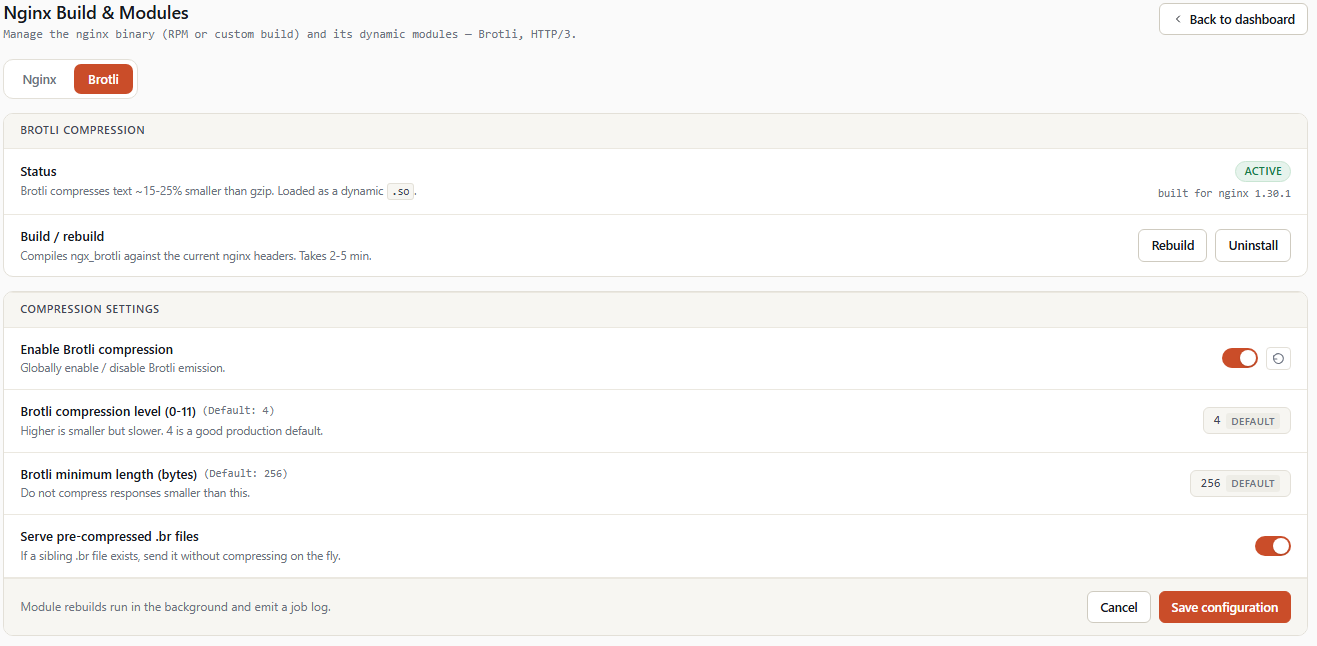
3.1 Status
   Status
   Brotli compresses text ~15-25% smaller than gzip.
   Loaded as a dynamic .so.
   ┌──────────────────────────────────────────────────────┐
   │  [ Active ]                                          │
   │  built for nginx 1.30.0                              │
   └──────────────────────────────────────────────────────┘
4 possible states:
| State | Pill | Meaning |
|---|---|---|
| Active | Green | Compiled, enabled, serving compressed responses. |
| Installed, disabled | Neutral | Compiled and loaded, but master switch brotli_enable=0. |
| Rebuild needed | Yellow | Compiled for an older nginx version (ABI drift). |
| Not installed | Red | No Brotli build on this server. |
Sub-line: nginx version Brotli was compiled for (built for nginx 1.30.0).
3.2 Build / rebuild
   Build / rebuild
   Compiles ngx_brotli against the current nginx headers.
   Takes 2-5 min.
   ┌──────────────────────────────────────────────────────┐
   │   [ Rebuild ]  [ Uninstall ]                         │
   └──────────────────────────────────────────────────────┘
3 buttons depending on state:
State 1 — Not installed
Install Brotli — Compiles and installs the module:
- Download ngx_brotli source (
git cloneatHTTP3_NGX_BROTLI_COMMIT). - Compile against current nginx version headers (~2 to 5 minutes).
- Install the
.soin/etc/nginx/modules/. - Add
load_moduleto main config. - Reload nginx.
State 2 — Installed
- Rebuild — Recompiles against the current nginx version. Useful after an nginx upgrade to avoid ABI drift.
- Uninstall — Removes the
.somodule, removesload_module, reloads nginx.
State 3 — Not eligible
Cannot install pill with reason (e.g., "Nginx 1.30.0 is too old, minimum 1.30.0", "Distribution not supported", etc.).
3.3 Compression configuration (visible when Brotli installed)
Four detailed parameters:
3.3.1 Enable Brotli compression
   Enable Brotli compression                     [ OFF ]
   Globally enable / disable Brotli emission.
(Default: Disabled)Field: brotli_enable Type: toggle Default: Off
Global master switch. When Off, the module stays loaded but emits no Brotli compressed response (visitors will receive gzip if enabled, otherwise uncompressed).
3.3.2 Brotli compression level
   Brotli compression level (0-11)        (Default: 4)
   Higher is smaller but slower.
[ 4 ] ↺Field: brotli_comp_level Type: integer 0–11 Default: 4
| Level | Trade-off |
|---|---|
| 0 | No compression. Testing only. |
| 1–3 | Very fast, minimal compression. Negligible CPU. |
| 4 (default) | Excellent speed/ratio compromise. |
| 5–6 | More compressed, ~10–20 % more CPU. |
| 7–9 | High compression, non-negligible CPU. |
| 10–11 | Maximum, very slow. Appropriate only with pre-compressed .br serve. |
Recommendation: 4 for on-the-fly compression. 11 if using serve .br (static pre-compression).
3.3.3 Brotli minimum length
   Brotli minimum length (bytes)        (Default: 256)
   Do not compress responses smaller than this.
[ 256 ] ↺Field: brotli_min_length Type: integer (bytes) Default: 256
Threshold below which responses are not compressed. Compressing very small payloads costs more in CPU than the size gain.
Recommendation: 256 is the balanced default. Increase to 1024 or 2048 on CPU-limited servers.
3.3.4 Serve pre-compressed .br files
   Serve pre-compressed .br files                [ ON ]
   If a sibling .br file exists, send it without
   compressing on the fly.
(Default: Enabled)Field: brotli_static_enable Type: toggle Default: On
When a pre-compressed .br file exists next to the original (style.css + style.css.br), nginx serves it directly instead of compressing on the fly.
No downside — pure gain when the customer's build tools generate .br (Webpack with CompressionPlugin({ algorithm: 'brotliCompress' }), WordPress plugin, etc.).
4. Footer and saving
4.1 Brotli config save
Save configuration button at the bottom of the Brotli tab (visible only when the module is installed). Saves the 4 Brotli settings (enable / level / min_length / static), then reloads nginx.
4.2 QUIC toggle save
Save configuration button at the bottom of the Nginx tab (visible only when HTTP/3 is installed). Saves the QUIC emission toggle value, then launches the streamed vhost rebuild.
4.3 Action buttons (Build, Upgrade, Revert) and the automatic toggles
These buttons don't require a Save — they directly trigger their action on click (with modal confirmation for destructive actions). The Auto-rebuild on WSA update and Automatic nginx upgrades toggles work the same way: a click saves them at once, without rebuilding or upgrading anything.
5. Internal architecture (informative)
5.1 Source of pinned versions
Hard-defined in src/lib/bootstrap.php (values of WSA 2.3.35):
define('HTTP3_NGINX_VERSION',     '1.30.7');
define('HTTP3_NGINX_SHA256',      '2565b5c837050e958f70fb0f73c48e2bca4542ad349fd356f46fb0c72610bc6e');
define('NGINX_SOURCE_SHA256', array(
    '1.30.7' => '2565b5c8…',
    '1.30.6' => '3cf46f5e…',
    // … every version WSA has verified, back to 1.30.1
));
define('HTTP3_OPENSSL_VERSION',   '3.5.9');
define('HTTP3_OPENSSL_SHA256',    '603f5602e2eef00d77fbd429d34dcd5822bb301757a1bc9cdb24c670f1eb859a');
define('HTTP3_NGX_BROTLI_COMMIT', '53e0fb55f250f48fe80c0ddbf6c0f7103cdbaae1');- *`HTTP3_`** — what the HTTP/3 build compiles. Moving one marks existing builds as stale (section 2.1.6).
NGINX_SOURCE_SHA256— the nginx versions WSA has verified: the Astral Internet team downloads each source tarball and its.tar.gz.ascsignature from nginx.org, checks the PGP signature against nginx's published signing keys, then records the SHA256. A server compiles only a source whose SHA256 matches. This list also decides which nginx package versions a standard RPM server may move to: the Brotli module can only be rebuilt for a verified version, so Upgrade nginx and Automatic nginx upgrades never install any other (section 2.1.2).
These constants are bumped each WSA release when the Astral Internet team validates a new upstream version — typically within days of an nginx security release.
5.2 Local state
Persisted in the options table of /etc/wsa/conf/wsa.sqlite:
| Key | Content |
|---|---|
http3_state |
JSON: {nginx_version_built, openssl_version_built, ngx_brotli_built, binary_sha256, built_at, wsa_version_built} |
http3_enable |
0 or 1 — QUIC emission toggle state |
http3_auto_rebuild |
0 or 1 — Auto-rebuild on WSA update toggle (also wsa --http3-auto-rebuild) |
nginx_auto_upgrade |
0 or 1 — Automatic nginx upgrades toggle (also wsa --nginx-auto-upgrade) |
nginx_auto_upgrade_state |
Last automatic attempt: {at, from, target, success, message, wsa, resolved?} (resolved = acknowledged, or settled by a successful manual upgrade) |
brotli_enable |
0 or 1 |
brotli_comp_level |
0 to 11 |
brotli_min_length |
integer |
brotli_static_enable |
0 or 1 |
The result of the last nginx package check is kept in /etc/wsa/conf/nginx_upgrade.json (installed and available versions, newest verified version, reason when nothing is available, date of the check). The WHM pages only read this file; they never call dnf.
5.3 Background tasks
These WSA internal tasks keep this page up to date and act on its options:
| Task | Interval | Role |
|---|---|---|
checkNginxUpgrade |
6 hours (24 h up to WSA 2.3.34) | Asks dnf for a newer nginx package and refreshes nginx_upgrade.json. Also run right after each WSA update. |
autoUpgradeNginx |
1 hour | Only when Automatic nginx upgrades is on and the server clock is between 02:00 and 05:00: upgrades nginx to a verified version (section 2.1.2). |
checkNginxAbiDrift |
10 minutes | If nginx was upgraded outside WSA (manual dnf, dnf-automatic), rebuilds Brotli for the new version, or disables it cleanly when that fails, and raises an alert. |
After a WSA update, post_update also starts the HTTP/3 rebuild when Auto-rebuild on WSA update is on and a pinned version moved (section 2.1.7).
6. Further reading
- Dashboard — Overview including Brotli and HTTP/3 tiles.
- Release notes — History of security pin bumps (nginx CVEs, etc.).
- What is WSA? — Conceptual explanation of HTTP/3 and Brotli.
- Command line —
wsa --http3-*andwsa --nginx-*commands.