
Account Inventory
List of all cPanel accounts with their cache profile, search, filters, bulk apply, CSV export.
The Account Inventory page lists all cPanel accounts on the server with their current cache profile and allows applying individual or bulk actions.
Access: Sidebar → Account Inventory.
💡 This page is the main mass management tool. To configure a specific account in depth (per domain, per subdomain, custom bot lists), the end user goes through their own cPanel panel.
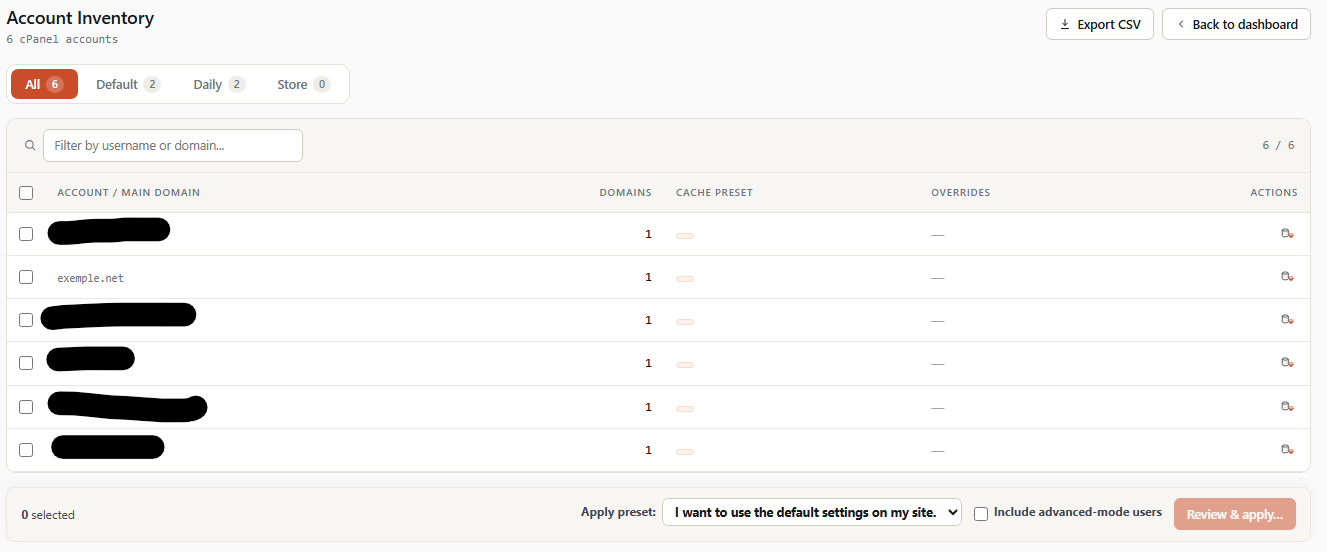
1. Overview
   ┌──────────────────────────────────────────────────────────┐
   │  Account Inventory                                       │
   │  120 cPanel accounts · 357 domains · 12 overrides        │
   │                            [ Export CSV ]  [ Back ]      │
   ├──────────────────────────────────────────────────────────┤
   │  [ All 120 | Default 95 | Daily 18 | Store 5 | Over. 12 ]│
   ├──────────────────────────────────────────────────────────┤
   │  🔍 [ Filter by username or domain... ]    visible 120/120│
   ├──────────────────────────────────────────────────────────┤
   │  ☐  Account            Domains  Preset       Overrides   │
   │  ☐  user1 / dom.com    3        Default      —     [×]   │
   │  ☐  user2 / shop.fr    7        Daily        2 ov. [×]   │
   │  ☐  user3 / blog.com   1        Store        —     [×]   │
   │  ☐  user4 / app.com    2        Advanced     5 ov. [×]   │
   │  ...                                                     │
   ├──────────────────────────────────────────────────────────┤
   │  0 selected   Apply preset: [Default▾]  □ inc. advanced  │
   │                                  [ Review & apply… ]     │
   └──────────────────────────────────────────────────────────┘
2. Header
2.1 Counters
Displayed below the title:
- N cPanel accounts — Total number of accounts detected.
- N domains — Total hosted domains (sum of domains + subdomains + addons).
- N overrides — Total per-domain custom configurations (an account can have multiple overrides).
2.2 Export CSV button
Downloads the complete inventory as CSV. The file is named wsa-account-inventory-YYYYMMDD-HHMI.csv.
CSV columns:
| Column | Content |
|---|---|
user |
cPanel username |
main_domain |
Main domain |
domain_count |
Domain count (incl. addons + subs) |
preset |
Current profile (default, update_daily, online_store, advanced) |
override_count |
Number of per-domain configurations |
is_suspended |
1 if account is cPanel-suspended |
last_modified |
Timestamp of last WSA modification |
Useful for:
- Billing based on actual WSA usage per customer.
- Annual customer configuration audit.
- Server migration (export, import on target).
2.3 Back to dashboard button
Returns to the WSA home page.
3. Quick filters (tabs)
5 clickable tabs filtering the account list:
[ All 120 | Default 95 | Daily 18 | Store 5 | With overrides 12 ]| Tab | Filter |
|---|---|
| All | All accounts. |
| Default | Accounts on the server default profile. |
| Daily | Accounts on the update_daily profile. |
| Store | Accounts on the online_store profile. |
| With overrides | Accounts with at least one per-domain custom configuration. |
The number displayed next to each tab is the real counter updated on each page load.
4. Search bar
🔍 [ Filter by username or domain... ] visible 120/120Live filter on:
- cPanel username
- Main domain
- Additional domains (addon, sub)
Typing filters the table instantly (no Search button — real- time JavaScript search).
To the right, a counter displays visible / total to indicate how many rows are currently shown.
5. The accounts table
5.1 Columns
| Column | Width | Content |
|---|---|---|
| ☐ | 34 px | Checkbox for bulk select. Clicking the header checkbox selects/deselects everything visible. |
| Account / main domain | flex | Username (bold) + main domain (mono). Clickable — opens the detail modal. |
| Domains | num | Total domain count (1 = main only, 5 = main + 4 addons/subs). |
| Cache preset | flex | Current profile as a colored pill. |
| Overrides | flex | "N overrides" if > 0 (brand pill), otherwise "—". |
| Actions | actions | ⌫ button (Clear cache) for the row. |
5.2 ⌫ Clear cache button per row
On each row, an icon button with tooltip Clear this account cache. On click:
- Modal confirmation: "Clear all cached responses for USERNAME?"
- On OK: POST
account-inventory-clear-cachewithtarget_user. - Backend execution:
wsa --purgecache-user=<user>. - Success banner: "Cache purge requested for user."
The action is fast (< 1 s per account typically) — the account's cache directories are renamed instantly and deleted in background.
5.3 Click on account name → detail modal
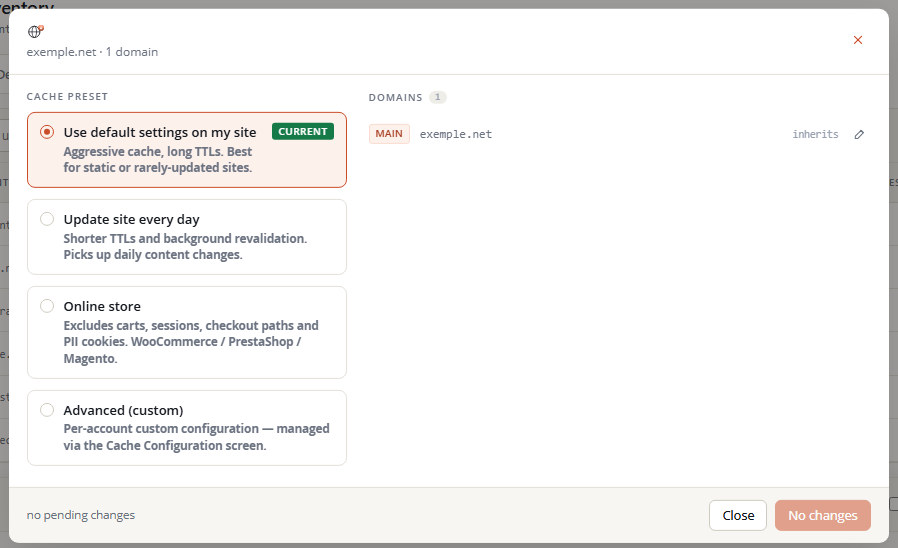
Clicking on the Account / main domain column of a row opens a detailed modal:
   ┌──────────────────────────────────────────────────────┐
   │  user1                                          [×]  │
   │  example.com · 3 domains                             │
   ├──────────────────────────────────────────────────────┤
   │                                                      │
   │  Cache preset                                        │
   │   ┌─────────────────────────────────────────────┐    │
   │   │ ⚪  Use default settings on my site         │    │
   │   │     Aggressive cache, long TTLs. Best for   │    │
   │   │     static or rarely-updated sites.         │    │
   │   ├─────────────────────────────────────────────┤    │
   │   │ ⚪  Update site every day                   │    │
   │   │     Shorter TTLs and background reval.      │    │
   │   ├─────────────────────────────────────────────┤    │
   │   │ ⚫  Online store                  [current]  │    │
   │   │     Excludes carts, sessions, checkout...   │    │
   │   ├─────────────────────────────────────────────┤    │
   │   │ ⚪  Advanced (custom)                       │    │
   │   │     Per-account custom configuration...     │    │
   │   └─────────────────────────────────────────────┘    │
   │                                                      │
   │  Domains (3)                                         │
   │   main      example.com         inherits     [✏][↺]  │
   │   addon     shop.example.fr     Daily        [✏][↺]  │
   │   sub       blog.example.com    inherits     [✏]     │
   │                                                      │
   │  preset will change online_store → update_daily      │
   │                            [ Cancel ]  [ Apply changes ] │
   └──────────────────────────────────────────────────────┘
5.3.1 Cache preset section
4 radio cards:
- Default settings — Server default profile (
default). - Update daily — Daily update profile (
update_daily). - Online store — E-commerce profile with cart/checkout bypass (
online_store). - Advanced — Custom configuration managed by the cPanel customer (
advanced). Don't overwrite by bulk apply unless specifically needed.
The current profile is marked [current]. Clicking another card selects it as pending — the Apply changes button becomes active.
5.3.2 Domains section
List of all account domains (main + addons + subs) with their effective preset:
- inherits — The domain uses the user's preset (no override).
- Daily / Online store / etc. — The domain has a per-domain override (cf.
~user/.wsa/<domain>.jsonfile).
For each domain, two potential buttons:
- ✏ Edit — Opens a prompt to choose a preset. POST
account-inventory-apply-preset-domainwithtarget_user,target_domain,preset. - ↺ Revert — (visible only when an override exists). Deletes the override file and makes the domain inherit the user's preset. Asks confirmation.
5.3.3 Footer
- "preset will change X → Y" — Diff indication.
- Cancel — Closes without applying.
- Apply changes — Active only when a different preset is selected. POST
account-inventory-apply-presetwithtarget_user,preset. Page reloaded with success/error banner.
6. Bulk actions (bottom bar)
This bar appears as soon as at least one account is checked in the table.
   3 selected   Apply preset: [Default ▾]   ☐ Include advanced
                                          [ Review & apply… ]
6.1 N selected counter
Updated in real time when the user (un)checks rows.
6.2 Apply preset dropdown
3 choices:
- Default
- Update daily
- Online store
(No Advanced option in bulk — each advanced account must be configured individually.)
6.3 Include advanced checkbox
Unchecked by default. Determines behavior when one of the checked accounts is currently in Advanced mode:
- Unchecked (default) — Advanced accounts are silently skipped (preserves the customer's custom config).
- Checked — Advanced accounts are overwritten by the chosen preset. ⚠️ Destructive action — the customer's custom configuration is lost.
6.4 Review & apply… button
Opens a plan modal that previews changes before actual application.
7. Plan modal (preview)
   ┌──────────────────────────────────────────────────────┐
   │  Bulk preset apply — review                     [×]  │
   ├──────────────────────────────────────────────────────┤
   │   3 selected · 2 changes · 0 overwrites · 1 skipped  │
   │                                                      │
   │  ⚠ 0 advanced accounts will be overwritten           │
   │                                                      │
   │  User     From       →    To       Note              │
   │  user2    Default    →    Daily                      │
   │  user5    Store      →    Daily                      │
   │  user7    Default    =    Default   no change        │
   │                                                      │
   │  Apply will run on 2 accounts and skip 1.            │
   │                            [ Cancel ]  [ Apply to 2 ] │
   └──────────────────────────────────────────────────────┘
7.1 Top counters
- N selected — Checked accounts.
- N changes — Accounts that will actually change.
- N overwrites — Advanced accounts that will be overwritten (visible only if Include advanced is checked).
- N skipped — Unchanged or skipped accounts (reason: Advanced without include, or no change because already on the target preset).
7.2 Overwrite warning banner
If Advanced accounts will be overwritten, a yellow banner at the top signals:
⚠️ N advanced accounts will be overwritten — their custom configuration will be lost.
7.3 Per-row table
For each selected account:
- User / Domain
- From (current preset, pill)
- Arrow (→ to change, = to skip)
- To (target preset, or "(no change)" for skip)
- Note ("overwrites custom", "skip · Advanced", "no change")
Skip rows are visually grayed; overwrites are in orange/yellow.
7.4 Footer
-
Cancel — Closes the modal, no action.
-
Apply to N accounts — Disabled if N=0. On click:
- POST
account-inventory-bulk-applywithusers[],preset,include_advanced=0|1. - For each user in
users[], the server:- Validates the username (regex
^[a-z][a-z0-9_-]{0,31}$). - Reads current config.
- If Advanced and include_advanced=0: skip.
- Otherwise: applies the new preset, triggers
wsa --rebuild-user=<user>.
- Validates the username (regex
- Success banner: "Bulk preset apply: N applied, M skipped (advanced mode)."
- POST
8. Security and validation
All actions on this page are validated in triple depth:
8.1 Client side (JS)
- Username: regex
^[a-z][a-z0-9_-]{0,31}$before sending. - Preset: choice limited to dropdown options.
- No submit if validation fails.
8.2 PHP dispatcher side
target_userre-validated with the same regex before any processing.target_domainvalidated against RFC domain regex.presetvalidated against whitelist inapply_preset_to_user.
8.3 account_inventory class side
- Account existence check (
pwd -u <user>). - Domain ownership check (
domain_belongs_to_user). escapeshellargon any argument passed toshell_exec.
No injection possible via configuration or POSTs on this page.
8.4 Audit log
Each action (clear-cache, apply-preset, bulk-apply, apply-preset-domain, revert-domain, export-csv) is journaled in /var/log/wsa/wsa.log with:
- WHM admin username who triggered the action.
- Target username and preset applied.
- Timestamp.
- Result (success/skip/fail).
9. Further reading
- cPanel simple mode — How customers use the profile you apply here.
- cPanel advanced mode — How customers switch to Advanced mode (and thus exit bulk-apply control without
include_advanced). - Command line —
wsa --rebuild-user,wsa --purgecache-user, CLI equivalents of this page's actions.