
Advanced mode
Detailed per-domain configuration — security headers, bot protection, per-category cache, bypass lists.
Advanced mode lets the end user customize cache behavior per domain and per subdomain, independently of server defaults set by the administrator. It is the more powerful of the two cPanel modes; the simpler Simple mode is a single picker of pre-canned profile choices.
To switch from Simple to Advanced: in the cPanel WSA interface, the mode switcher is the row right under the page title — pick Advanced and the page swaps to the domain-list view described below.
1. The three-layer inheritance model
Every configuration knob in Advanced mode follows the same inheritance chain — understanding this avoids 90% of the support questions about "why did my setting do X":
  per-domain JSON           ← what you edit in this UI
       ▲
       │ (only when "Custom" is selected for the domain)
       │
  admin SQLite              ← what the WHM administrator set
       ▲                      on the *Server default* row
       │
       │ (fallback when admin hasn't customized the option)
       │
  shipped default.conf      ← what the WSA package ships
Two consequences:
- Picking Server default for a category does not mean "off". It means "inherit whichever value the layer below has decided" — which may itself be inherited from the shipped default. Read it as "use the admin's choice".
- Picking Custom does not wipe the inherited values. It means "I want to control this category myself"; the editor pre-populates the inherited values so you start FROM the current policy and amend FROM there. The "(Default: X)" pill next to every input tells you the effective inherited value at any moment.
The "Default: …" or "Server default :" pill that appears next to every input + every tri-state selector is your continuous read-out of what the inherited layer is doing — even after you start overriding.
2. The domain list page
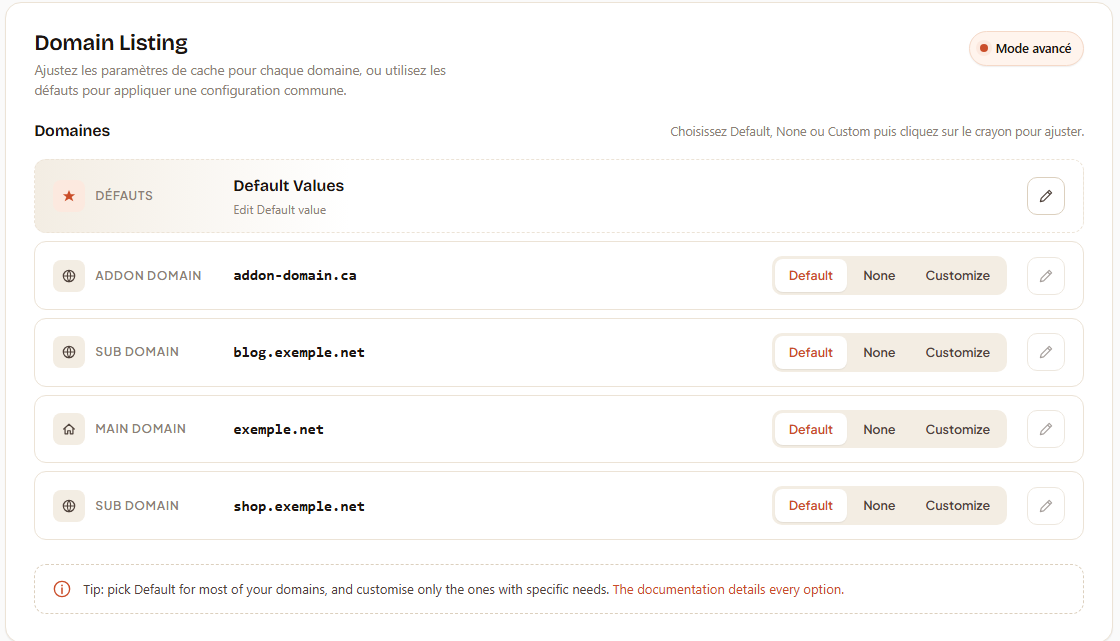
Landing on Advanced mode shows a table with one row per editable entity:
  ┌────────────────────────────────────────────────────────────┐
  │  ★ Defaults                              [pencil]          │
  │     Defines the values used for "Default" on every domain  │
  ├────────────────────────────────────────────────────────────┤
  │  🏠 Main domain      example.com     [Default│None│Custom] │
  │                                                  [pencil]  │
  ├────────────────────────────────────────────────────────────┤
  │  🌐 Addon            shop.example.fr [Default│None│Custom] │
  │                                                  [pencil]  │
  ├────────────────────────────────────────────────────────────┤
  │  🌐 Subdomain        blog.example.com [Default│None│Custom]│
  │                                                  [pencil]  │
  └────────────────────────────────────────────────────────────┘

  💡  Tip — pick "Default" for most of your domains and
      customise only the ones with specific needs.
2.1 Icons in the left column
| Icon | Meaning |
|---|---|
| ★ Star | The Defaults profile — applies to every domain that picks "Default" in its row. |
| 🏠 House | Your main / primary domain (the one tied to the cPanel account). |
| 🌐 Globe | An addon or subdomain (one of the additional domains the account hosts). |
2.2 The 3-state pill per domain
Every domain row (NOT the Defaults row) carries a 3-state segmented control:
| State | What happens for that domain |
|---|---|
| Default | Uses the Defaults profile from row 1. Editing this profile in row 1 propagates to every domain in this state. |
| None | Caching disabled entirely for that domain. The vhost is built without any proxy_cache_* directives — every request goes straight to Apache. Use when a site cannot tolerate any caching delay (real-time apps, admin-only domains). |
| Custom | Uses a per-domain profile that you edit by clicking the pencil. Becomes the truth for that domain regardless of what the Defaults profile says. |
The pencil button to the right of the pills is enabled only when the state is Custom (the icon is solid). For Default and None it is shown dimmed — you can still click it to pre-flight the editor and switch the state to Custom upon save.
The Defaults row (row 1) is always editable — its pencil is permanently active.
2.3 Saved feedback
After saving a domain (see section 8), the corresponding row flashes a "Saved" overlay that fades after ~1 s. The overlay covers the row briefly so you have visual confirmation that the backend round-trip completed; it does NOT block interaction with other rows during that window.
If the rebuild step fails server-side (rare — usually a malformed custom JSON), the overlay is replaced by a red "Error" badge and the editor reopens with an error banner inside the popup describing the offending field(s).
3. The Edit popup — structure
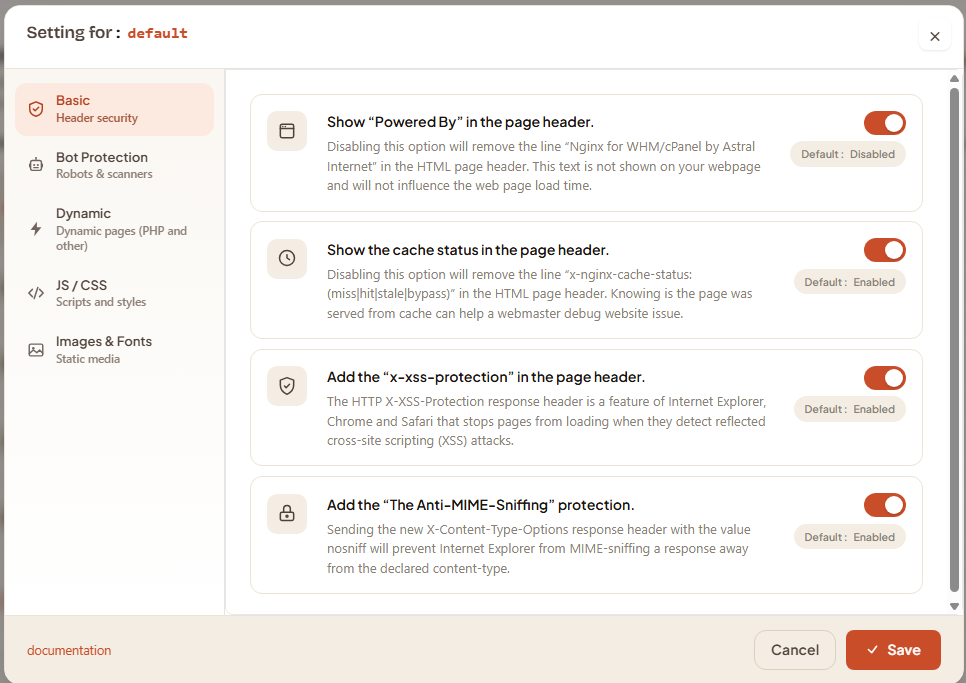
Clicking the pencil opens a modal split in two:
  ┌────────────────────────────────────────────────────────────┐
  │  Settings for: example.com                            [×]  │
  ├──────────────┬─────────────────────────────────────────────┤
  │ 🛡 Basic     │                                             │
  │ 🤖 Bot prot. │       active tab's content                  │
  │ ⚡ Dynamic   │       (4 to 8 rows of "settings")           │
  │ </> JS/CSS   │                                             │
  │ 🖼 Images    │                                             │
  ├──────────────┴─────────────────────────────────────────────┤
  │ [documentation link]            [Cancel]      [✓ Save]     │
  └────────────────────────────────────────────────────────────┘
3.1 Tab sidebar
Five tabs, top to bottom:
- Basic — HTTP response-header policy (4 toggles).
- Bot Protection — Per-category bot blocking with optional per-domain UA list editing (8 categories).
- Dynamic — Cache rules for dynamic pages (PHP, HTML, JSON, APIs).
- JS / CSS — Cache rules for scripts and stylesheets.
- Images & Fonts — Cache rules for static media.
The active tab is highlighted (filled icon + tinted background); the others read as "click here to switch". Each tab carries a two-line label: the section title plus a short subtitle (for example, Basic / Security headers) so you know what you're stepping into before clicking.
3.2 Setting rows — the common pattern
Every row inside any tab follows the same 3-column layout:
| Column | Content |
|---|---|
| Icon | A category-specific glyph that visually identifies the option (cookie, monitor, server, link, etc.). |
| Body | Bold title + 1-line description. Some rows also expose a More info button (the small i) that opens a tooltip popup with extra explanation, examples, and gotchas. |
| Control | A toggle, a number-and-unit picker, a tri-state pill, or a chip list editor (depends on the option). |
Beneath the control (or on its right edge), you'll often see a small gray pill labeled Default :
3.3 Footer
Bottom of the popup contains the action buttons:
- Documentation link (left, muted) — opens this page in a new tab so you can refer to it without losing your work.
- Cancel — discards every unsaved change and closes the popup. Equivalent to clicking the × in the header.
- Save — validates each tab, writes the per-domain JSON, and asks the server to rebuild this domain's vhost. The button shows a check-mark icon and changes label briefly to "Saving…" while the round-trip is in progress.
If any field fails validation (e.g., invalid TTL number, bad UA token), a red banner appears at the top of the content area listing each offending field. The save does not go through until those are fixed — closing the popup with Cancel discards them.
4. Basic tab
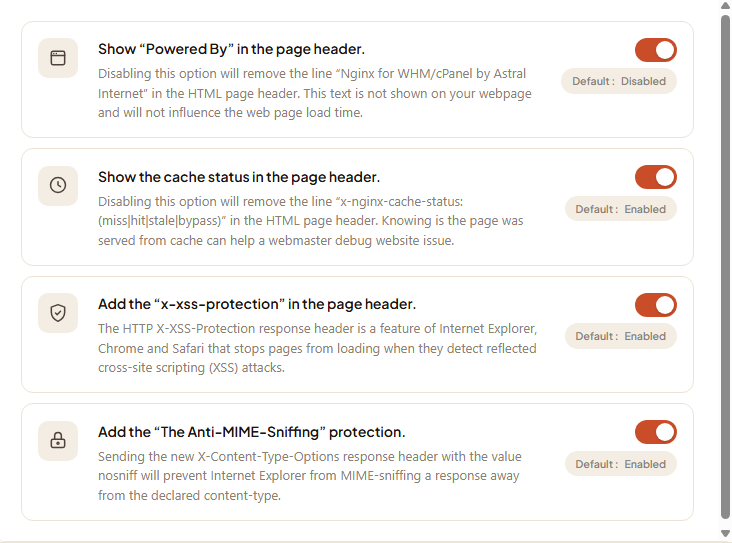
The Basic tab carries four toggle rows, each controlling a single HTTP response header. These are independent of caching policy — they describe what extra headers nginx will send back to the client browser. Default state for all four is On.
4.1 Powered-By header
Toggle name: enable_header_show_poweredby Default: On
When On, nginx adds the response header:
X-Server-Powered-By: Nginx for WHM/cPanel by Astral InternetUse cases:
- Useful for tech-support — a quick
curl -Iconfirms "this site is served through WSA" without checking the vhost config. - Some operators turn it Off to avoid advertising the stack publicly (security through obscurity is weak, but some compliance policies require it).
4.2 Show cache status header
Toggle name: enable_header_show_cachestatus Default: On
When On, nginx adds:
X-Nginx-Cache-Status: HITPossible values:
| Value | Meaning |
|---|---|
HIT |
Response served from cache. Apache was NOT called. |
MISS |
Response generated by Apache, now stored for next time. |
BYPASS |
Request matched a bypass rule (cookie, URI, or Cache-Control: no-cache from the app) — Apache was called and response was NOT stored. |
EXPIRED |
Cached entry was past its TTL; nginx fetched a fresh one from Apache. |
UPDATING |
Stale entry served while a background refresh runs. Only happens when proxy_cache_use_stale is enabled. |
STALE |
Stale entry served because Apache was unreachable. Rare — failover behavior. |
REVALIDATED |
Cache entry conditionally re-validated against Apache (304 response) and served. |
This header is the #1 debugging tool when diagnosing "is my site actually being cached?". Turn it Off only if you don't want end-users seeing the internal cache state in their browser DevTools.
4.3 XSS Protection header
Toggle name: enable_header_add_xss_protection Default: On
When On, nginx adds:
X-XSS-Protection: 1; mode=blockLegacy browser-side XSS filter. Modern browsers (Chrome ≥78, Firefox, Safari) have removed the underlying engine and ignore this header; only older IE / Edge releases honor it. Most security policies still require it for old-browser coverage, so default is On. No measurable cost.
4.4 Content-Type Options header
Toggle name: enable_header_add_contenttypeoptions_protection Default: On
When On, nginx adds:
X-Content-Type-Options: nosniffTells the browser not to second-guess the Content-Type of responses. Defends against MIME-confusion attacks where a file served as text/plain is silently executed as JavaScript. No downside to enabling, baseline modern-web hardening — leave On unless you have a specific reason to disable.
5. Bot Protection tab
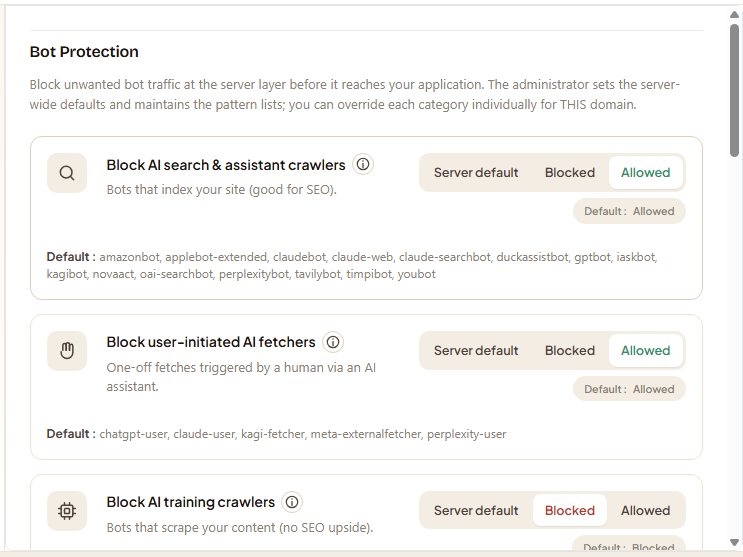
The most feature-rich tab. Each row is a category of unwanted traffic that can be selectively blocked at the nginx layer (before the request reaches Apache or your application). Bot protection acts on the request's User-Agent header plus, for some categories, the presence of other headers.
There are 8 categories. The first five expose a per-domain UA list editor in addition to the tri-state; the last three are toggle-only because their detection logic doesn't take a list.
5.1 The tri-state pill
Every category row carries the same three-button selector:
| State | Effect |
|---|---|
| Server default | Inherits the WHM admin setting. Whatever the admin shipped as the global policy for this category applies to this domain. The Default : pill on the right tells you what that effective state currently is (Blocked or Allowed). |
| Blocked | Force-block the category for this domain, overriding the admin's choice. Useful when one domain on a multi-tenant server wants stricter policy. |
| Allowed | Force-allow the category for this domain. Useful when one domain (e.g. an AI-friendly API or an SEO-promoted blog) needs to opt out of a server-wide block. |
These three are mutually exclusive — the active one is highlighted; clicking another switches the row's state instantly. Save commits the choice across all rows.
5.2 The per-domain UA list editor (5 categories)
For the five categories that expose a list, picking Blocked also reveals the editor:
  AI training crawlers
  ────────────────────────────────────────────────────────────
  [ Server default | Blocked | Allowed ]   Default: Allowed
  ┌─────────────────────────────┐  ┌─────┐
  │  ai2bot                     │  │  +  │     (text field + add)
  └─────────────────────────────┘  └─────┘

  [ ai2bot ×] [ anthropic-ai ×] [ bytespider ×] [ claudebot ×]
  [ ccbot   ×] [ gptbot       ×] ...           ← editable pill list

  Default : ai2bot, anthropic-ai, bytespider, … (Apply default values)
What the list contains
A list of User-Agent substring patterns (case-insensitive). Any request whose User-Agent header contains one of the listed tokens is matched against the category's block rule. Shipped defaults cover well-known crawlers in each family; you can add your own or remove the ones you don't want blocked on this domain.
Adding a token
Type into the input box and click + (or press Enter). The token must be alphanumeric with allowed punctuation (. - _ \ | ( ) * + ? \s); other characters are rejected with an inline error. The token must NOT already exist in another category on this domain (cross-category uniqueness — see 5.4 below).
Removing a token
Click the × on the pill. The token is dropped from the list immediately; nothing is persisted until you click Save at the bottom.
The "Apply default values" link
Underneath the pill list, the Default : readout shows the inherited list (the effective list this domain would use if on Server default). The link in parentheses, Apply default values, replaces your current pills with the inherited list in one click — useful for resetting after experimentation.
Empty list warning
If you switch a category to Blocked and remove every pill, the editor surfaces a yellow warning:
"An empty list in Blocked mode will apply the server default values. To fully disable protection on this domain, choose Allowed instead."
This is the most common confusion: "I set Blocked, removed all the pills, why are bots still being blocked?". The answer: nginx treats enable=1 with list=[] as "use the inherited list", because an empty list almost certainly means "the user hasn't configured this yet" — not "block nothing". If you actually want no bots blocked for this category on this domain, flip the tri-state to Allowed.
5.3 The 8 categories
5.3.1 AI search and assistants (ai_search)
Shipped default: Allowed
User-Agent patterns for AI assistants that fetch a page when a USER asks them a question (live retrieval at query time). Examples: GPTBot (search variant), PerplexityBot, You.com bot.
These are usually NOT a server-load problem — they hit your site once per real user question, with the same Cache-Control respect as a normal browser. Blocking them mostly hurts your visibility in AI search products without saving meaningful resources. Keep Allowed unless you have a clear policy reason to block.
5.3.2 AI user-initiated tools (ai_userinit)
Shipped default: Allowed
User-Agent patterns for AI tools that a user invokes deliberately (browser extensions, chat plugins, "summarise this page" tools). Typically lower volume than search and bound to explicit user intent. Same logic as ai_search: blocking them mostly hurts UX without saving anything.
5.3.3 AI training crawlers (ai)
Shipped default: Blocked
User-Agent patterns for autonomous crawlers that harvest content for AI model training. Examples: ai2bot, AnthropicBot, Bytespider, ClaudeBot, CCBot, GPTBot (training variant), ImagesiftBot, MistralAI-User.
These run continuously and at high volume, with no user-facing benefit to your site. Shipped default blocks them; this is the most commonly customized category — operators add new training crawlers as they appear.
5.3.4 Security scanners (scanners)
Shipped default: Blocked
User-Agent patterns for vulnerability scanners. Examples: Nikto, sqlmap, Wfuzz, Wpscan, Nuclei, ZAP. Almost always malicious; legitimate security testing is normally done with a custom UA you control. Keep Blocked.
5.3.5 SEO spiders (seo)
Shipped default: Allowed
User-Agent patterns for SEO research tools. Examples: AhrefsBot, SemrushBot, MJ12bot, MegaIndex, DotBot.
These crawl aggressively to build third-party SEO products; they are not Google / Bing / DuckDuckGo (those have their own UAs not in this list and are never blocked). Allowing them is fine for most sites; blocking them is common when a server-load problem can be traced to one of them. Customers running marketing-heavy sites may want them allowed to be tracked by Ahrefs / SEMrush data.
5.3.6 Fake user-agents (fake_ua) — toggle-only
Shipped default: Blocked
This category detects User-Agent strings that are known impossible: forged values used by basic scrapers and abuse tools that don't realise the UA string they made up doesn't correspond to any real browser-version combination. Patterns are curated by the WHM administrator (not user-editable per domain) because they're regex-based and easy to footgun.
You only get the tri-state for this one — no list editor. The Default : pill on the right tells you whether the admin has enabled or disabled the global block.
5.3.7 Strict headers (strict_headers) — toggle-only
Shipped default: Allowed
Optional stricter detection that requires every request to carry both Accept-Language and Accept-Encoding headers (real browsers always send these; basic scripts often don't). When Blocked, requests missing either header are rejected with 403.
This has a small false-positive rate on corporate proxies and embedded clients that strip headers — shipped default leaves it Allowed. Enable per-domain only after testing that your real traffic carries both headers.
5.3.8 Empty User-Agent (noagent) — toggle-only
Shipped default: Blocked
Blocks requests that arrive with no User-Agent header at all (empty string or missing entirely). Real browsers and well-behaved bots ALWAYS send a User-Agent. An empty UA is a near-certain sign of a malformed script or a probe.
No list — single condition. Block by default; only Allow if you have a legitimate internal client that deliberately strips its UA (rare).
5.4 Cross-category uniqueness
A single UA token can only sit in ONE category per domain. Trying to add gptbot to AI training while it already exists in AI search and assistants produces an inline error:
"Token already in ai_search — remove it from there first."
This is enforced three times defense-in-depth: in the client-side adder, in the server-side save handler, and in the regex emitter that writes the final nginx config. The check uses a fixed iteration order to deterministically resolve conflicts when an older configuration file mistakenly placed the same token in multiple categories (first-occurrence-wins: AI training → AI search → AI user-init → scanners → SEO).
6. Dynamic tab
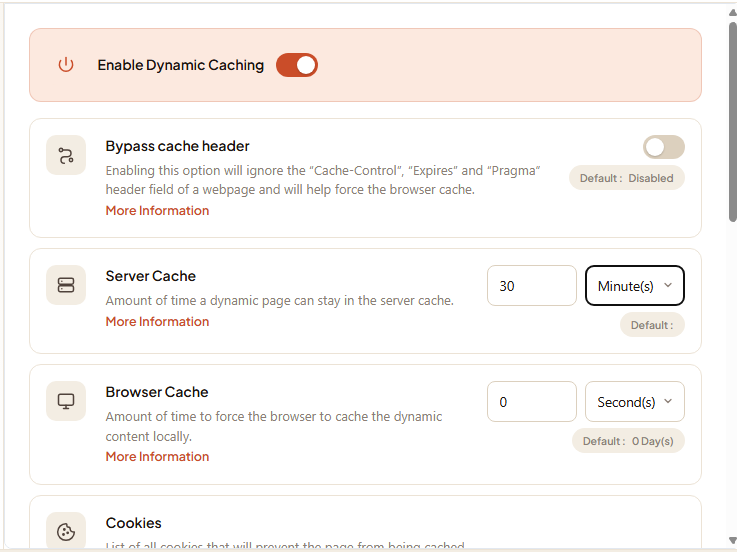
Cache rules for dynamic content — generated HTML, JSON, REST APIs, or any response that doesn't carry a .css/.js/image extension. This is the tab that most directly affects perceived page-load speed for a typical website.
6.1 Master switch — Activate dynamic caching
Name: dynamicfiles_Activate Default: On
When Off, every other option in this tab is grayed out and nginx skips dynamic caching entirely for this domain. The vhost emits no proxy_cache_* directives for dynamic responses — every request goes through to Apache. Useful for a single-user admin site, a real-time application, or a domain where caching causes problems you don't want to investigate.
When On, the rest of the rows take effect.
6.2 Bypass Cache-Control header
Name: dynamicfiles_disablecachecontrolbypass Default: Off (= respect the application's Cache-Control)
The HTTP spec says a caching proxy should obey Cache-Control: no-cache and Cache-Control: private from the upstream app. Many CMSes and frameworks emit these on every dynamic page even when the response is perfectly cacheable, because they don't know they're behind a proxy cache.
When this toggle is On, WSA ignores those directives and caches the response anyway based on the Server cache TTL below. Use case: a WordPress site whose theme inserts <?php header('Cache-Control: no-cache'); ?> in header.php for some historical reason — turning this toggle on lets WSA cache despite the bad header.
Trade-off: you take responsibility for ensuring the response truly IS cacheable. Pages with per-user data behind this toggle would leak across users. The cookie / URI bypass lists below are your safety net (carve out logged-in users, carts, admin paths).
6.3 Server cache TTL
Names: dynamicfiles_servercache_digit + _char Default: see the Default : pill on the row (typically 5 minutes to 1 hour depending on the admin's choice)
How long nginx keeps a cached response on disk before considering it expired. The widget is split into:
- A number field (0–255).
- A unit dropdown: seconds (s), minutes (m), hours (h), days (d), weeks (w), months (M).
Examples and rules of thumb:
| Site type | Suggested TTL |
|---|---|
| News / blog homepage | 5–15 minutes |
| Product catalog | 1 hour |
| Mostly-static brochure | 1 day |
| Documentation site | 1 week |
A higher TTL gives more cache hits but slower content freshness. You can always purge the cache manually via the Clear cache button on the WSA cPanel home, or per-domain from WHM if the admin has wired up that path.
Leaving the field empty re-applies the inherited default on save.
6.4 Browser cache TTL
Names: dynamicfiles_browsercache_digit + _char Default: see the Default : pill on the row (often 0, meaning "no extra browser caching")
How long the end-user's browser caches the response, set via the Expires and Cache-Control: max-age response headers. This is independent of the server-side cache — it controls what the browser does on subsequent visits.
- A value of 0 means "tell the browser not to cache" (each visit re-fetches from the server, which then serves from its own cache or rebuilds).
- A higher value reduces requests to your server entirely but at the cost of users seeing stale content until their browser's TTL expires. Generally keep this low (0 to 5 minutes) for dynamic content; the server-side TTL is what saves your CPU.
6.5 Cookie bypass list
Name: dynamicfiles_cookie
A list of cookie NAMES (not values). Any request that arrives with at least one of the listed cookies is automatically served from Apache without checking the cache, and the response is NOT stored in the cache either (status: BYPASS).
This is the standard mechanism for excluding logged-in users from the cache.
Recommended entries (already in shipped defaults for most CMSes):
| Cookie name | What it identifies |
|---|---|
wordpress_logged_in_* |
WordPress logged-in session |
wp-postpass_* |
WordPress password-protected post viewer |
woocommerce_cart_hash |
WooCommerce active cart |
comment_author_* |
WordPress comment author |
PHPSESSID |
Generic PHP session |
_pma_* |
phpMyAdmin login |
Add a cookie name: type it in the input, click + (or press Enter). The cookie name supports the trailing * wildcard (e.g., wordpress_logged_in_* matches every cookie starting with that prefix).
Remove: click × on the pill.
The Default : line under the editor shows the inherited list so you can see what the server-wide policy already covers — start adding only the cookies specific to YOUR site that the admin hasn't pre-loaded globally.
6.6 URI bypass list
Name: dynamicfiles_uri
A list of URI patterns. Any request whose path matches at least one entry is bypassed (BYPASS status). Use for paths that should never be cached even when the same user visits them — admin areas, checkout flows, search-results pages.
Recommended entries (typically in shipped defaults):
| Pattern | Application |
|---|---|
/wp-admin |
WordPress admin |
/wp-login.php |
WordPress login |
/admin |
Generic admin path |
/cart /checkout |
Cart and checkout flow |
/my-account |
Customer account page |
/cpanel /whm /webmail |
cPanel front-end paths |
/?p=preview |
WordPress preview |
?nocache=1 |
Manual bypass query string |
Same input pattern as cookies — type, +, pill. Wildcards (*) and leading slashes are supported.
7. JS / CSS tab
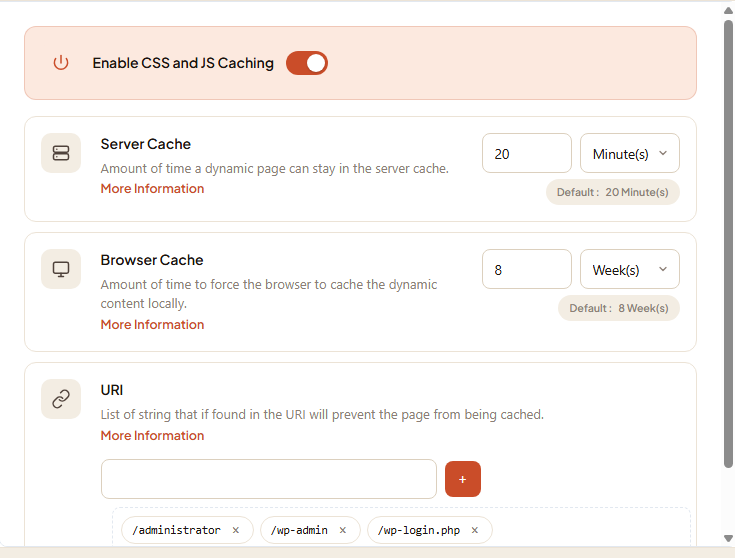
Cache rules for .css and .js files. Structurally simpler than Dynamic — no cookie bypass (these files are not cookie-sensitive), no Cache-Control bypass (these files normally don't ship one).
Four controls, top to bottom:
7.1 Master switch — Activate JS/CSS caching
Name: cssjsfiles_Activate Default: On
Same gate as Dynamic — when Off, the rest of the rows are disabled. Caching static assets is essentially free of correctness risk, so very few operators turn this off.
7.2 Server cache TTL
Names: cssjsfiles_servercache_digit + _char Default: typically 1 month
How long nginx keeps the cached .css / .js file. Static assets can comfortably use 1 month to 1 year — versioned URLs (app.js?v=4.7.2) mean a real update gets a new URL and a fresh cache entry; the old TTL on the old URL doesn't matter.
7.3 Browser cache TTL
Names: cssjsfiles_browsercache_digit + _char Default: typically 1 month to 1 year
How long the browser caches the file. Long values are ideal here — they cut roundtrips entirely for return visitors. Pair with versioned URLs and you can safely use 1 year.
7.4 URI bypass list
Name: cssjsfiles_uri
URIs to exclude from caching. Rarely needed for CSS/JS but useful for unversioned dev builds where a single app.js filename overwrites itself on every deploy. Adding /dev/app.js to the bypass list ensures developers see fresh files immediately without manually purging the cache.
8. Images & Fonts tab
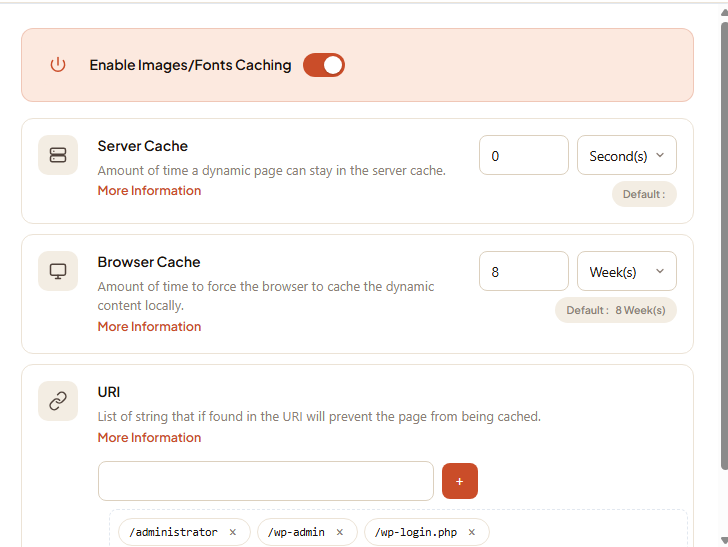
Cache rules for image, font, video, and other large static media (.png, .jpg, .webp, .woff2, .mp4, .pdf, etc.). Same shape as JS/CSS — master switch, server TTL, browser TTL, URI bypass list — but typically longer default TTLs because media is the most cacheable content type on a typical website.
8.1 Controls
Same four controls as JS/CSS, named:
imagesfontsfiles_Activateimagesfontsfiles_servercache_digit+_charimagesfontsfiles_browsercache_digit+_charimagesfontsfiles_uri
Defaults: usually 1 month server cache + 1 year browser cache. Reasonable for vast majority of sites; media files almost never change in place (a new image gets a new filename via fingerprinting), so a long TTL is safe.
8.2 When to bypass
Cases where you might add URIs to the bypass list:
- User-uploaded avatars that overwrite a fixed URL (
/avatars/user-12.png) — bypass that path or the whole/avatars/directory so an updated upload is visible immediately. - A live-generated chart endpoint serving SVG/PNG with a fresh result each call.
- A signed-URL download endpoint where the URL itself encodes the authentication.
For everything else, leave the URI bypass list empty.
9. Saving
The Save button at the bottom of the popup performs four steps, in order:
-
Client-side validation — every numeric input is range-checked (0–255), every UA token is regex-matched, and the form refuses to submit if anything is invalid (red banner at the top of the content area listing each offender).
-
AJAX POST to
ajax.live.php— the form serializes every field into a JSON payload and POSTs to the cPanel-side AJAX endpoint. The endpoint validates server-side again (defense in depth), then writes the result. -
Persist to per-domain JSON — for Custom state, the per-domain configuration is written to:
/home/<cpuser>/.wsa/<domain>.json
For Default or None state, the file is removed (the absence of a JSON file means "use the inherited layer"); the row's tristate in the cPanel SQLite is updated to reflect the new state.
4. Vhost rebuild — the AJAX handler calls wsa --rebuild-user=<cpuser> so nginx regenerates the affected vhost(s) and reloads. Typically completes in 1–3 s for a single account. The popup closes and the row in the domain list flashes the "Saved" overlay.
If step 4 fails (very rare — usually a malformed pin in admin SQLite that the rebuild can't reconcile), the AJAX response carries an error and the popup stays open with an error banner. The per-domain JSON has still been written; you can either fix the underlying issue in WHM or click Save again once the admin has resolved it.
9.1 What the saved JSON looks like
For curious operators or troubleshooting via SSH, the per-domain JSON is a structured representation of every override. Roughly:
{
    "basicconfig": {
        "header_show_poweredby":   "1",
        "header_show_cachestatus": "1",
        ...
    },
    "bot_protection": {
        "ai":         { "mode": "1", "list": ["gptbot", "ai2bot", ...] },
        "scanners":   { "mode": "default" },
        ...
    },
    "dynamicfiles":   { "Activate": "1", "servercache": "5m", ... },
    "cssjsfiles":     { "Activate": "1", "servercache": "1M", ... },
    "imagesfontsfiles": { "Activate": "1", "servercache": "1M", ... }
}
Keys missing from a section mean "inherit". A whole section missing means "everything in this section inherits". This shape makes incremental overrides cheap — adding one bot list doesn't force you to repeat every other config.
10. Reverting to defaults
To wipe every customization for a domain and restart from the server defaults:
- From the domain list, flip the domain's tristate from Custom to Default.
- Click anywhere else (or save through the editor — both work).
- The
/home/<cpuser>/.wsa/<domain>.jsonfile is removed, the vhost is rebuilt, and the domain immediately uses the inherited admin policy.
To wipe a SINGLE bot category but keep your other overrides:
- Open the editor on the domain.
- Switch to the Bot Protection tab.
- For the category you want to drop, flip the tristate to Server default.
- Save.
The other categories' Custom overrides are untouched.
11. Troubleshooting
| Symptom | Likely cause | Fix |
|---|---|---|
| Saved a Blocked bot list but bots still hit Apache | Empty list under Blocked re-applies the inherited list (see 5.2). Check the Default : readout. | Either add specific UA tokens, or flip to Allowed if you want no block. |
Cache header is BYPASS on every request |
One of the bypass cookies is being set on every page, OR the URI matches a bypass pattern, OR the app sends Cache-Control: no-cache and you haven't enabled Bypass Cache-Control. |
Check curl -I of the failing URL; inspect cookies in DevTools. |
| Cache header is missing entirely | The category's master switch is off, OR the file extension doesn't match what this tab handles. | Re-open the editor and check the tab's master toggle. |
| Saved successfully but no change visible | Browser cache is masking the result. | Open in private mode or force-refresh (Ctrl+Shift+R). |
| "Token already in |
Cross-category uniqueness rule (5.4) | Remove the token from the other category first, then add it here. |
| Edit popup shows no domains | The cPanel account has no domains, OR the WHM admin hasn't enabled the WSA feature for this account's plan. | Contact the host administrator. |
12. Further reading
- Simple mode — If your sites have similar needs, Simple mode is faster.
- Overview — Understand the top bar and the Clear cache button.
- Optimization — Developer tools to identify cookies and URIs to exclude.