
Module Configuration
Auto update, per-zone cache sizes, release branch choice.
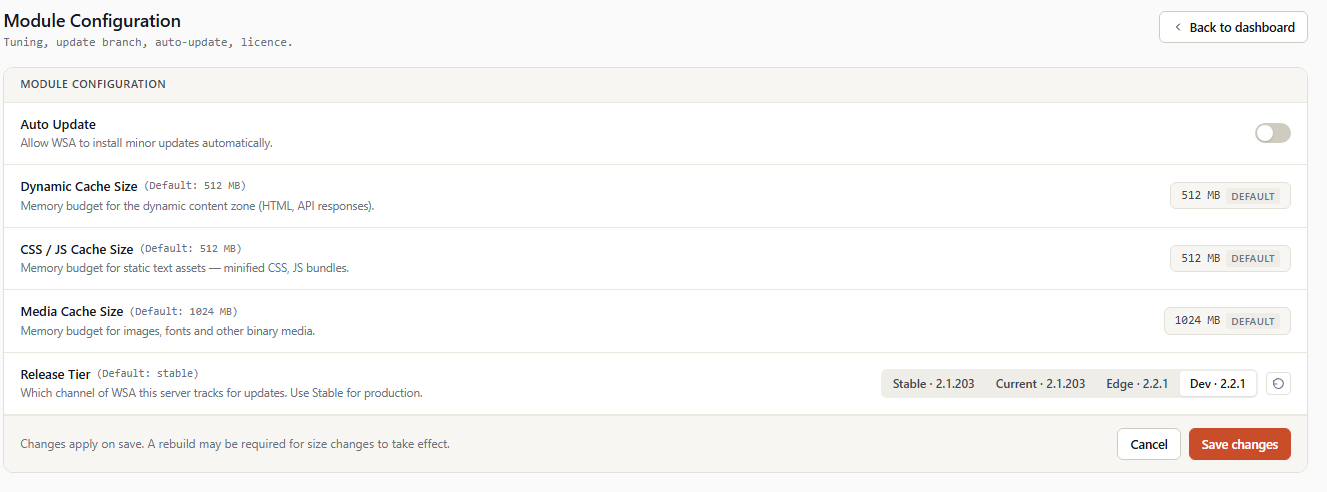
The Module Configuration page groups the WSA module's global settings — update behavior, resources allocated to the different cache zones, and the version stability tier installed.
Access: Sidebar → Module Configuration.
💡 All settings on this page apply to the whole server (all cPanel accounts). For per-account adjustments, see Account Inventory.
1. Overview
The page contains 5 settings organized vertically:
   ┌──────────────────────────────────────────────────────┐
   │  Module Configuration                                │
   ├──────────────────────────────────────────────────────┤
   │                                                      │
   │  Auto Update                                  [On]   │
   │  Allow WSA to install minor updates                  │
   │  automatically.                                      │
   │                                                      │
   ├──────────────────────────────────────────────────────┤
   │  Dynamic Cache Size           (Default: 512 MB)      │
   │  Memory budget for the dynamic content zone          │
   │                                       [ 512 MB ] ↺   │
   ├──────────────────────────────────────────────────────┤
   │  CSS / JS Cache Size          (Default: 512 MB)      │
   │  Memory budget for static text assets                │
   │                                       [ 512 MB ] ↺   │
   ├──────────────────────────────────────────────────────┤
   │  Media Cache Size             (Default: 1024 MB)     │
   │  Memory budget for images, fonts, media              │
   │                                      [ 1024 MB ] ↺   │
   ├──────────────────────────────────────────────────────┤
   │  Release Tier                 (Default: stable)      │
   │  Which channel of WSA this server tracks             │
   │  [ Stable · 2.2.0 | Current | Edge | Dev ]      ↺    │
   ├──────────────────────────────────────────────────────┤
   │  Changes apply on save. A rebuild may be required    │
   │  for size changes to take effect.                    │
   │                            [ Cancel ]  [ Save ]      │
   └──────────────────────────────────────────────────────┘
Each row follows the same pattern:
- Title of the setting.
- (Default: ...) — indication of the default value, in small gray font.
- Description below the title.
- Control on the right (toggle, numeric field, or segmented).
- ↺ button (undo) — visible only when the value is modified; restores the default value in one click.
2. Auto Update
   Auto Update                                      [ON]
   Allow WSA to install minor updates automatically.
POST field: autoupdate Values: 0 (Off) or 1 (On) Default: 1 (On)
2.1 Effect
When On, the WSA module checks daily for the latest available version on its release branch (see §5 Release Tier below) and installs it automatically in the background.
The automatic update:
- Runs via an internal cron task (
checkModule, 3600 s interval). - Downloads the new version to a temporary folder.
- Atomically replaces source code.
- Executes
post_update.phpfor necessary migrations. - Reloads nginx.
- Doesn't interrupt any running site.
2.2 When to disable
- Certified environments where each update must pass a manual validation.
- Critical sites where the operator prefers to control precise timing (e.g., avoid an update during peak e-commerce period).
- Tests on a staging server before propagating to prod.
2.3 When to leave enabled (recommended)
For the majority of production servers. Stable releases are tested before publication, and security fixes (e.g. nginx CVEs) are delivered quickly via this channel.
3. Dynamic Cache Size
   Dynamic Cache Size                   (Default: 512 MB)
   Memory budget for the dynamic content zone
   (HTML, API responses).                  [ 512 MB ]  ↺
POST field: dynamicSize Value: integer (MB) Default: 512
3.1 Effect
Maximum size (in megabytes) of the cache zone dedicated to dynamic content — PHP/HTML pages, JSON, API, authentication.
When the limit is reached, nginx evicts the least recently used entries (LRU) to make room.
3.2 Recommendations by server profile
| Server type | Recommended size |
|---|---|
| Small hosting (< 50 accounts, light sites) | 256–512 MB |
| Medium hosting (50–200 WordPress accounts) | 512–1024 MB |
| Large hosting (200+ accounts, e-commerce) | 1024–4096 MB |
| Dedicated server for a single high-traffic site | 2048–8192 MB |
3.3 Effects of a change
- Increase the size: more hits, fewer evictions. Improves cache hit ratio.
- Decrease the size: frees disk. May increase cache miss ratio and therefore Apache load.
⚠️ Modifying this value requires an nginx rebuild to take effect (the
max_sizeis emitted in theproxy_cache_pathdirective of the main nginx file). A yellow banner reminds you after saving.
4. CSS / JS Cache Size
   CSS / JS Cache Size                  (Default: 512 MB)
   Memory budget for static text assets —
   minified CSS, JS bundles.               [ 512 MB ]  ↺
POST field: staticSize Value: integer (MB) Default: 512
4.1 Effect
Maximum size of the cache zone dedicated to static text files: stylesheets, JavaScript scripts, static JSON files.
4.2 Recommendations
| Server type | Recommended size |
|---|---|
| Modern sites with JS frameworks (React, Vue, Angular) | 512–1024 MB |
| Classic WordPress / Joomla / Drupal sites | 256–512 MB |
| Static sites | 128–256 MB |
This zone tends to fill slowly and offers an excellent hit ratio because CSS/JS files change only rarely (when a theme or plugin is updated).
5. Media Cache Size
   Media Cache Size                     (Default: 1024 MB)
   Memory budget for images, fonts and other
   binary media.                          [ 1024 MB ]  ↺
POST field: mediaSize Value: integer (MB) Default: 1024
5.1 Effect
Maximum size of the cache zone dedicated to binary media: images (PNG, JPG, WebP, AVIF), fonts (WOFF2, WOFF), videos, PDFs, downloadable archives.
This is generally the largest zone because media represents the bulk of a modern web page's weight.
5.2 Recommendations
| Server type | Recommended size |
|---|---|
| Small hosting | 512–1024 MB |
| Medium hosting | 1024–2048 MB |
| Large hosting (e-commerce, media) | 2048–8192 MB |
| Heavy video / download sites | 8192+ MB |
5.3 Reference calculation
Rough estimate: average page size × number of unique pages × 1.5. For an average WordPress site, about 200 unique pages × 3 MB of media per page = 600 MB.
6. Release Tier
   Release Tier                       (Default: stable)
   Which channel of WSA this server tracks for updates.
   [ Stable · 2.2.0 | Current · 2.2.1 | Edge · 2.3.0 | Dev ] ↺
POST field: moduleTier Values: stable, current, edge, dev Default: stable
6.1 The four channels
| Channel | Target audience | Risk | Update frequency |
|---|---|---|---|
| Stable | Production. Versions that passed through current and edge without incident. |
Very low. | Monthly or quarterly. |
| Current | Production slightly more up-to-date. Recently published stable versions. | Low. | A few times a month. |
| Edge | Beta. For test servers or evaluation before official publication. | Moderate — possible residual bugs. | Weekly to biweekly. |
| Dev | Active development. Reserved for the Astral Internet team. | High — unstable. | Daily. |
To the right of each option, the version number currently published on this channel is displayed if available (e.g., Stable · 2.2.0).
6.2 Effect of the change
When you change channels and save:
- The module updates its internal configuration file.
- At the next update check (automatic daily, or manual via Update WSA), it downloads the latest version of the new channel.
- If the new channel has a more recent version, the module updates.
- If the new channel has an older version, no automatic downgrade is performed — you stay on the installed version.
6.3 Recommendations
- Normal production:
stable. - To benefit from the latest features without waiting:
current. - To test in advance (staging server):
edge. - Astral team only:
dev.
⚠️ Moving from
stabletoedgemay install an untested beta at the next auto-update. Make a backup before switching on a production server.
7. Footer — actions
   Changes apply on save. A rebuild may be required
   for size changes to take effect.
                                    [ Cancel ]  [ Save changes ]
7.1 Cancel button
Cancels all unsaved changes and returns to the dashboard. No confirmation requested — unsaved values are simply lost.
7.2 Save changes button
Saves all modified values:
- Client-side validation — each numeric field is checked (positive integer, in expected range). If an error is detected, a red border indicates it and saving is blocked.
- POST to the WHM dispatcher —
mod-action=save-mod- setting. - Server-side validation — double-check of values (the
wsa::Set*methods re-validate). - SQLite write of the new values.
- nginx rebuild if
moduleTierchanged (launcheswsa --update --verbosestreamed). - Success banner on the refreshed page, listing modified options.
7.3 Fields requiring a rebuild
| Field | Impact |
|---|---|
| Auto Update | No rebuild needed. Immediate effect. |
| Dynamic Cache Size | Rebuild needed to apply new size. |
| CSS/JS Cache Size | Rebuild needed. |
| Media Cache Size | Rebuild needed. |
| Release Tier | No nginx rebuild, but triggers an update check. |
If you changed a size, then execute Rebuild Nginx conf from the dashboard to apply the new configuration.
8. Internal architecture (informative)
For curious administrators, settings are persisted in the SQLite database /etc/wsa/conf/wsa.sqlite, table options:
| SQLite key | Type | UI source |
|---|---|---|
autoupdate |
string (0/1) |
Auto Update toggle |
dynamic_cache_size |
int (MB) | Dynamic Cache Size |
cssjs_cache_size |
int (MB) | CSS/JS Cache Size |
other_cache_size |
int (MB) | Media Cache Size |
update_branch |
string | Release Tier |
Manual intervention is possible via:
sqlite3 /etc/wsa/conf/wsa.sqlite \
    "UPDATE options SET value='1024' WHERE option='dynamic_cache_size';"
…but strongly discouraged: values are then no longer in sync with what the UI displays, and an nginx rebuild is required to apply the change.
9. Further reading
- Dashboard — Overview of indicators.
- Nginx configuration — Fine nginx parameters (workers, timeouts, gzip, etc.).
- Cache configuration — Per-zone settings and bypass lists.
- Nginx Build & Modules — Binary management (RPM vs WSA build) and HTTP/3.