
Command line (CLI)
Complete reference of wsa commands, for automation, troubleshooting, and bulk operations.
WSA exposes a complete CLI to automate its operations (shell scripts, Ansible, cron tasks, deployments). The utility is installed at /etc/wsa/wsa and runs as root.
⚠️ The CLI requires root access. All commands must be run from an SSH session logged in as
root.
💡 If the command fails with "Permission denied" while you're root, it's usually because the execute bit was removed (hardening, restorecon, etc.). Two alternatives:
/etc/wsa/./wsa <flags>/usr/local/cpanel/3rdparty/bin/php /etc/wsa/wsa <flags>
1. Quick reference — all options
Summary table of all available options, grouped by category. See the following sections (§2 to §10) for detailed recommendations and complete usage examples.
Help and information
| Option | Description |
|---|---|
-h / --help |
Display the built-in help |
-v / --version |
Display the installed version |
--verbose |
Verbose mode (combine with another command) |
Module management
| Option | Description |
|---|---|
--enable |
Activate the WSA module |
--disable |
Disable the module (preserves config) |
--update |
Force update to the latest version |
Configuration rebuild
| Option | Description |
|---|---|
--rebuild |
Regenerate only configs that have changed |
--rebuild-user=<u> |
Regenerate a single cPanel account |
--rebuild-forced |
Rebuild ALL configurations |
--no-lock |
Bypass the .progress lock (combine) |
nginx management
| Option | Description |
|---|---|
--restart-nginx |
Full nginx restart |
--reload-nginx |
nginx hot reload |
--check-httpd-conf |
Detect Apache config change |
--check-wsad |
Verify the wsad daemon |
--update-disk-usage |
Update cache disk stats |
Cache management
| Option | Description |
|---|---|
--purgecache-all |
Empty entire cache (all accounts) |
--purgecache-user=<u> |
Empty a cPanel account's cache |
--purgecache-domain=<d> |
Empty a domain's cache (+ --user=) |
--purgecache-url=<url> |
Empty a single URL from cache |
--user=<u> |
Auxiliary flag for --purgecache-domain |
nginx modules (Brotli, HTTP/3, …)
| Option | Description |
|---|---|
--nginx-list |
List supported modules |
--nginx-status=<m> |
JSON snapshot of a module |
--nginx-caninstall=<m> |
Test: can compile? |
--nginx-isinstalled=<m> |
Test: module installed? |
--nginx-isstatic=<m> |
Test: statically compiled? |
--nginx-isenabled=<m> |
Test: module enabled? |
--nginx-install=<m> |
Compile and install (+ --force, --verbose) |
--nginx-uninstall=<m> |
Uninstall |
--nginx-enable=<m> |
Enable in nginx.conf |
--nginx-disable=<m> |
Disable in nginx.conf |
--nginx-upgrade-status |
nginx package update available? (JSON) |
--nginx-upgrade |
Launch dnf upgrade nginx |
--nginx-check-update |
Refresh version cache |
--nginx-recover-upgrade |
Auto-recovery post-upgrade |
--nginx-recovery-state |
Last recovery event snapshot |
--nginx-recovery-clear |
Clear the recovery state |
--nginx-protect-repos |
Apply anti-revert versionlock |
--nginx-relock |
Reconcile the dnf lock |
--nginx-unlock |
Release all WSA locks |
--nginx-lock-status |
JSON state of the full lock |
HTTP/3 (EL 9 / EL 10 only)
| Option | Description |
|---|---|
--http3-status |
JSON snapshot: installed, stale, pins |
--http3-caninstall |
HTTP/3 eligibility test |
--http3-install |
Compile + USR2 swap |
--http3-uninstall |
USR2 swap back to RPM |
--http3-rebuild |
Alias --http3-install --force |
--http3-auto-rebuild[=on\|off] |
Read/write auto-rebuild |
--http3-enable |
Emit QUIC + Alt-Svc |
--http3-disable |
Stop QUIC emission |
Monitoring and miscellaneous
| Option | Description |
|---|---|
--list-watch-folders |
List inotify-watched folders |
--migrate-bp-v2131 |
One-shot Bot Protection v2 migration |
💡 Internal flags (do not use manually):
--secret-cron-bypass-oiusdtgsh,-q,-s. See §11 Internal flags at the bottom of the page.
2. Help and version
--help (or -h)
Displays the built-in CLI help. Lists all available options with a brief description.
/etc/wsa/wsa --help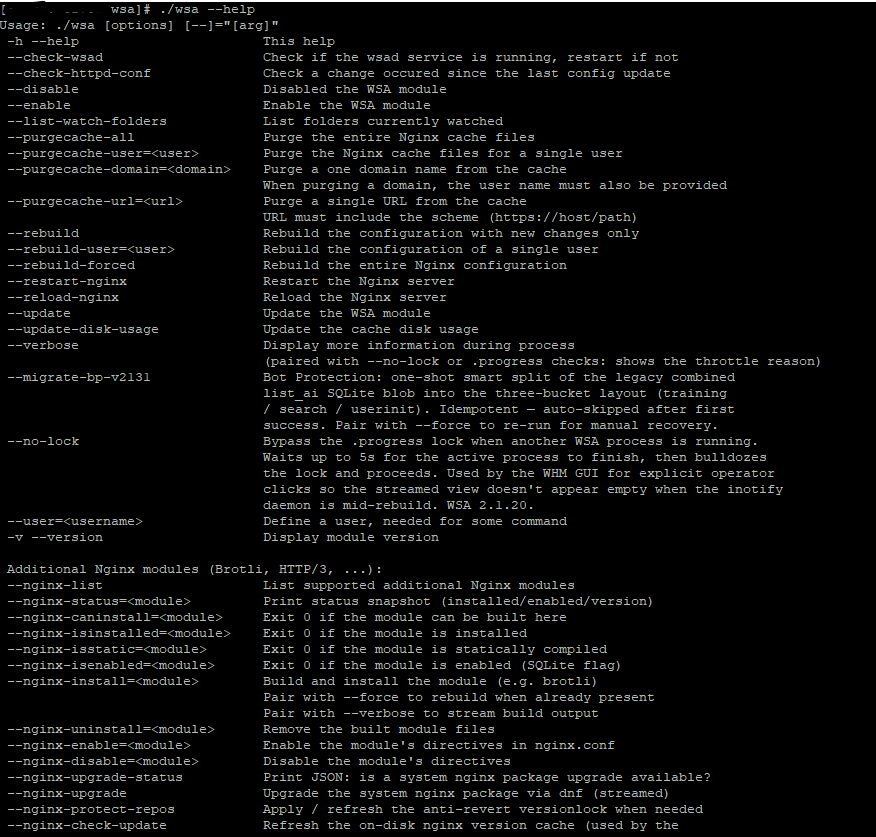
--version (or -v)
Displays the installed module version.
/etc/wsa/wsa --version
# 2.2.0
--verbose
Verbose mode. Combine with any other command to display step-by-step details. Particularly useful for --update, --rebuild-forced, --http3-install, --nginx-install=brotli, which stream their output.
/etc/wsa/wsa --rebuild-forced --verbose3. Module management
--enable
Activates the WSA module (nginx vhosts mounted, wsad daemon started, cPanel hooks enabled). Use after a --disable to restore the service.
/etc/wsa/wsa --enable --verbose--disable
Completely disables the module. nginx removes WSA vhosts and Apache reclaims ports 80/443. Existing configurations are preserved on disk — a subsequent --enable restores them intact.
/etc/wsa/wsa --disable --verbose--update
Forces an immediate update to the latest version available on the configured release branch (stable, current, edge, dev).
/etc/wsa/wsa --update --verboseThe operation is non-blocking for sites — code is replaced atomically and post_update.php migrates SQLite data if needed.
4. Configuration rebuild
--rebuild
Regenerates only the nginx configurations that have changed since the last rebuild. Fast for cron use or a hook (cPanel SSL renewal, addon domain creation).
/etc/wsa/wsa --rebuild--rebuild-user=<user>
Regenerates the nginx configuration for a single cPanel account. Useful after a per-user modification (advanced mode, preset apply) that affects only that account.
/etc/wsa/wsa --rebuild-user=astralinternet --verbose--rebuild-forced
Rebuilds ALL nginx configurations, even without detected changes. Then performs a hot nginx reload (current visitors not affected).
/etc/wsa/wsa --rebuild-forced --verbose --no-lockThis is what the WHM Rebuild Nginx conf button executes. Use when you've manually modified something (pre/post_virtual_host.conf, default.conf) and want to force its consideration.
--no-lock
Combine with --rebuild*: ignores the .progress lock that normally prevents two WSA processes from running in parallel. The lock exists to avoid corruption when inotify triggers a rebuild at the same time as a manual action.
/etc/wsa/wsa --rebuild-forced --no-lock --verboseUse only when you know there's no other WSA running. WHM passes this flag automatically for explicit operator actions.
5. nginx management
--restart-nginx
Stops then fully restarts the nginx process. Open connections are forcibly closed.
/etc/wsa/wsa --restart-nginx --verbose--reload-nginx
Hot-reloads the nginx configuration (without interrupting current connections). Prefer this over --restart-nginx when possible.
/etc/wsa/wsa --reload-nginx--check-httpd-conf
Checks if the Apache configuration has changed since WSA's last execution. If so, triggers a rebuild. Idempotent — can run in cron without risk.
/etc/wsa/wsa --check-httpd-conf --verbose--check-wsad
Checks that the wsad daemon (inotify watcher) is running. Restarts it if stopped.
/etc/wsa/wsa --check-wsad --verbose--update-disk-usage
Updates the usage.stats file read by the Cache Utilization tile of the WHM dashboard. Runs automatically every 2 hours via internal cron, but can be forced manually to get fresh figures immediately.
/etc/wsa/wsa --update-disk-usage --verbose6. Cache management
--purgecache-all
Fully empties the nginx cache for all server accounts. Atomic operation: cache directories are renamed instantly, recreated empty, then deleted in background.
/etc/wsa/wsa --purgecache-all --verbose--purgecache-user=<user>
Empties only the cache of a single cPanel account.
/etc/wsa/wsa --purgecache-user=astralinternet --verbose--purgecache-domain=<domain>
Empties the cache of a specific domain (useful for multi-domain accounts). Requires --user=<user> to identify the owner.
/etc/wsa/wsa --purgecache-domain=example.com --user=astralinternet --verbose--purgecache-url=<url>
Empties a single URL from the cache. The URL must include the scheme (http:// or https://).
/etc/wsa/wsa --purgecache-url=https://example.com/blog/article-42 --verboseUseful for selectively purging after a specific content update without touching the rest of the cache.
--user=<user>
Auxiliary flag required by some commands (--purgecache-domain) to identify the owner of a resource.
7. nginx modules (Brotli, HTTP/3, …)
WSA can compile and manage several dynamic nginx modules. The --nginx-* command family centralizes these operations.
--nginx-list
Lists supported modules.
/etc/wsa/wsa --nginx-list
# brotli
# http3
--nginx-status=<module>
Displays a JSON snapshot of a module's state: installed, enabled, compiled version, target version.
/etc/wsa/wsa --nginx-status=brotli--nginx-caninstall=<module>
Exit 0 if the module can be compiled on this server. Otherwise exit non-zero with a message explaining why (unsupported OS, nginx too old, missing dependencies).
/etc/wsa/wsa --nginx-caninstall=http3 && echo "OK" || echo "Not eligible"--nginx-isinstalled=<module>
Exit 0 if the module is installed.
/etc/wsa/wsa --nginx-isinstalled=brotli && echo "Brotli OK"--nginx-isstatic=<module>
Exit 0 if the module is statically compiled into nginx (as opposed to a dynamic .so module loaded via load_module).
--nginx-isenabled=<module>
Exit 0 if the module is enabled (SQLite flag <module>_enable=1).
--nginx-install=<module>
Compiles and installs the module. Combine with:
--force: recompiles even if the module is already installed.--verbose: streams the compilation output (recommended — compilation can take 2-5 minutes).
/etc/wsa/wsa --nginx-install=brotli --verbose--nginx-uninstall=<module>
Uninstalls the module (removes .so files, removes load_module from nginx config).
/etc/wsa/wsa --nginx-uninstall=brotli --verbose--nginx-enable=<module> / --nginx-disable=<module>
Enables or disables the module's directives in nginx.conf without touching the compiled binary. Allows having a module installed but momentarily inactive (e.g., for testing a fallback).
/etc/wsa/wsa --nginx-enable=brotli
/etc/wsa/wsa --nginx-disable=brotli
--nginx-upgrade-status
Displays JSON: is an nginx package update available via dnf?
/etc/wsa/wsa --nginx-upgrade-status--nginx-upgrade
Launches nginx package update via dnf, streamed. Automatically recompiles Brotli after the update if the module is installed (the module is linked to the nginx ABI).
/etc/wsa/wsa --nginx-upgrade --verbose--nginx-check-update
Refreshes the disk cache used by WHM tiles and the "↻ Refresh" button of the interface. Runs automatically in daily cron.
/etc/wsa/wsa --nginx-check-update --verbose--nginx-recover-upgrade
Auto-recovery after an out-of-band nginx upgrade (e.g., dnf-automatic that bypassed the WSA versionlock). Detects ABI drift:
- Plan A: rebuild Brotli against the new ABI.
- Plan B: disable Brotli if Plan A fails.
Idempotent — can be called in cron without danger.
/etc/wsa/wsa --nginx-recover-upgrade --verbose--nginx-recovery-state
Displays JSON: snapshot of the last recovery event (exit 0 when an event exists, 1 when none recorded).
--nginx-recovery-clear
Clears the recovery state (closes the corresponding banner in WHM).
--nginx-protect-repos
Applies or refreshes the anti-revert versionlock on the nginx package (Tier 2 mechanism — prevents dnf-automatic from replacing a custom build).
--nginx-relock
Reconciles the dnf lock with the current install state. Idempotent — adds the lock if Brotli or HTTP/3 is installed, removes it if neither is active.
--nginx-unlock
Releases ALL WSA locks on the nginx package. Use ONLY before a deliberate manual dnf upgrade nginx, and follow with --nginx-recover-upgrade to rebuild Brotli with the new ABI.
--nginx-lock-status
Displays JSON: lock state across all layers (versionlock, dnf.conf [main], automatic.conf).
8. HTTP/3 (EL 9 / EL 10 only)
--http3-status
JSON snapshot: installed, stale, compiled pins vs pinned pins.
/etc/wsa/wsa --http3-status--http3-caninstall
Exit 0 if the server can compile HTTP/3. Detects the distribution (EL 9/10 only) and the presence of dependencies.
/etc/wsa/wsa --http3-caninstall && echo "OK" || echo "Not supported"--http3-install
Compiles and installs the custom HTTP/3 nginx binary, USR2 swap (zero-downtime). Compilation takes 3 to 8 minutes; always use --verbose.
/etc/wsa/wsa --http3-install --verboseCombine with --force to recompile even if already up to date.
--http3-uninstall
USR2 swap back to the standard RPM nginx package. Disables QUIC on all vhosts.
/etc/wsa/wsa --http3-uninstall --verbose--http3-rebuild
Alias for --http3-install --force. Rebuilds the HTTP/3 binary even without pin change.
/etc/wsa/wsa --http3-rebuild --verbose--http3-auto-rebuild[=on|off]
Reads or writes the SQLite option http3_auto_rebuild. When on, WSA automatically rebuilds HTTP/3 when a WSA pin moves.
/etc/wsa/wsa --http3-auto-rebuild        # displays state
/etc/wsa/wsa --http3-auto-rebuild=on     # enables
/etc/wsa/wsa --http3-auto-rebuild=off    # disables
--http3-enable
Emits listen 443 quic; + Alt-Svc header in all SSL vhosts. Opens UDP/443 in the firewall (CSF or firewalld auto-detected). Reloads nginx.
/etc/wsa/wsa --http3-enable --verboseRequires HTTP/3 to be installed beforehand (--http3-install).
--http3-disable
Removes QUIC directives from vhosts. Reloads nginx. Does not close UDP/443 in the firewall (the admin may use it for other services).
/etc/wsa/wsa --http3-disable --verbose9. Monitoring and miscellaneous operations
--list-watch-folders
Lists folders currently watched by the inotify daemon (/etc/wsa/ + all /home/*/.wsa/). Useful for diagnosing why a change isn't detected.
/etc/wsa/wsa --list-watch-folders--migrate-bp-v2131
One-shot migration: splits the legacy combined SQLite blob list_ai into three separate buckets (training / search / userinit). Idempotent — auto-skipped after first successful run.
Run manually only to recover from SQLite corruption, combining with --force:
/etc/wsa/wsa --migrate-bp-v2131 --force --verbose10. Automation examples
10.1 Post-deployment hook
Script to execute after each code deployment:
#!/bin/bash
# /usr/local/bin/post-deploy-wsa.sh
USER="$1"
DOMAIN="$2"

# Empty the freshly deployed domain's cache
/etc/wsa/wsa --purgecache-domain="$DOMAIN" --user="$USER" --verbose

# Rebuild if nginx config needs updating
/etc/wsa/wsa --rebuild-user="$USER" --verbose
10.2 Ansible health check
- name: Verify WSA module is enabled
  command: /etc/wsa/wsa --check-wsad
  changed_when: false

- name: Brotli installed and active?
  command: /etc/wsa/wsa --nginx-isenabled=brotli
  register: brotli_status
  failed_when: brotli_status.rc != 0
  changed_when: false
10.3 Backup before manual nginx upgrade
# 1. Snapshot current state
/etc/wsa/wsa --nginx-status=brotli > brotli-pre-upgrade.json
/etc/wsa/wsa --http3-status > http3-pre-upgrade.json

# 2. Release the lock
/etc/wsa/wsa --nginx-unlock --verbose

# 3. Do the `dnf upgrade nginx` manually
dnf upgrade nginx

# 4. Auto-recover
/etc/wsa/wsa --nginx-recover-upgrade --verbose

# 5. Re-apply the lock
/etc/wsa/wsa --nginx-relock
10.4 Daily health check cron
# /etc/cron.d/wsa-daily-health
0 4 * * * root /etc/wsa/wsa --nginx-check-update > /dev/null 2>&1
0 4 * * * root /etc/wsa/wsa --check-httpd-conf > /dev/null 2>&1
Note: these tasks already run automatically via WSA's internal cron. The system cron above guarantees they run even if the wsad daemon is temporarily stopped.
11. Internal flags (do not use)
Some flags appear in source code but are internal to the module:
--secret-cron-bypass-oiusdtgsh— Auto-cron bypass used by the wsad daemon itself. Never use manually.-q— Forces queue mode. Legacy internal flag.-s— Queue delay (2s). Legacy internal flag.
12. Further reading
- WHM Dashboard — All WHM buttons have a CLI equivalent.
- Account Inventory — Per-user actions are the equivalents
--rebuild-userand--purgecache-user. - Manual nginx modifications — When to use
pre_virtual_host.confrather than a CLI command. - Optimization — Tools to identify what to configure.