
Cache Configuration
Per-zone settings (Dynamic, CSS/JS, Media) and server-wide bypass lists.
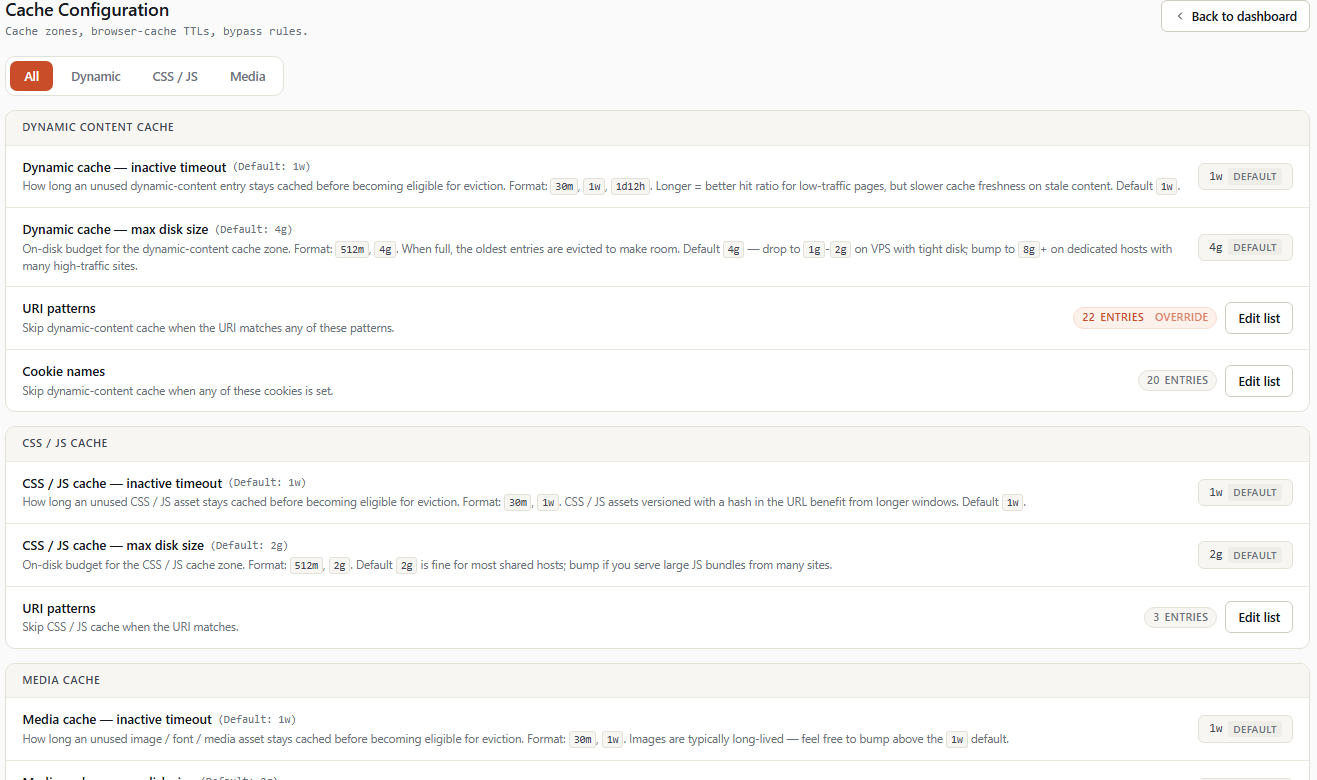
The Cache Configuration page gathers all cache settings that apply zone by zone: memory expiration duration, max size per zone, and bypass lists (URI and cookies) applied globally to all sites.
Access: Sidebar → Cache Configuration.
💡 The zones' maximum sizes (Dynamic, CSS/JS, Media) are settable here and on the Module Configuration page. Both pages stay synchronized — modifying one updates the other.
💡 Per-account settings (which domain uses what) are managed from cPanel by each customer (simple or advanced mode). The WHM page described here provides the default server values.
1. Tab organization
The page is divided into 4 tabs:
[ All | Dynamic | CSS / JS | Media ]| Tab | Content |
|---|---|
| All | Shows settings of all 3 zones at the same time. |
| Dynamic | Cache settings for generated content (PHP/HTML, JSON, API). |
| CSS / JS | Settings for stylesheets and scripts. |
| Media | Settings for images, fonts, videos. |
Each zone tab (Dynamic, CSS/JS, Media) contains the same 4 types of settings:
- Inactive — duration before an unrequested entry is evicted.
- Max size — maximum disk size of the zone.
- Bypass URI — URLs that always bypass this zone.
- Bypass Cookie — cookies that always bypass this zone (Dynamic only).
For each field, the user sees:
- The option's title.
- The current value.
- The default value indicated next to it.
- A ↺ undo button if the value differs from default.
- A help tooltip for non-obvious concepts.
2. Dynamic tab
Settings for the Dynamic zone — PHP/HTML pages, JSON, API responses. This is the zone that most impacts the perceived speed of sites for visitors.
2.1 dyn_proxy_cache_inactive
   Inactive timeout                       (Default: 60m)
   Time before an unrequested cache entry is dropped.
[ 60m ] ↺Type: duration (60m, 1h, 1d, etc.) Default: 60m
Duration nginx keeps a response in the zone even if it's not requested. Beyond, the entry is evicted to free space.
⚠️ Not to be confused with cache TTL (duration during which nginx considers the response fresh to serve directly). TTL is defined:
- Globally by cPanel customer (simple mode: pre-defined profile; advanced mode: per domain).
- Or by server default (configured in the
default.conffile).
The inactive is the maximum limit: even if you have a 1-day TTL but no one requests the page for 60 minutes, the entry is evicted.
Recommendations:
| Site profile | Recommended inactive |
|---|---|
| Constant traffic (always someone) | 60m (default) |
| Burst traffic (rarely visited outside events) | 3h to 6h |
| Rarely visited sites | 12h to 24h |
2.2 dyn_proxy_cache_path_max_size
   Maximum cache size                    (Default: 512m)
   Total disk space allocated to this cache zone.
[ 512m ] ↺Type: size (512m, 1g, etc.) Default: 512m
Maximum size of the zone on disk. When reached, nginx evicts the least recently used entries (LRU) to free space.
This value is also exposed on the Module Configuration page. Modifying here updates both locations.
2.3 Bypass URI list
Multi-line textarea, one URI per line.
Any request whose path matches one of these entries automatically bypasses the Dynamic cache. The response is served directly by Apache and is not stored.
Format: path as it appears in the URL, without the domain. Wildcards * and query strings are supported.
Example content:
/wp-admin
/wp-login.php
/administrator
/admin
/cart
/checkout
/my-account
/cpanel
/whm
?nocache=1Recommendation: the shipped list covers sensitive URIs of popular CMS. Add your own specific URIs above this list (e.g., a preview page /?preview=true).
2.4 Bypass Cookie list
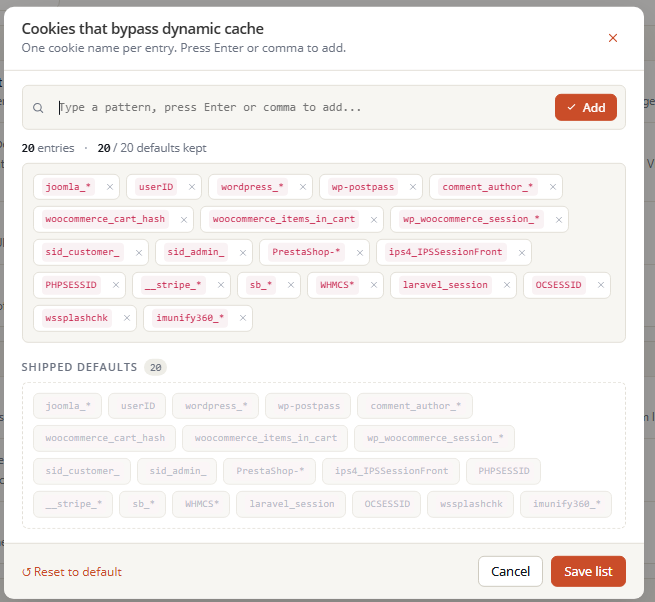
Multi-line textarea, one cookie name per line.
Any request containing one of these cookies automatically bypasses the Dynamic cache. This is the main mechanism that prevents logged-in users from seeing another user's cache.
Format: cookie name as it appears in the Cookie: HTTP header. Trailing wildcard * is supported.
Example content:
wordpress_logged_in_*
wp-postpass_*
comment_author_*
woocommerce_cart_hash
woocommerce_items_in_cart
PHPSESSID
member_*
edd_items_in_cartRecommendation: don't shorten this list. The shipped list is the result of years of operational feedback — each entry exists because a customer case was encountered.
3. CSS / JS tab
Settings for the CSS/JS zone — stylesheets and scripts. Simpler than Dynamic: no cookie bypass (scripts and styles don't depend on cookies).
3.1 cssjs_proxy_cache_inactive
Default: 7d
Inactive timeout before eviction. Longer than Dynamic because CSS/JS files rarely change.
3.2 cssjs_proxy_cache_path_max_size
Default: 512m
Maximum zone size. See Module Configuration for recommendations.
3.3 Bypass URI list
Textarea list. Rarely used for CSS/JS.
Typical cases:
/dev/app.js
/dist/unversioned.css
To use when a dev build serves files at fixed URLs that are rewritten on each deploy.
4. Media tab
Settings for the Media zone — images, fonts, videos, PDFs, ZIPs, and all binary files.
4.1 static_proxy_cache_inactive
Default: 7d
Same as CSS/JS — media rarely changes.
4.2 static_proxy_cache_path_max_size
Default: 1024m
Maximum size. This zone is usually the largest because media represents most of the weight of web pages.
4.3 Bypass URI list
Textarea list, rarely modified.
Typical cases:
/avatars/*
/charts/live/*
/downloads/signed/*
For URLs where content changes even though filename doesn't change.
5. Save behavior
5.1 Per-item validation
For lists (URI and Cookie), each entry is validated individually:
- URI: regex
^[A-Za-z0-9._~/?&=%*\-]{1,256}$. - Cookie: regex
^[A-Za-z0-9_*\-]{1,128}$.
Partial-save policy: if some entries are invalid, the valid ones are still saved. A yellow banner lists the rejected entries with an explanation of the expected format.
5.2 Automatic nginx rebuild
Any modification to sizes or lists requires an nginx rebuild to be effective. WSA automatically triggers a wsa --rebuild-forced --verbose after save, with streamed output.
5.3 Impact on running sites
Visitors currently browsing are not affected:
- Newly added bypass lists apply from the next request.
- Size modifications rebuild the zone (existing memory entries remain valid).
- No service interruption window.
6. Further reading
- Nginx configuration — Fine nginx settings (timeouts, rate limiting, gzip, etc.).
- Module Configuration — Global sizes, release branch, automatic update.
- cPanel simple mode — How customers use a pre-made profile based on server settings.
- Optimization — How to identify URIs and cookies to add to your bypass lists.