
Mail Scanner
SpamAssassin installed and tuned for the server, spam sorted into each account's Junk folder or quarantine, and a page in cPanel where customers read their history and release what was held.
Version 0.3.11 · Store extension, paid · requires PHP 7.4+ with
pdo_sqlite, cPanel's Exim and SpamAssassin, and Astral Toolbox with the task scheduler Every incoming message gets SpamAssassin points, then goes to the inbox, the Junk folder or the quarantine; customers see their history and quarantine in cPanel.
Mail Scanner installs and tunes SpamAssassin and its add-ons (Pyzor, Razor, DCC, Bayes learning, URI block lists), then puts its own scanner service between Exim and cPanel's SpamAssassin. Every message the mail server accepts gets spam points. With them:
- under the Junk folder number, the message goes to the inbox;
- from it, to the account's Junk folder (cPanel's Spam Box);
- from the Quarantine number, to the account's quarantine, where it is held for a number of days. The customer can release it to their inbox or delete it.
Every message is recorded: who sent it, to which addresses, its subject, its points, the rules that gave them, and where each copy went. Its text is not kept. Customers read that history, and their quarantine, on a page of their cPanel named Mail Scanner - Astral360.
In WHM, three tabs: Dashboard, Scanner settings and Configuration.
The rule above all: mail flows, whatever happens to this extension. If its service stops answering, Exim goes on without it; an outage costs the record of a message, never the message.
Where a message goes, for an account
| Level | Comes from, strongest first | What it does |
|---|---|---|
| Junk | The account's spam threshold (cPanel › Spam Filters) → the server's Junk folder from | cPanel's Spam Box files the message in the account's Junk folder |
| Quarantine | The account's auto-delete score (cPanel › Spam Filters) → the server's Quarantine from | Mail Scanner holds the message in the account's quarantine, instead of deleting it |
| Lists | The account's allow and block lists of senders (cPanel › Spam Filters) | An allowed sender is not held; a blocked sender is |
A message is scored with the Spam Filters settings of the account of its first recipient on this server. A customer changes their own levels on the Settings tab of the customer page, or in cPanel's Spam Filters: both write the same two settings. The quarantine is always on: each install and update turns it on, and Configuration has no switch for it.
If a quarantine cannot be written (full disk, a folder the account broke), the message goes to the Junk folder instead, never back to its sender.
Spam sent to a forwarder of a domain on this server, from the forwarder's domain's quarantine score, goes to those of its targets that are mailboxes on this server (never a domain whose mail is delivered elsewhere, by a remote exchanger), before the domain's filters (so before its auto-delete). Each copy is then handled as a message sent to that mailbox: held in its quarantine from its own quarantine score. Targets outside this server do not get it: cPanel's setting that blocks forwarded spam (recommended at 5) already held it back from them.
Dashboard tab
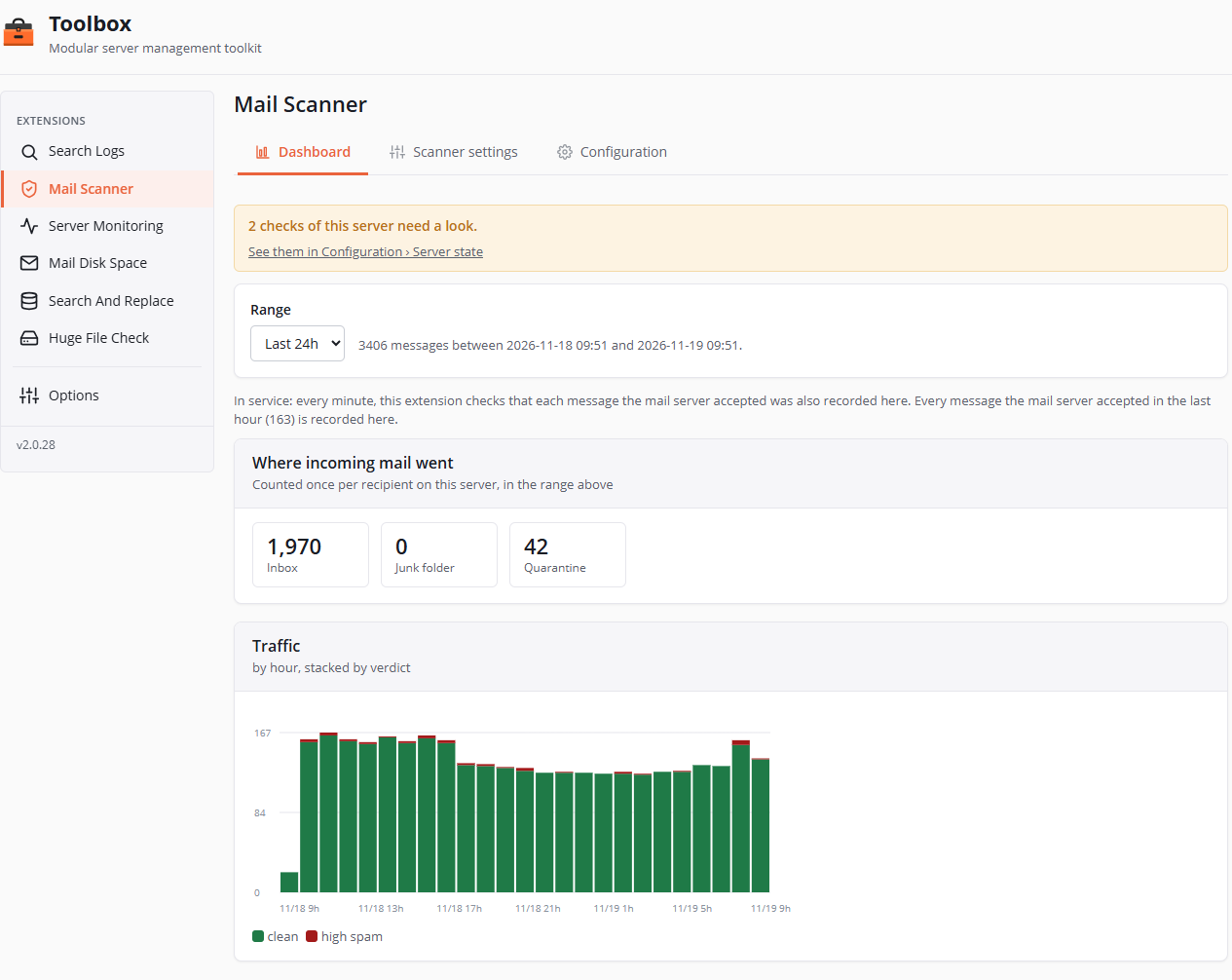
From top to bottom:
- A banner when checks of the server need a look (2 checks of this server need a look.), with a link to Configuration › Server state.
- Range: the last hour, the last 24 hours (default), 7 days or 30 days, and the number of messages in the range, from when to when. The range picker and the panels show once something has been recorded.
- A sentence on what happens to mail right now: whether mail reaches the scanner service and whether every message the mail server accepted is recorded here, and what to do if not (it names what fixes it, most often the Mail Scanner line at the top of Configuration › Server state). An alert also shows when recording falls behind.
- Alerts for the messages that have something to say: those nobody could check, shortened checks, this extension's mark held back by a safety check (each with its reasons in plain words), and a verdict that was not understood.
- An alert on the block lists: when they refuse to answer this server, or since when they have refused nothing.
- Where incoming mail went: three numbers for the range, Inbox, Junk folder and Quarantine, counted once per recipient on this server.
- Traffic: a chart of the range's messages stacked by verdict (clean, low spam, high spam, unscanned, whitelisted, blacklisted, unknown), by hour up to two days, by day beyond.
Scanner settings tab
Three tabs at the top of the page: Scores, Trusted servers and SpamAssassin.
Scores
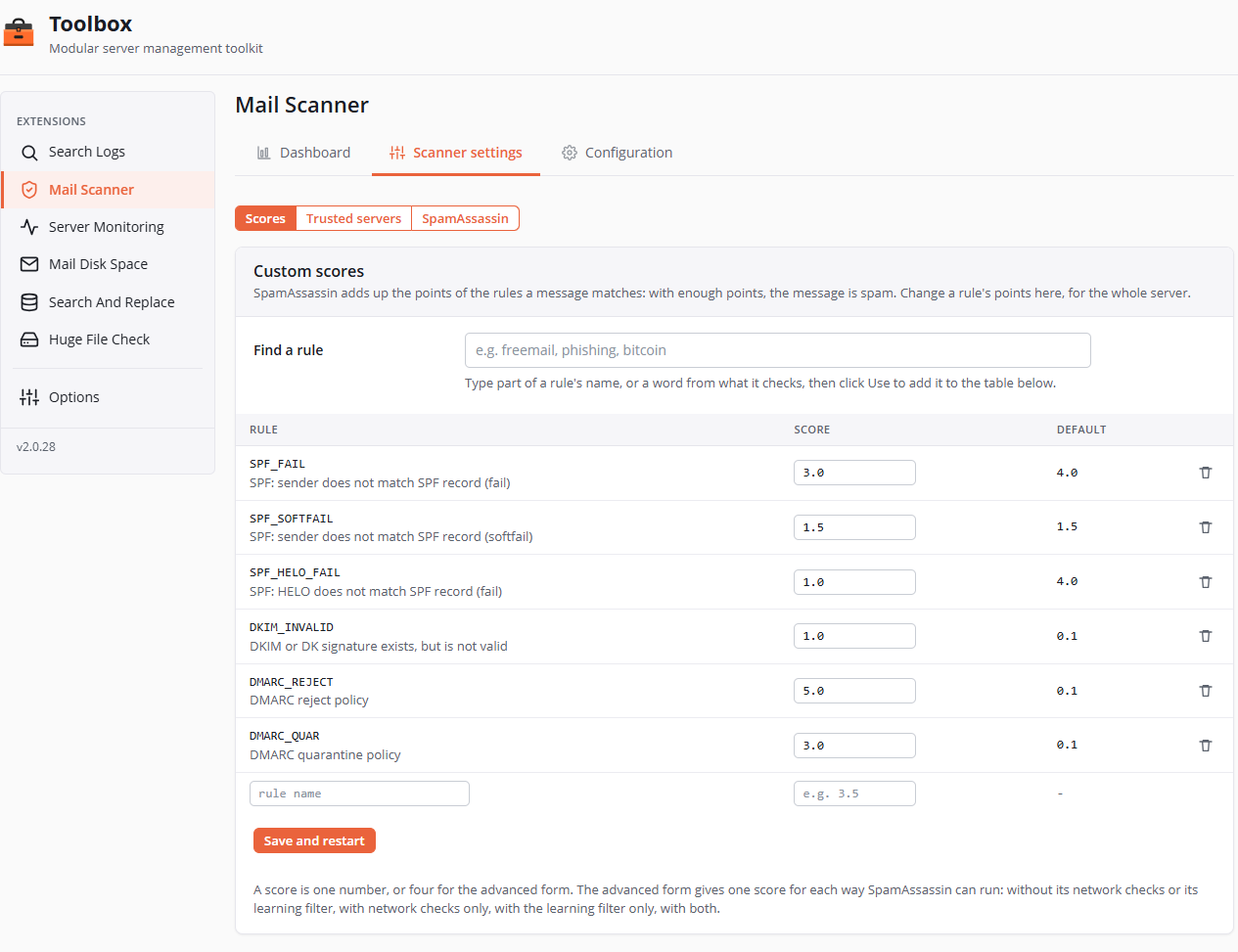
The weight of SpamAssassin's rules on this server (Custom scores). Find a rule searches by part of a rule's name or by a word of what it checks; Use adds it to the table. The table shows each rule set here, its score and its default score; a row's trash icon removes its score (the rule goes back to its default). A score is one number, or four for the advanced form (one score for each way SpamAssassin can run: without its network checks or its learning filter, with network checks only, with the learning filter only, with both). A score of 0 would switch a rule off completely: the page saves it as 0.001, no points, but the rule still shows in the results.
Save and restart: SpamAssassin first checks the new scores, and only if it accepts them are they written to a file of their own (zz_toolbox-mail.cf, read after cPanel's local.cf) and SpamAssassin restarted; a refusal changes nothing. Messages that arrive during those few seconds are delivered without being checked.
Risky changes are flagged under their rule: a rule that would mark a message as spam on its own (10 points or more), a rule that would let almost everything through, sender-authentication rules (SPF, DKIM) that would take points away, a rule unknown to this server or a sub-rule, a rule set twice, or a rule that another SpamAssassin file, read later, sets differently.
Trusted servers
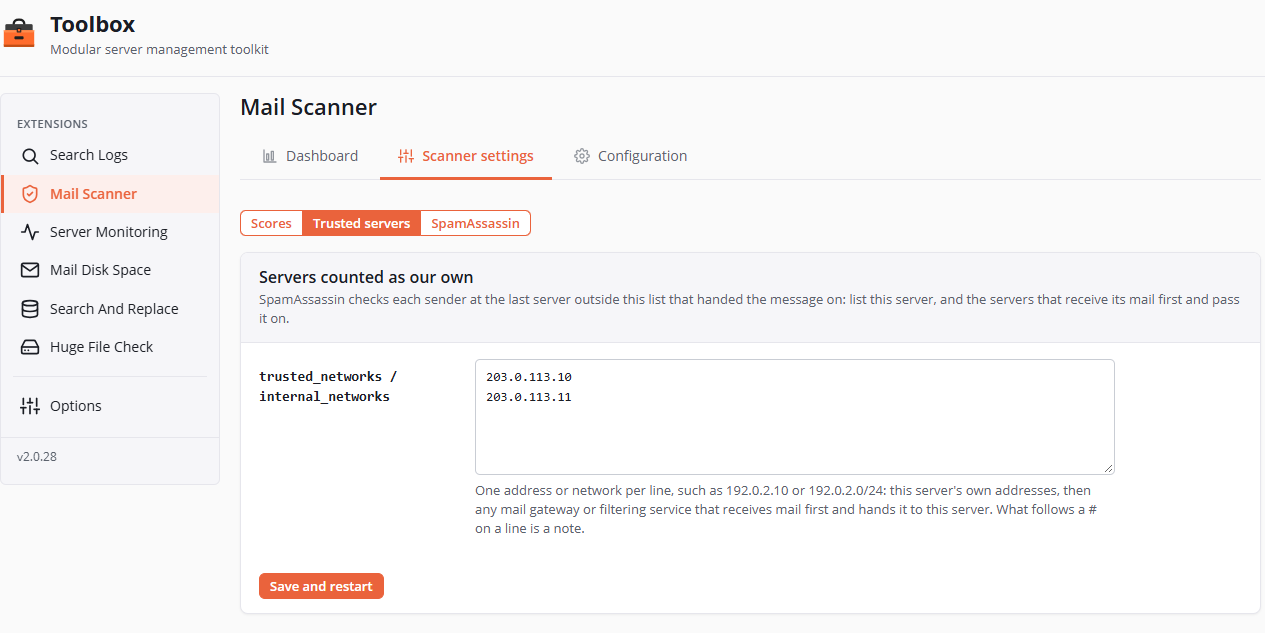
Servers counted as our own: the servers SpamAssassin trusts to hand mail on (its trusted_networks and internal_networks). It checks each sender at the last server outside this list that handed the message on. List this server's addresses, then any mail gateway or filtering service that receives mail first and hands it to this server, one address or network per line; what follows a # is a note. Until something is saved here, the field offers this server's addresses (or a hand-set list).
Save and restart checks SpamAssassin's settings with the new list, then restarts it; an empty field removes the list saved here, and SpamAssassin goes back to a hand-set list, or cPanel's. The rule is the same on every server: Server state warns only when cPanel's automatic list (or none) is in use, and Apply the recommended settings again then writes this server's addresses.
SpamAssassin
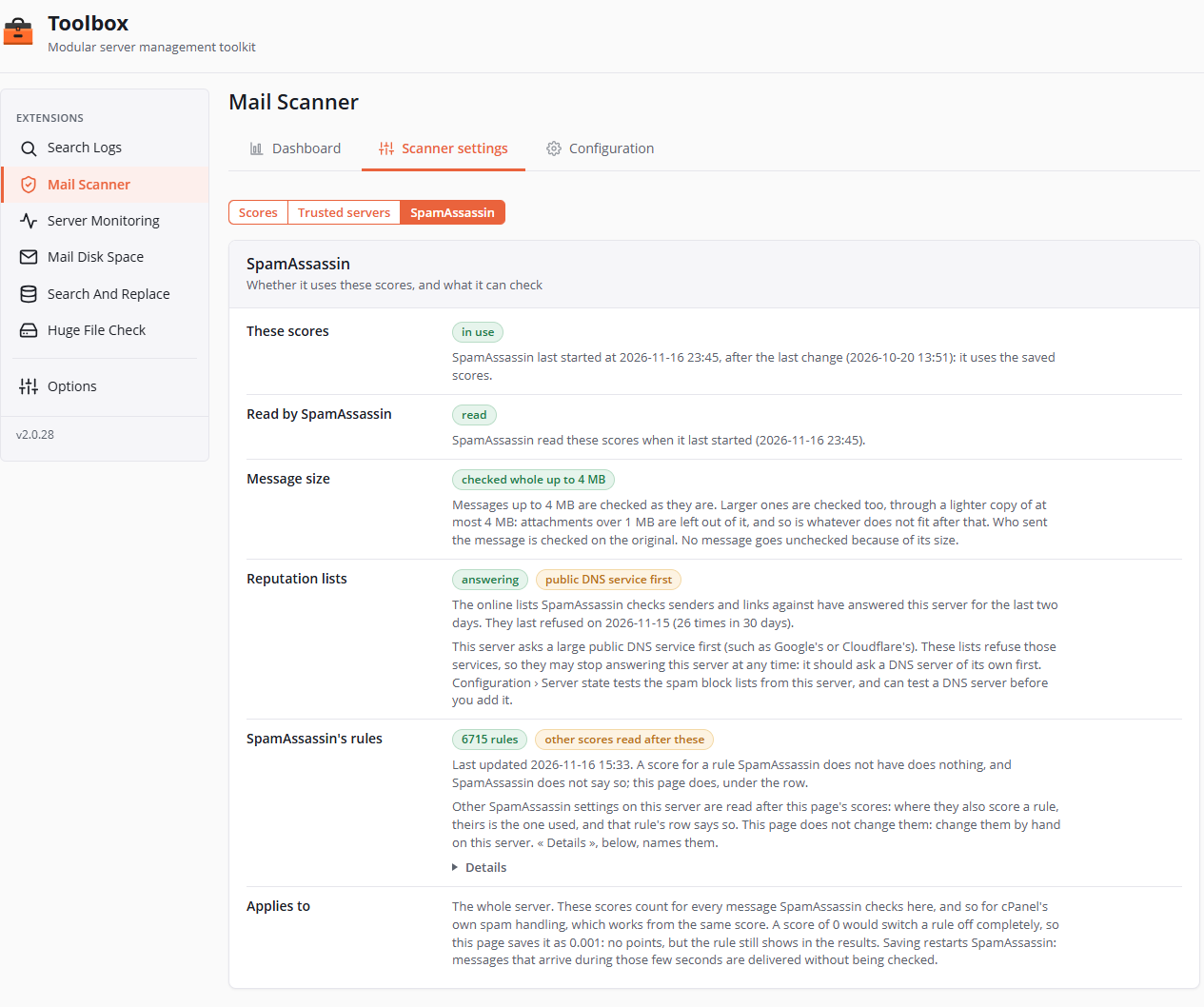
What SpamAssassin does with these scores, and what it can check, in six rows:
- These scores: whether it uses the saved scores (its last start, after the last change).
- Read by SpamAssassin: whether it read them when it last started.
- Message size: messages up to 4 MB are checked whole; larger ones through a lighter copy of at most 4 MB. No message goes unchecked because of its size.
- Reputation lists: whether the online lists that rate senders and links answer this server, and how many times they refused in 30 days; a warning when the server asks a large public DNS service, which those lists may refuse.
- SpamAssassin's rules: their count and last update, and the other settings read after this page (Details names them).
- Applies to: the whole server, cPanel's own spam handling included, which works from the same score.
Restart SpamAssassin and Let SpamAssassin read these scores show only when needed, at the top of the three tabs.
Configuration tab
Three tabs at the top of the page, one per part below: Settings, Server state and Spam learning (once the server has been checked). A button of Server state or Spam learning comes back to its own tab, and a reload keeps the open tab.
Settings
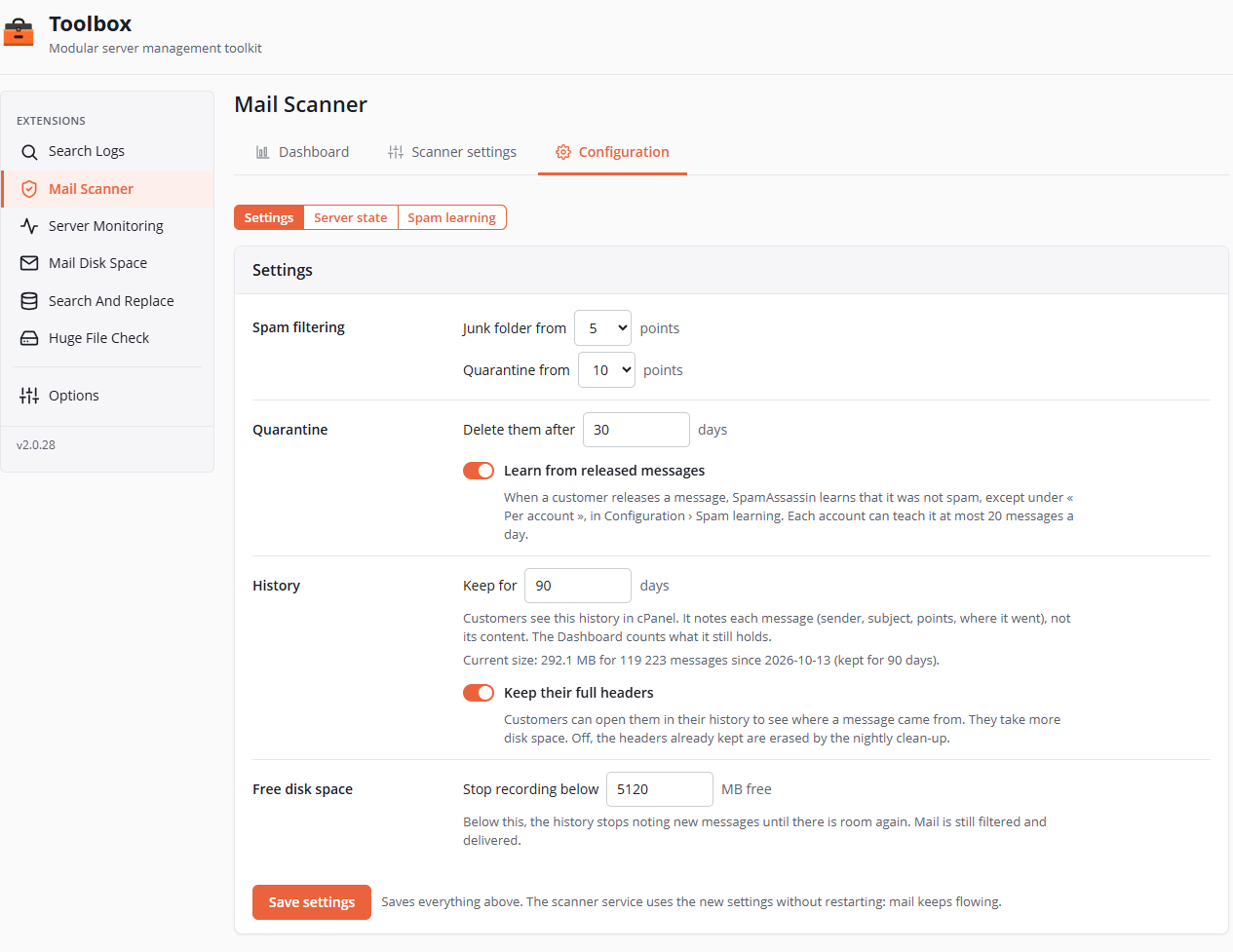
One form, one Save settings. The scanner service applies its new settings without restarting: mail keeps flowing.
| Setting | Default | Notes |
|---|---|---|
| Spam filtering · Junk folder from | 5 points | The server's first number, 1 to 30 whole points; it must stay below the quarantine's. Lower catches more spam, but also more good mail. A change is also given to SpamAssassin, which restarts for a few seconds: its own spam headers then follow the same number (see One spam score for the server). |
| Spam filtering · Quarantine from | 10 points | The server's second number, 1 to 30. Both lists are greyed out when the scanner service is missing or its settings cannot be read. |
| Quarantine · Delete them after | 30 days | 1 to 365. The quarantine is emptied each night, each account under its own identity. |
| Quarantine · Learn from released messages | On | When a customer releases a message, SpamAssassin learns it was not spam, except under "Per account" in Spam learning, where there is no learning shared by every account. Each account can teach it at most 20 a day. |
| History · Keep for | 30 days | 1 to 3650. The history customers see in cPanel, and what the Dashboard counts. An update from a version before 0.3.0 keeps 90 days if nobody had chosen. Under the field, Current size gives what the history takes and since when. |
| History · Keep their full headers | On | Customers can open them to see where a message came from. Off, the headers already kept are erased by the nightly clean-up. |
| Free disk space · Stop recording below | 5120 MB | 64 to 1,048,576 MB. Below this, the history stops recording new messages until there is room again. Mail is still filtered and delivered. |
One spam score for the server
SpamAssassin has a spam score of its own, the one of cPanel's spam headers and of its Spam Box for an account without a score of its own. Mail Scanner keeps it equal to Junk folder from: saving a new number writes it to a SpamAssassin file of its own (zz_toolbox-low.cf, read after the others), checks SpamAssassin's settings, then restarts it. The SpamAssassin uses the same spam score row, in Server state, says when the two differ, for example after a hand edit, and offers the same action.
Server state
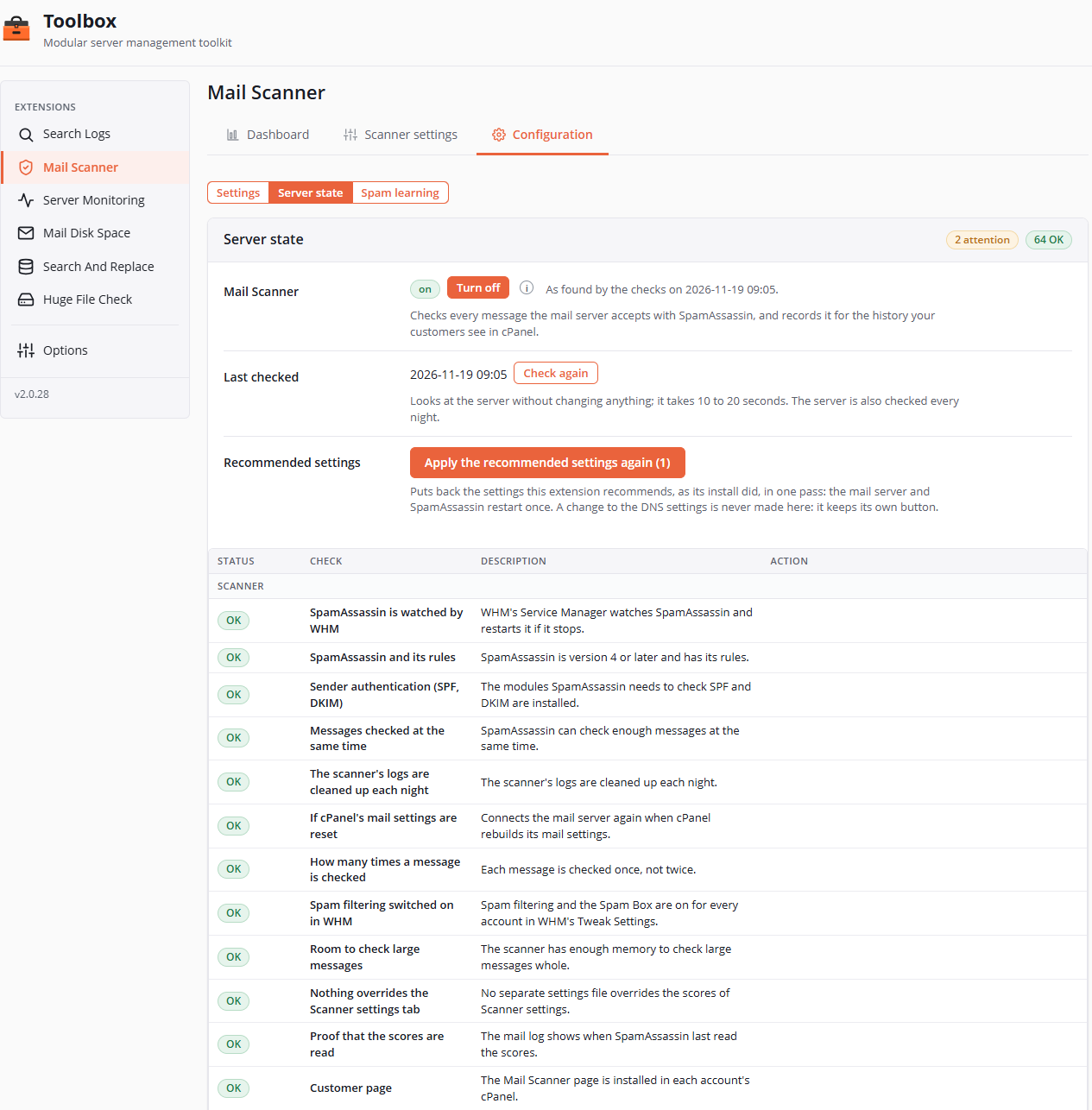
Short and simple, for admins:
- Mail Scanner, at the top: the scanning's only switch, with its state (on, off, not working, needs repair, cannot be read, not checked yet) as the checks found it. Turn on sets up the scanner service if it needs to, then connects the mail server to it; Turn off gives mail back to cPanel's spam filtering (the scanner service stays, ready); Repair shows when something is wrong, with the reason under the line. Each button has an (i) that says what it does.
- Last checked and Check again, which looks at the server without changing anything (10 to 20 seconds); the server is also checked each night.
- Recommended settings · Apply the recommended settings again (N), when some are no longer in place: it puts them all back at once, like the install did, with at most one mail-server rebuild and one SpamAssassin restart. It never touches the DNS settings, which keep their own button.
- A table of every check, the OK ones included, in groups (Scanner, Previous spam filter, SpamAssassin, Mail server): Status (OK, ATTENTION, FAILED, SKIPPED, INFO, with required for those that count), Check, Description (what it does, in one sentence) and Action (its buttons, each with its (i)). A count at the top of the table says how many failed, need a look and are OK.
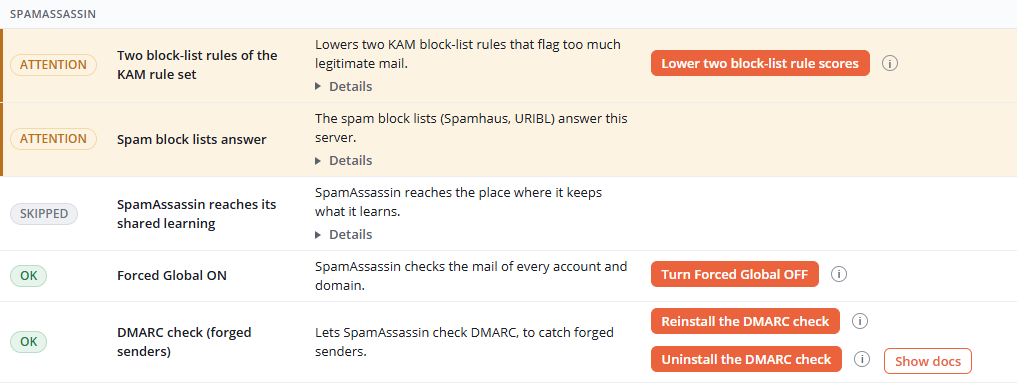
A check that is not OK keeps what was found and what to do in a closed Details; the block-lists one offers Test this DNS server there. The DCC, Pyzor, Razor2 and DMARC check rows have Show docs. Two actions are red and ask for confirmation, because they cannot be undone: removing a previous spam filter completely, and deleting incomplete messages from the mail queue.
After a button, a banner at the top of the tab says how it ended (done, partly done, failed, refused). Every action is recorded on the server, for support. Recording is always on: each message is recorded within a minute or two for the history your customers see in cPanel.
Spam learning
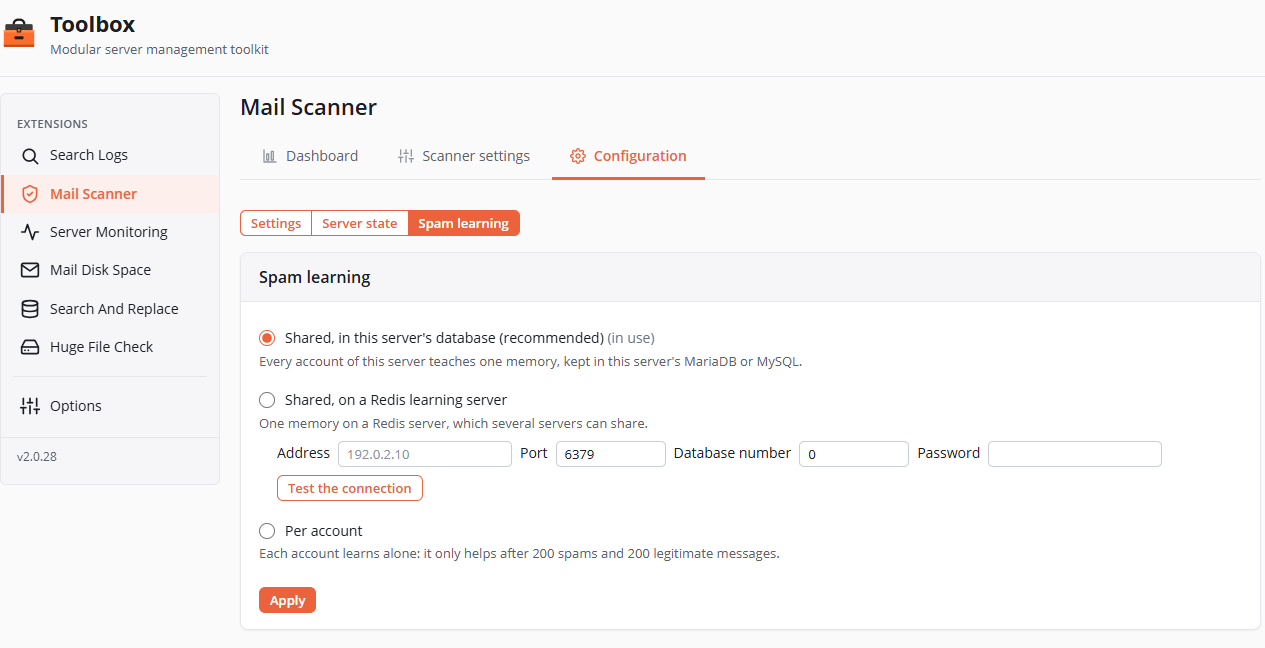
Spam learning picks where SpamAssassin keeps what it learns, the same way on every server:
- Shared, in this server's database (recommended): one memory for every account, in the server's MariaDB or MySQL;
- Shared, on a Redis learning server: its address, its port (6379), its database number (0) and its password (never shown), the fields showing the learning server in use. SpamAssassin 4 sends only a password, to Redis's default user, unencrypted: so the learning server goes on a private network. Test the connection answers in place, its button turning into a green OK, and changes nothing. When a Redis answers on this very server (127.0.0.1:6379), the page offers to use it;
- Per account: each account learns alone, which only helps after 200 spams and 200 legitimate messages.
The way in use is marked (in use); a choice that is not possible on this server is greyed out. Apply checks the new settings, then SpamAssassin restarts for a few seconds, and the tab says Saved.; what was learned does not move. A shared memory set up by hand is kept. A learning problem shows in Server state.
The customer page in cPanel
A Mail Scanner - Astral360 tile, in the Email section of each account's cPanel. The account owner sees every address of the account. At the top, a line says whether their incoming mail is filtered; the page opens on Quarantine when it holds something (the tab shows their count), otherwise on History. When the extension is disabled, the page says so; when the service does not answer, it says so too, with Try again.
Quarantine
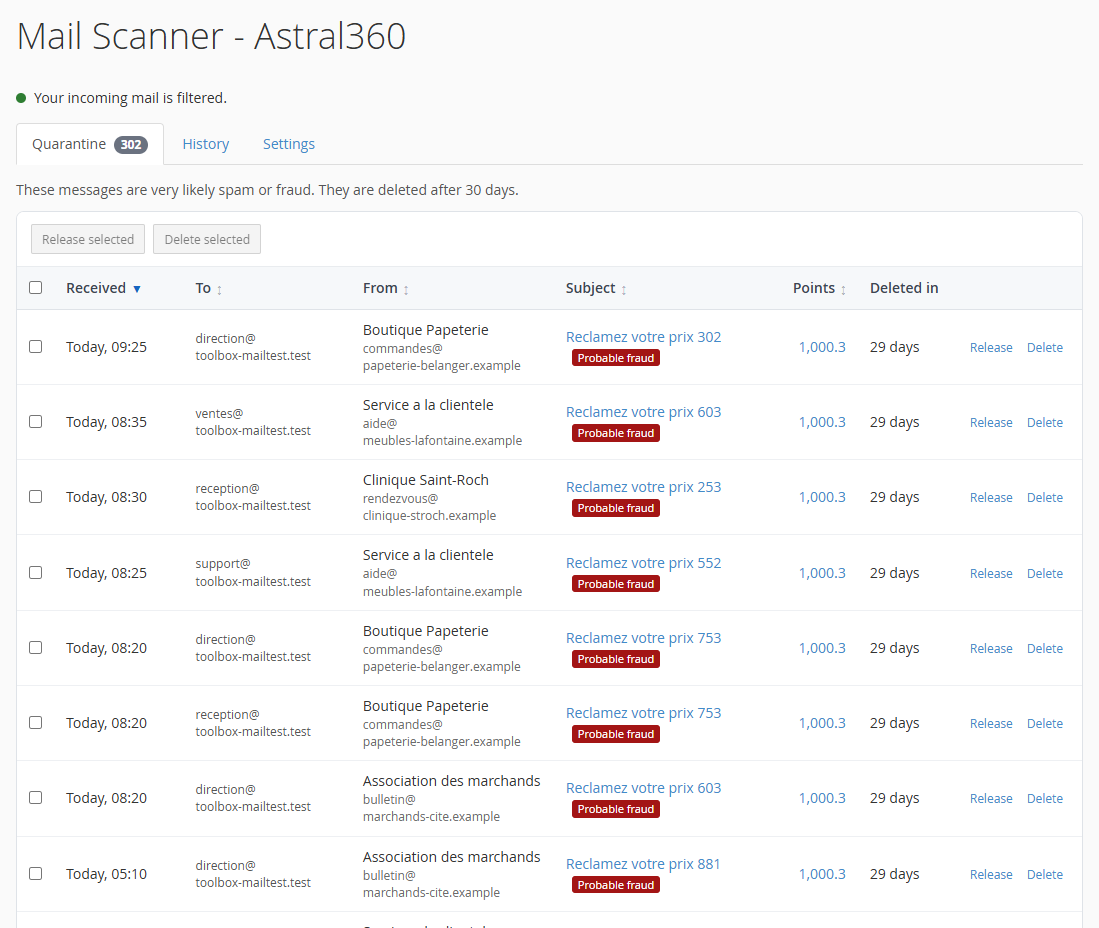
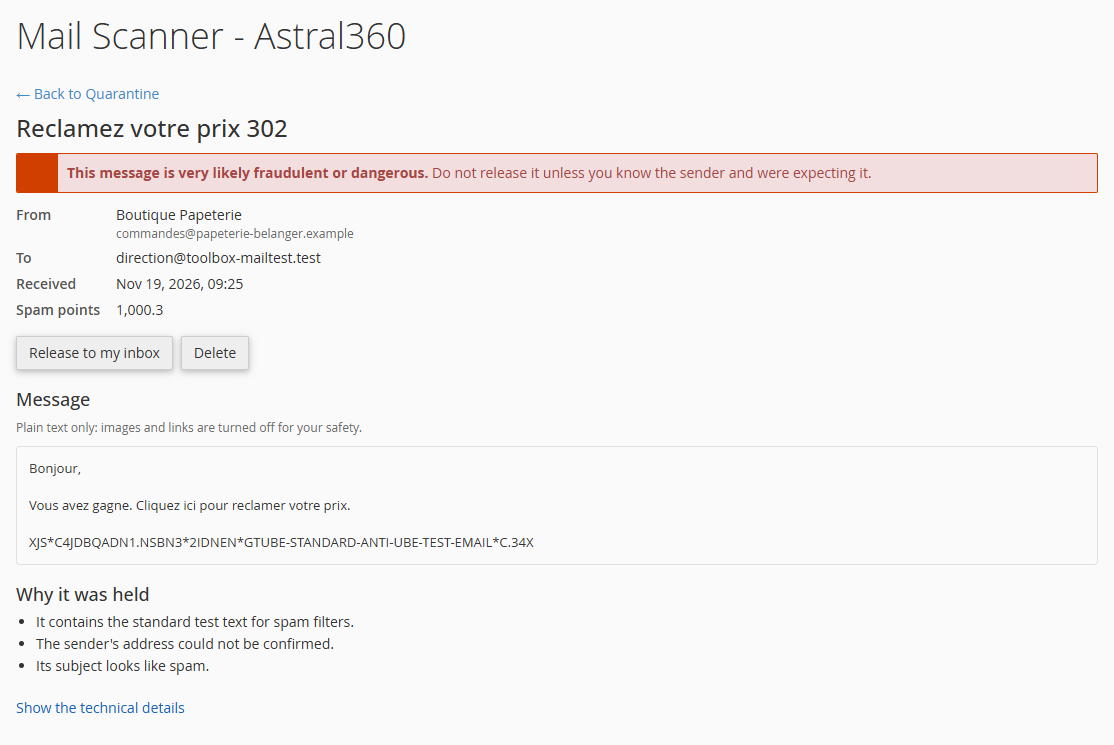
The held messages, with the days left before they are deleted. Release sends a message to the inbox of the address it was meant for; Delete removes it. One at a time or several at once (at most 25 per action), each time after a confirmation. A message that looks like fraud, or carries a dangerous file type, says so in red (Probable fraud, Dangerous file type), and its confirmation is firmer. One page per message: its text only (HTML and links are never opened; attachments are listed by name and size), Why it was held, and its technical details under Show the technical details.
History
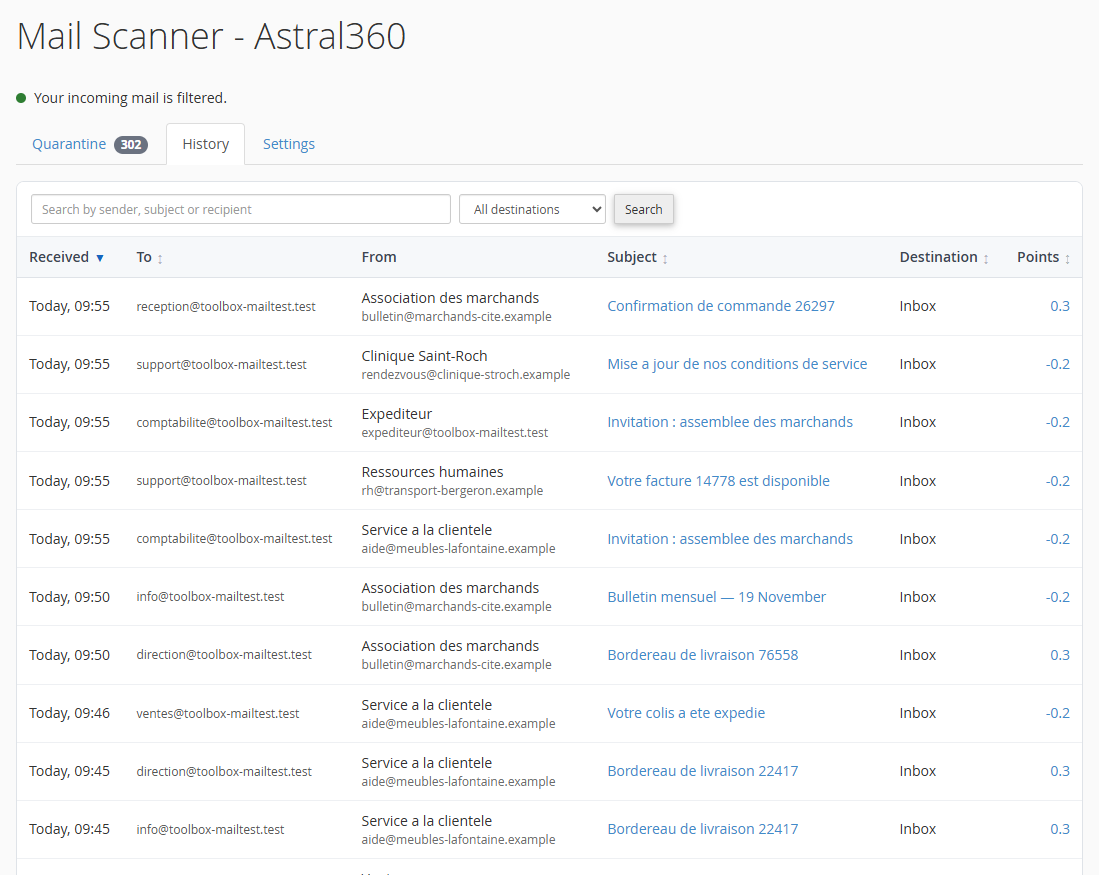
The messages the account received in recent days, and where each copy went: Inbox, Folder (the customer's filters), Junk, Quarantine, Inbox (released), Deleted, Forwarded, Other or Unknown. A search by sender, subject or recipient, a destination filter and Clear. One page per message: the reasons for its points in plain words, its headers and SpamAssassin's rules under Show the technical details, and, under Was this a mistake?, the button that contradicts the verdict: Report as spam or Report as not spam (a report does not move the message). A quarantined copy opens in the Quarantine.
The lists are on a white card; their column titles sort them, and a second click reverses the order: the date, the recipient, the subject, the destination and the points in the History (not the sender, which the index cannot sort as shown), and the date, the recipient, the sender, the subject and the points in the Quarantine. In the History, the sort follows the pages, the search and the return from a message.
Settings
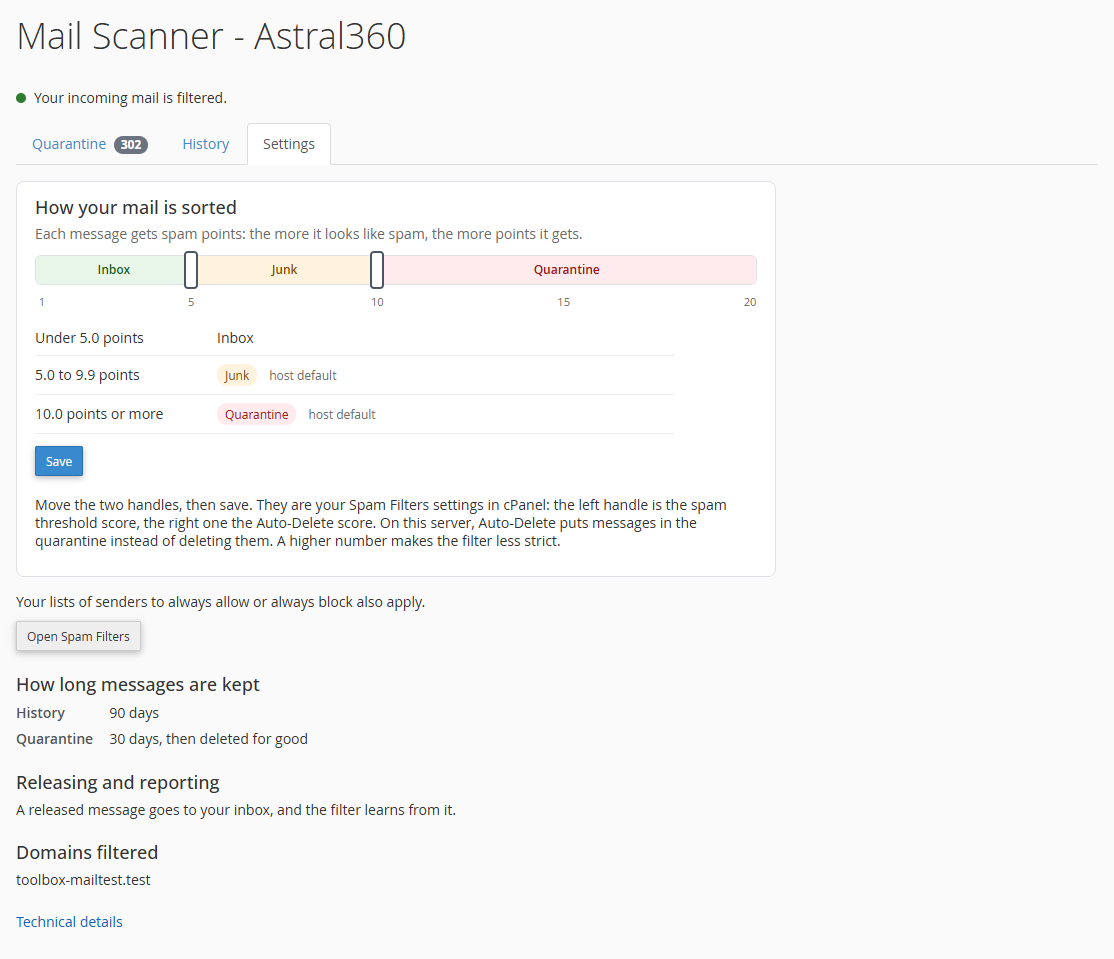
- How your mail is sorted: the two levels as two handles on three bands, Inbox, Junk and Quarantine, from 1 to 20 whole points. Save writes them as cPanel Spam Filters settings, on the account's behalf: the left handle is the spam threshold score, the right one the auto-delete score, which on this server quarantines instead of deleting (within a minute). Under the bands, the levels in force and where they come from (your setting or host default). Back to your host's levels shows when the account has levels of its own, and removes them. When the account's Spam Box is off, the middle band reads Inbox, marked as spam.
- To always accept or always refuse a sender, the customer adds it to the Spam Filters lists: Open Spam Filters.
- How long messages are kept (history and quarantine), Releasing and reporting, Domains filtered, and Technical details (the
X-Toolbox-Spamheader).
The page is in English or French, like the account's cPanel. It shows text only: a quarantined message's HTML and attachments are never opened.
The page and what it reads are installed outside the extension, in cPanel's own folders (/usr/local/toolbox-mailcp, cPanel's AdminBin and UAPI modules). It can be turned off per package in WHM › Feature Manager (feature Mail Scanner - Astral360).
Install, update and removal
- Install (in the install console, see Installation): a previous spam filter is removed completely (its own files and software are deleted); the recommended settings are applied, shared learning set up, the scanner service installed and the mail server connected; the quarantine is turned on; cPanel's Spam Box is turned on once for each account (in the background, a few accounts each minute), and for each account created later; the customer page is installed. A customer who then turns their Spam Box off is respected. Only one question can be asked: changing the server's DNS settings.
- Update from 0.2.x: like an install for what is new (quarantine, Spam Box, customer page, the mail server reconnected for its new routes), except a choice the admin already made, which is kept. WHM's Search tab and the kept message texts go away: the texts are erased once the new scanner service runs, and the history the index keeps stays.
- One switch, recording always on (since 0.3.10): the three lines "Scanner service", "Automatic recording" and "Mail reaches this extension" became the single "Mail Scanner" line; an update removes the "Automatic recording" file (
/var/cpanel/toolbox/mail-scanner-recording), and the core's scheduler records every minute. A removal holds recording while it runs. - Shared learning at update (since 0.3.8): an update from an earlier version moves a server where each account learns alone to learning shared in its own database, once; a later update keeps the way the admin chose, and a memory already shared is kept. When that is not possible (DBD::mysql missing, for example), Server state says why.
- The learning password set apart (since 0.3.9): each install and update moves a learning password the accounts could read (a Redis or SQL setting written by hand) to a file only SpamAssassin can read; nothing restarts.
- Spam features in every package (since 0.3.6): an install or update turns on cPanel's spam filter and Spam Box once in each feature list (WHM › Feature Manager), and the hourly job does it in a list created since. Accounts that could not have the Spam Box get it then, once. A list is turned on only once: an admin who then removes those features is respected. A removal leaves them on.
- Spam is no longer refused on arrival (since 0.3.5): everything that reaches the quarantine score goes there. cPanel's setting that refuses incoming mail above a spam score (
acl_deny_spam_score_over_int) is recommended at 0 (off); while it still refuses, the "Spam is not refused on arrival" row of Server state says so. - The mail server reconnected at update: an update reconnects the mail server when it still runs with a previous version's connection, if the extension is on; otherwise the "Mail Scanner" line of Server state says needs repair, with Repair. Settings an admin wrote under 0.1.x's connection in
/etc/exim.conf.local(message_logs = false, for example) keep their section when it is replaced or removed. - A previous spam filter's page and hooks in cPanel: each install and update removes the page an old spam filter left in cPanel's Email group, and the code it had cPanel run, once that filter is stopped. Their files are set aside under
/var/lib/toolbox-mail/legacy-backup/<date>, not erased, and each package's feature list only loses its line, after a copy. A hook cPanel cannot remove by itself stays, and the install says to delete it in WHM, under Development › Manage Hooks. - Disable (Options › Extensions): the customer page closes at once, and within a minute or two mail goes back to cPanel's spam filtering; recording, the history clean-up and the quarantine purge go on. See Installation → Adding and removing extensions.
- Removal (Options › Extensions, in the console): mail goes back to cPanel's own spam filtering, the mail server restarts for a few seconds and the scanner service is removed, with the customer page. What this extension recorded is erased for good: the message index, its logs and the messages held in each account's quarantine. Left: its SpamAssassin settings, the shared learning, the engines it installed, each account's Spam Box, and what it set aside from a previous filter or an earlier learning server. The Also put back the server's values from before Mail Scanner box also puts back the SpamAssassin, WHM and mail-server settings Mail Scanner changed; a setting changed by hand since stays as it is.
Scheduled jobs
Run by the core's scheduler; each run goes to /var/log/toolbox-scheduler.log.
| Job | When | Also while disabled |
|---|---|---|
| Message recording | every minute | yes |
| History clean-up | each night at 3:20 | yes |
| Quarantine purge | each night at 3:50 | yes |
| Server checks | each night at 4:35 | no |
| Learning from released messages | every 5 minutes | no |
| Spam features of new feature lists | every hour, at :20 | no |
| Accounts' Spam Box | every minute, while accounts are left to do | no |
Data & file map
| Path | Role |
|---|---|
extensions/mail-scanner/var/settings.user.json |
Your settings (kept by updates; the defaults are in config/settings.default.json) |
extensions/mail-scanner/var/setup-report.json |
The last report of the server checks |
/etc/toolbox-mailscand/config.json |
The scanner service's settings (the Junk folder and Quarantine numbers, free disk space) |
/usr/local/toolbox-mailscand/ |
The scanner service |
/var/lib/toolbox-mail/mail-scanner.db |
The message index (SQLite, root only) |
/var/lib/toolbox-mail/ |
Also: the values from before Mail Scanner (initial-values, kept by the removal), the learning queue, what was set aside from a previous filter (legacy-backup/) |
/etc/toolbox-mail-high-scores |
Each domain's quarantine number, for Exim, compiled every minute from the accounts' auto-delete scores |
/home/<account>/.toolbox-quarantine/ |
The account's quarantine, written by Exim under the account's identity |
/usr/local/toolbox-mailcp/ |
The customer page in cPanel |
/etc/mail/spamassassin/zz_toolbox-mail.cf |
The scores of the Scanner settings tab |
/etc/mail/spamassassin/zz_toolbox-networks.cf |
The servers counted as our own, saved on the Scanner settings tab (kept at removal, unless the put-back box is ticked) |
/etc/mail/spamassassin/zz_toolbox-low.cf |
SpamAssassin's spam score, equal to Junk folder from |
/etc/mail/spamassassin/zz_toolbox-*.cf |
The other SpamAssassin settings the extension writes (learning, add-ons) |
/var/log/toolbox-mail/ |
The scanner service's event stream |
/var/log/toolbox-mail-scanner.log |
This extension's own notes |
/var/log/toolbox-scheduler.log |
Each run of its scheduled jobs (see above) |