
Mail Disk Space
Per-account mailbox usage tracking with per-plan quotas, per-account overrides and automatic over-quota reports.
Version 1.0.3 · Store extension · requires PHP 7.4+ Track email storage usage per cPanel account, with per-user quota overrides and automatic over-quota reports.
Mail Disk Space measures each account's mailbox usage (du on /home/<user>/mail/), compares it against a per-plan quota (in GB) times an optional per-account multiplier, and reports accounts exceeding quota + buffer — on screen, on the dashboard tile, and by email (cron every 3 days or on demand).
It can also surface an "Email disk usage" entry inside each user's cPanel dashboard via an optional Perl resource hook.
Scan tab
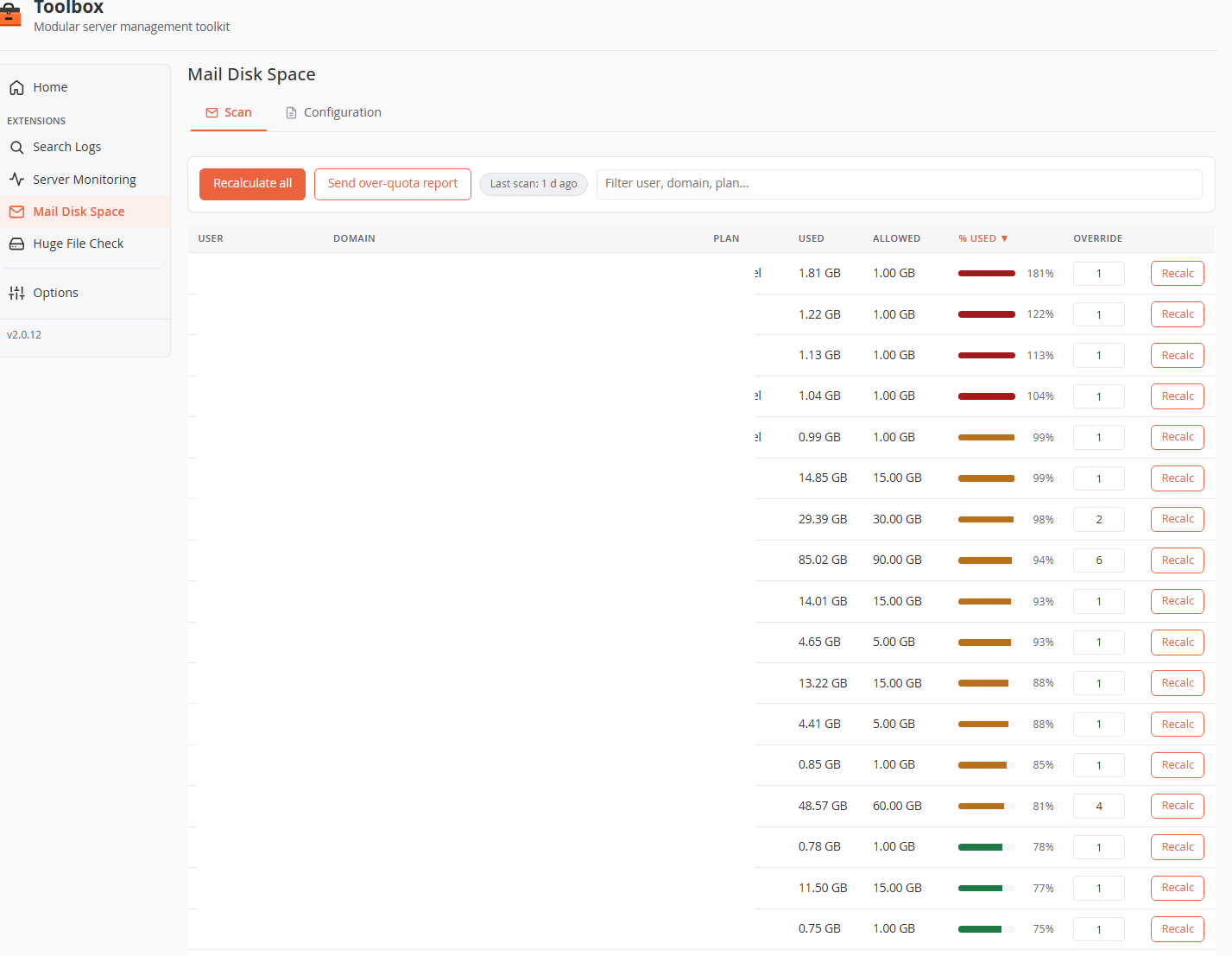
- Recalculate all — full rescan of every account (can take several minutes on busy servers; a progress notice asks you not to close the tab). Runs are serialized by a lock, so a UI scan and the cron can't collide.
- Send over-quota report — dispatches the current report through the core Notifier immediately. If no account is over quota, nothing is sent (you get "No account is over quota.").
- Last scan badge — age of the cached scan (green when fresh, orange when older than 3 days or never run).
- Filter box — instant client-side filtering across user / domain / plan.
The table
One row per account, all columns sortable (default: % used, descending):
| Column | Meaning |
|---|---|
| User / Domain / Plan | Account, primary domain, WHM package name. |
| Used | Current mailbox size (GB). |
| Allowed | plan quota × override multiplier (GB). |
| % used | Progress bar — green < 80 %, amber 80–99 %, red ≥ 100 %, or “—” when the plan's quota is disabled (-1). |
| Override | Per-account multiplier (default 1, accepts decimals 0–100, e.g. 1.5 = 150 % of the plan quota, 6 on the screenshot = 6× the plan). Commits on blur/Enter and rescans that account immediately. |
| Recalc | Rescans just this account. |
Rows over quota get a warm highlight; rows whose scan failed show the username in red with the error in a tooltip.
Configuration tab
Report
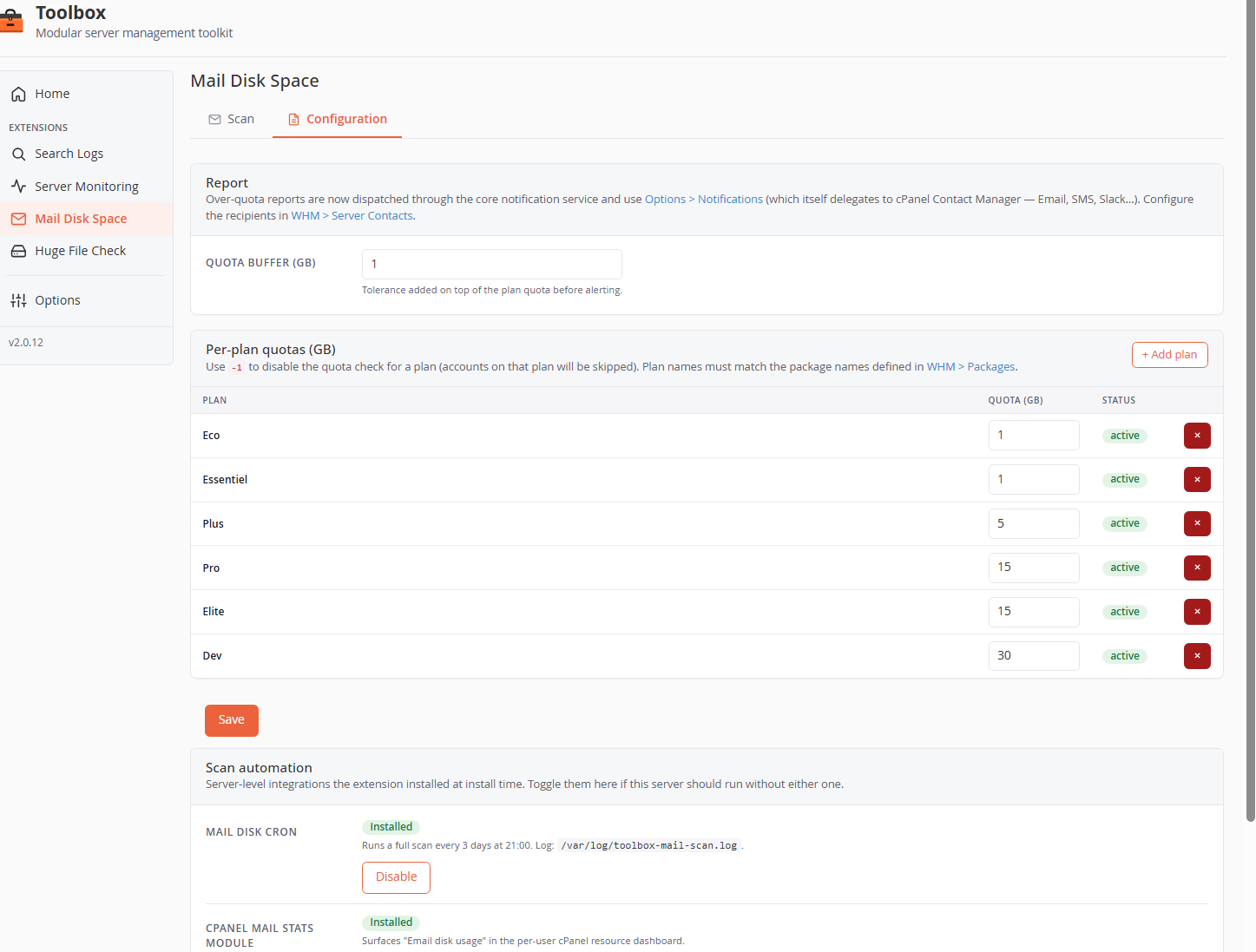
Recipients/channels are managed centrally — the report goes through the core Notifier (Options → Notifications), which delegates SMS/Slack to cPanel Contact Manager (WHM → Server Contacts).
| Field | Default | Notes |
|---|---|---|
| Quota buffer (GB) | 1 | Tolerance added on top of the allowed quota before an account is considered over quota (decimals accepted). |
Per-plan quotas (GB)
One row per hosting plan. Plan names must match the package names defined in WHM → Packages (the name is bound to the package — rename it in WHM, then remove + re-add the entry here).
- Quota value: a positive integer (GB),
0, or-1to disable the quota check for that plan (accounts on it are skipped). - + Add plan adds a row; the × button removes one (at least one plan must remain — use
-1to neutralize a plan instead of deleting the last row). - Duplicate plan names are rejected.
Shipped defaults: Eco: 1, Essentiel: 1, Plus: 5, Pro: 15, Elite: 15, Dev: 30.
Scan automation
Two server-level integrations, installed at extension-install time, each with an Enable/Disable toggle:
| Integration | What it does |
|---|---|
| Mail disk cron | /etc/cron.d/toolbox-mail-scan — full scan every 3 days at 21:00, sending the over-quota report automatically if at least one account exceeds its quota. Log: /var/log/toolbox-mail-scan.log. |
| cPanel mail stats module | Perl hook /var/cpanel/perl/Cpanel/ResourceUsage/Custom/emaildiskusage.pm — surfaces "Email disk usage" in each user's cPanel resource dashboard (reads the per-account ~/.cpanel/mailsizeinfo file the scanner maintains). |
The over-quota report
Sent through the core Notifier (subject [<hostname>] Astral Toolbox - Mail disk usage over quota) when at least one account exceeds allowed + buffer:
- HTML email — context table (server, count, scan time) plus a per-account table (Mailbox, Domain, Used, Quota, % used) sorted by usage, with a red badge at ≥ 150 %.
- Plain-text twin — one
User : <user> (<domain>) is over quota X / Y Gbline per account (this is what SMS/Slack channels receive).
Data & file map
| Path | Purpose |
|---|---|
extensions/mail-disk-space/config/settings.default.json |
Shipped defaults (plans, buffer) |
extensions/mail-disk-space/config/settings.user.json |
Your overrides (preserved on update) |
extensions/mail-disk-space/var/scan-cache.json |
Last scan results (root-only) |
extensions/mail-disk-space/var/overrides.json |
Per-account multipliers (only non-1.0 values stored) |
/home/<user>/.cpanel/mailsizeinfo |
Two lines (used bytes, allowed bytes) consumed by the cPanel hook |
/etc/cron.d/toolbox-mail-scan |
The every-3-days cron (when enabled) |
/var/log/toolbox-mail-scan.log |
Cron output |