
Astral Toolbox — Documentation
A modular WHM plugin bundling server-side tools for cPanel/WHM administrators, with an extension store.
By Astral Internet inc. — a modular WHM plugin that bundles server-side tools for cPanel/WHM administrators.
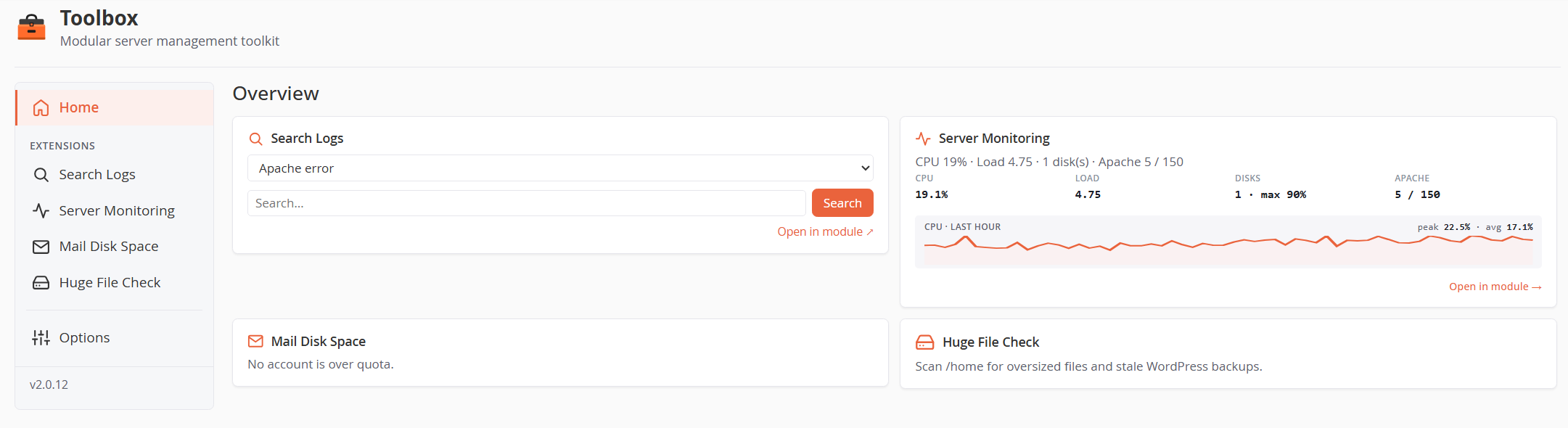
Astral Toolbox (formerly WHM Toolbox) is built around a small core — routing, authentication, templating, notifications, auto-update and an extension manager — and a set of self-contained extensions that each provide one feature. Some extensions ship with the core install (bundled); others are delivered through the remote Store and can be gated per-server by IP.
The plugin appears in the WHM sidebar as Astral Toolbox and is served from /cgi/toolbox/toolbox.php (root-only, CSRF-protected).
Documentation index
| Document | Contents |
|---|---|
| Installation | One-line install, installer options, DNSOnly support, updates, uninstall |
| Core configuration (Options) | The five Options tabs — Extensions, General, Store, Notifications, Version — and how to add/remove extensions |
| Huge File Check | Scheduled /home scans for oversized files & WordPress backups, cleanup actions, silence list, email reports |
| Server Monitoring | CPU/load/disk/Apache/Nginx metrics, threshold alerting, SSH login tracking, post-mortem snapshots |
| Mail Disk Space | Per-account mailbox usage tracking, per-plan quotas, over-quota reports |
| Search And Replace | Serialized-data-aware MySQL search & replace with dry-run, automatic backups and restore |
| Search Logs | Real-time tail, search and filter of server log files (including rotated .gz archives) |
The home dashboard
The landing page shows one tile per enabled extension with its live status (e.g. accounts over quota, CPU sparkline, quick log search). Tiles can be:
- Reordered by drag-and-drop (the order is saved automatically).
- Hidden individually from Options → Extensions (the extension keeps running; only the tile disappears).
The page that opens when you click the plugin in the WHM sidebar is configurable in Options → General (home, or any enabled extension).
Extensions at a glance
| Extension | Version | Distribution | Purpose |
|---|---|---|---|
| Search Logs | 1.0.3 | Bundled with core | Tail, search and filter server log files in real time |
| Server Monitoring | 1.1.7 | Store | SSH login tracking + CPU/load/disk/Apache metrics with alerting |
| Mail Disk Space | 1.0.3 | Store | Email storage usage per account with quota reports |
| Search And Replace | 1.0.0 | Store | Safe MySQL string/domain replacement with backups |
| Huge File Check | 1.5.2 | Store | Scan /home for oversized files and stale backups |
Architecture quick reference
| Component | Path |
|---|---|
| Plugin root | /usr/local/cpanel/whostmgr/docroot/cgi/toolbox/ |
| Entry point | toolbox.php (single CGI entry, all requests) |
| Core classes | core/ (Kernel, Notifier, ExtensionManager, Update, …) |
| Extensions | extensions/<slug>/ (each with its own manifest.php) |
| Core state | var/state.json (enabled extensions, tile order, auto-update flag) |
| Notification config | var/notifications.json (0600 — contains SMTP credentials) |
| Auto-update cron | /etc/cron.d/toolbox-auto-update (every 4 h, randomized minute) |
| WHM registration | AppConfig install/toolbox.conf → /var/cpanel/apps/toolbox.conf |
All extension cron drop-ins use the toolbox- prefix (/etc/cron.d/toolbox-*) so the uninstaller can clean them up in one sweep.
Security model
- Root-only: the plugin runs as root under WHM (
whostmgr); every request is authenticated by cpsrvd. - CSRF: every state-changing POST requires a valid
_csrftoken. - Download integrity: the installer and the auto-updater verify a SHA-256 checksum for every archive (core and extensions) before extraction, and validate ZIP contents against path traversal.
- Private files: state, notification config (including the SMTP password) and scan data are written
0600/0700, root-only.