
Huge File Check
Scheduled /home scans for oversized files and WordPress backups, with cleanup actions, a silence list and email reports.
Version 1.5.2 · Store extension · requires PHP 7.4+ Scan
/homefor oversized files and WordPress backups, report and clean them up.
Huge File Check walks the server's /home tree (configurable) on a schedule or on demand, flags oversized files in three categories, optionally auto-deletes them by policy, keeps a run history with full reports, emails the report, and gives you an interactive table to clean up flagged files by hand — with a silence list for known-good files.
Detection categories
| Category | Default rule |
|---|---|
error_log / debug.log |
Files named error_log or debug.log larger than 50 MB |
| Large files | Any file larger than 500 MB |
| WordPress backups | Filenames matching provider patterns: Updraft (^backup_.*\.zip$), Backuply (^wp_.*\.tar\.gz$), Bividbackups (^wpclone_.*\.zip$), Duplicator Pro (^[0-9]{8}_.*_archive\.daf$, ^[0-9]{8}_.*_installer\.php\.bak$) |
Overview tab
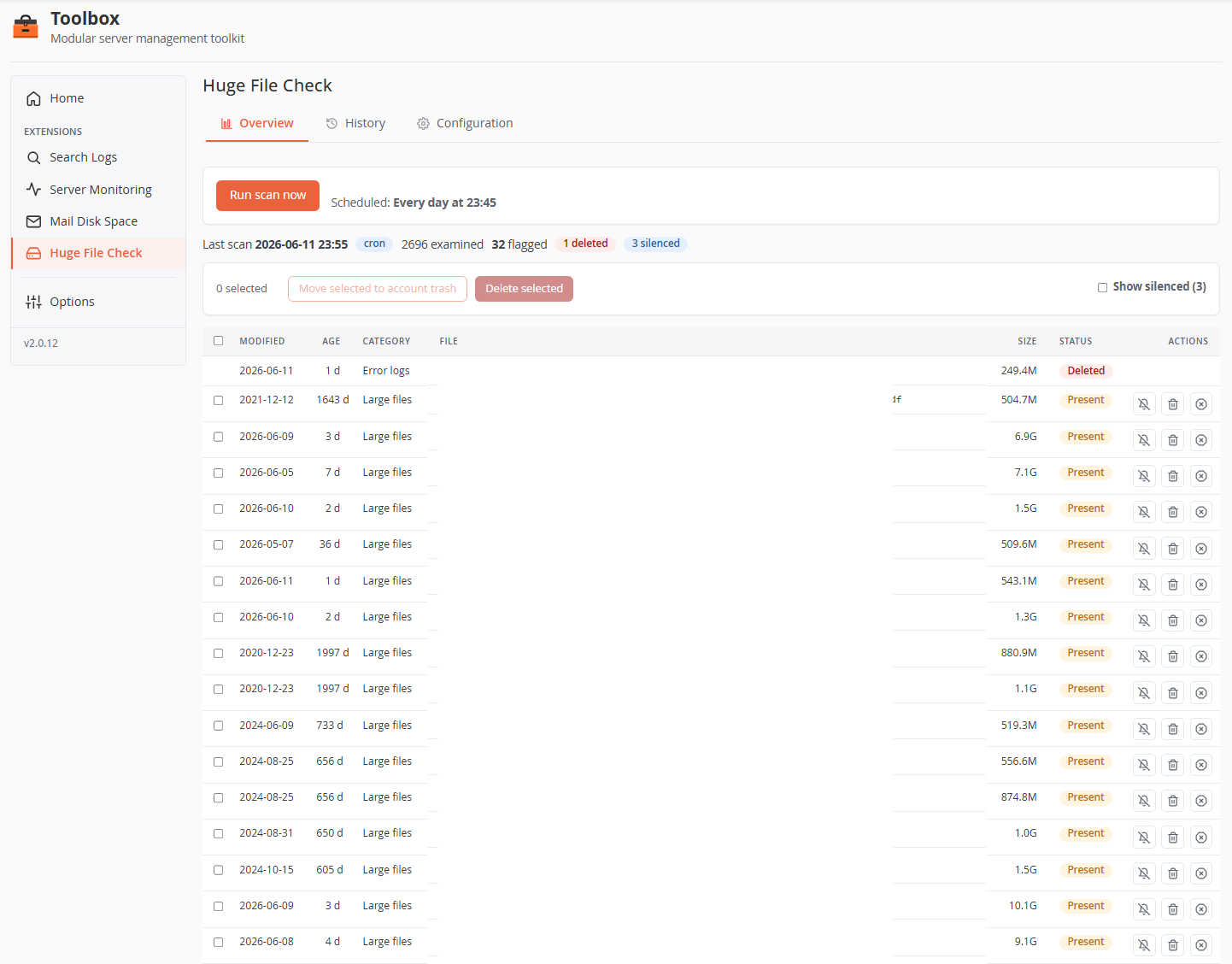
The Overview shows the latest run and lets you act on its files.
- Run scan now — spawns the scan as a detached background process: it keeps running even if you close the tab, and a status panel shows live progress (finding → filtering → processing). Only one scan can run at a time (a second request reports scan busy). Manual runs are unrestricted — the once-per-day cap applies only to the schedule.
- Summary line — last scan time, trigger badge (
manual/cron), files examined, flagged, plus badges for deleted / trashed / silenced counts. - File table — one row per flagged file. Sortable columns: Modified, Age (days), Category, File (middle-ellipsized path), Size, Status (
Present/Trashed/Deleted/Silenced), Actions. - Bulk bar — select rows with the checkboxes, then Move selected to account trash or Delete selected. The buttons stay disabled until at least one row is checked.
- Show silenced (N) — silenced rows are hidden by default; this toggle reveals them.
Per-row actions (files with status Present)
| Action | Effect |
|---|---|
| Silence (speaker icon) | Opens the silence modal: pick a duration (1–180 days, pre-filled from the configured default) and an optional note (max 2 000 chars). The file is excluded from reports/emails and from auto-deletion until the silence expires. |
| Trash | Moves the file to the owning account's ~/.trash (the cPanel File Manager trash), where the account holder can review or restore it. Collisions get a random suffix. |
| Delete (red icon) | Permanently unlinks the file. |
Every trash/delete — single or bulk — goes through a confirmation popup first.
Files with a note show an ⓘ icon next to the path: hover to read the note, click to open a popup with Cancel / Remove / Update to manage it.
Safety guards on file actions
Actions are heavily hardened — useful to know when something is refused:
- Only paths flagged by the latest run and still Present can be acted on — the UI can never target an arbitrary path.
- The path must canonically resolve under the scan root (no symlink or
..escape anywhere in the path), be a regular file with a single hard link, re-checked just before the operation. - When running as root, the unlink/rename executes with the owning account's privileges (effective uid/gid drop), so the kernel itself blocks cross-account race tricks.
- Trash refuses to operate if
~/.trashis a symlink; moved files are chowned back to the account (root-owned files are left root-owned).
History tab
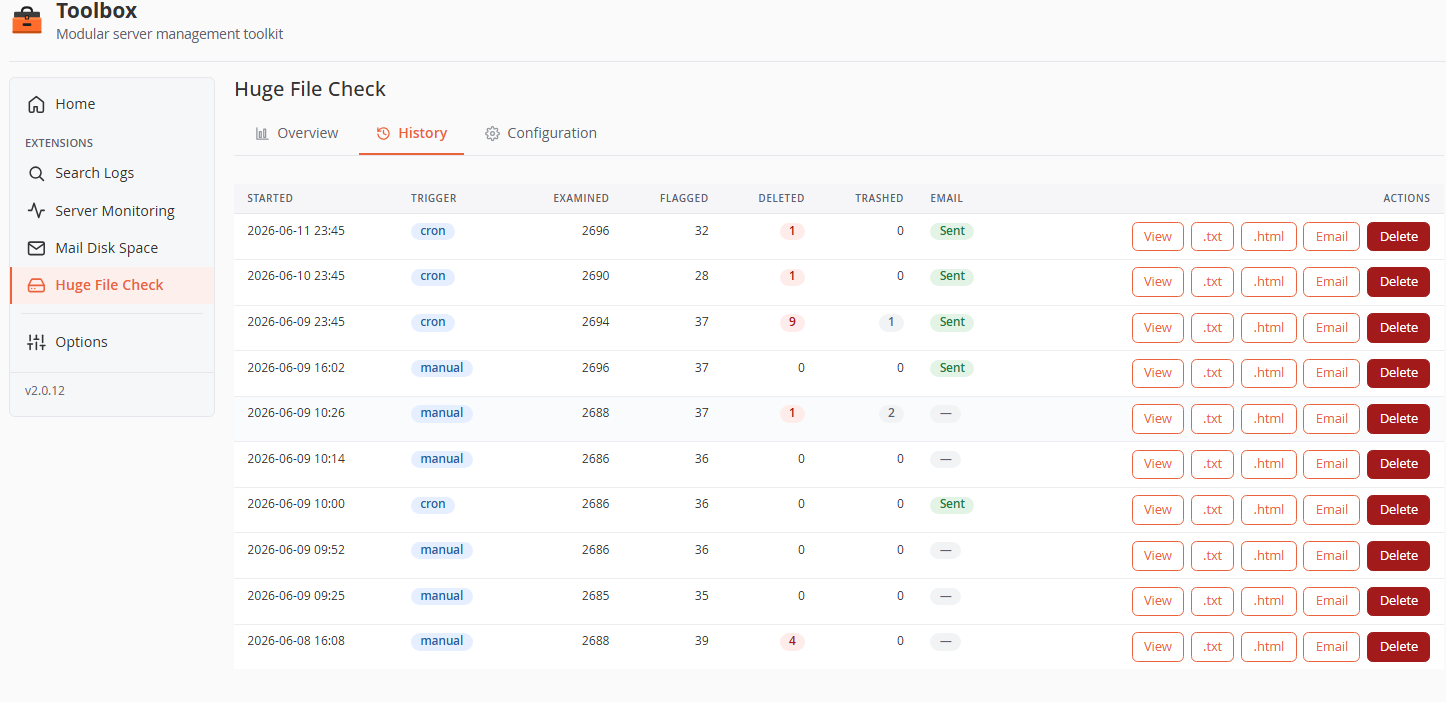
One row per past run: start time, trigger badge, examined / flagged / deleted / trashed counts, and whether the report was emailed.
| Action | Effect |
|---|---|
| View | Opens the stored plain-text report in a modal. |
| .txt / .html | Download the report in either format. |
| Re-sends this run's report through the configured channels — works regardless of the "email after cron/manual" toggles. | |
| Delete | Removes the run record and its stored reports (confirmed). |
Retention is count-based: the newest N runs (default 30, configurable) are kept; older records and their report files are pruned automatically.
Configuration tab
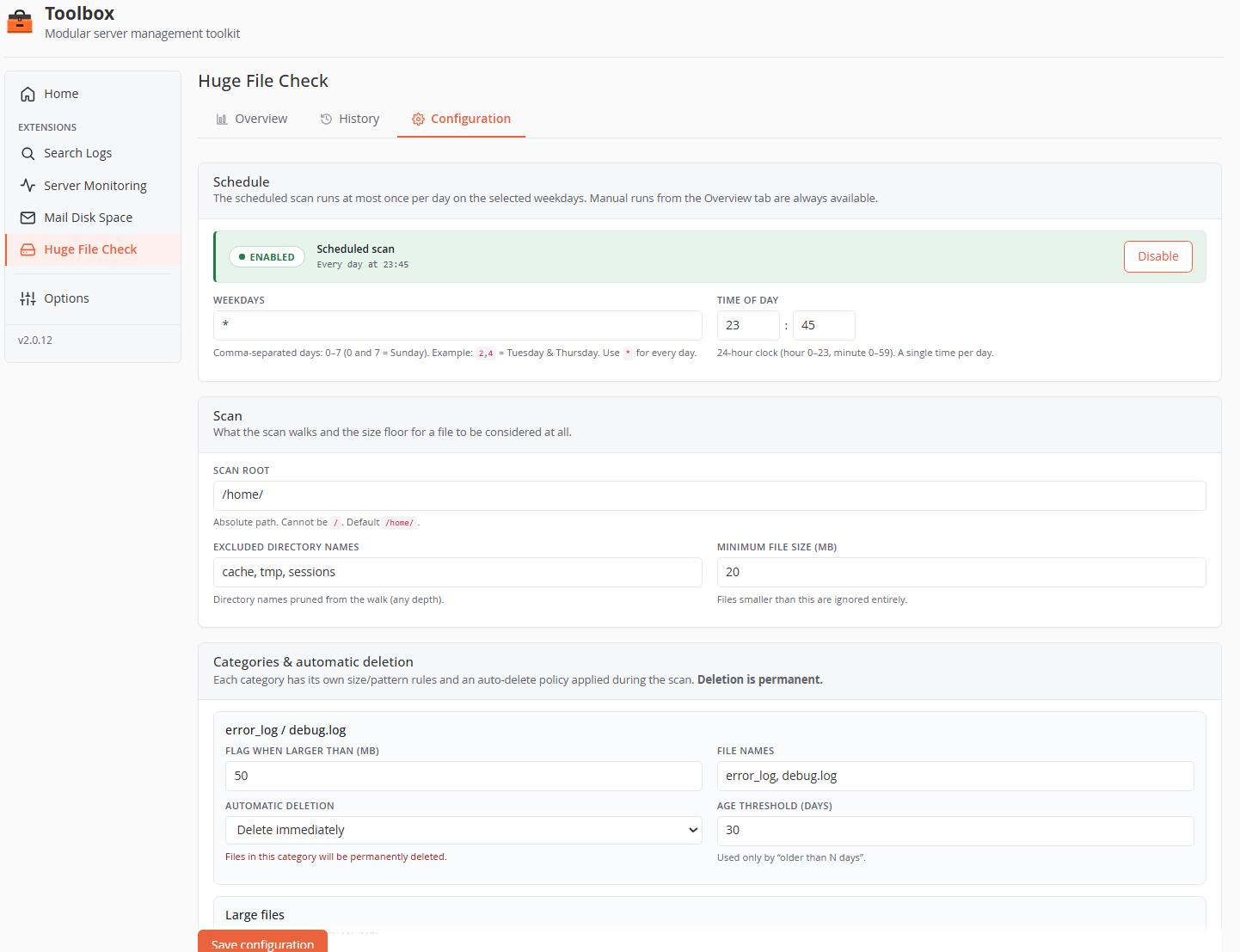
Schedule
The scheduled scan runs at most once per day on the selected weekdays (by design: the time is a single hour + minute, not a list). The Enable/Disable button installs or removes the cron drop-in.
| Field | Default | Rules |
|---|---|---|
| Weekdays | * |
Comma-separated day numbers 0–7 (0 and 7 = Sunday), e.g. 2,4 = Tuesday & Thursday, or * for every day. |
| Time of day | 23:45 | Hour 0–23, minute 0–59 — one single time per day. |
The cron drop-in is /etc/cron.d/toolbox-huge-file-check; scheduled-run output is appended to /var/log/toolbox-huge-file-check.log.
Scan
| Field | Default | Rules |
|---|---|---|
| Scan root | /home/ |
Absolute path; / is refused. |
| Excluded directory names | cache, tmp, sessions |
Directory names pruned from the walk at any depth. |
| Minimum file size (MB) | 20 | Files smaller than this are ignored entirely (the floor for every category). |
Categories & automatic deletion
Each category has its own rules and an auto-delete policy applied during the scan. The policy selector offers:
- Never delete (report only) — default for every category.
- Delete if older than N days — deletes only files whose modification date is older than the Age threshold (days) field.
- Delete immediately — deletes on detection.
Deletion is permanent. When any category has a deleting policy, saving the configuration requires ticking "I understand files matched by a deleting policy will be permanently removed." Auto-deletion uses the same hardened file-action path as the UI buttons, and silenced files are never auto-deleted.
Category-specific fields:
| Category | Fields |
|---|---|
| error_log / debug.log | Flag when larger than (MB) (default 50) · File names (exact basenames, default error_log, debug.log) |
| Large files | Flag when larger than (MB) (default 500) |
| Backups | One textarea per provider, one PCRE per line, matched against the file name only. Grouped by CMS (WordPress today) so new platforms can be added later. An invalid regex is skipped and logged — never fatal. |
Notifications
The HTML report email lists each category and its files (silenced files excluded).
| Field | Default | Notes |
|---|---|---|
| Send email reports | on | Master switch for this extension's emails. |
| Via Toolbox Notifier (cPanel Contact Manager) | on | Sends through the core Notifier — see Core configuration → Notifications. Configure an SMTP relay there for guaranteed delivery of large reports. |
| Also send to a fixed address (sendmail) | off | An additional copy straight to the address below via local sendmail, independent of Contact Manager. |
| Fixed report address | support@astralinternet.com |
Recipient for the sendmail channel. |
| Email subject suffix | Large Files |
Subject becomes <hostname> - <suffix>. |
| Email after scheduled (cron) scans | on | |
| Email after manual scans | off | Note: a manual "Run now" only emails if this is checked. |
A status block shows whether a Contact Manager email is configured, provides a Send test report email button, and a collapsible Recent notification attempts (diagnostics) view of the Notifier debug log.
History
| Field | Default | Rules |
|---|---|---|
| Runs to keep | 30 | Minimum 1. Older run records and their reports are pruned beyond this count. |
Silenced files
| Field | Default | Rules |
|---|---|---|
| Default silence duration (days) | 30 | Pre-filled in the silence modal. Maximum 180 days. |
Below the field, a table lists every active silence (soonest-to-expire first) with its path, an ⓘ icon when a note exists, the time remaining, and an Un-silence button. Expired silences clean themselves up automatically; the file is then flagged again on the next scan.
How the scan works (runtime)
- Both cron and "Run now" execute the same CLI runner (
cron/scan.php) under cPanel's PHP. Aflockonvar/scan.lockserializes runs — a second invocation exits quietly. The lock is held by the process, so it releases automatically if the process dies (no stale-lock file to delete). - The walk is a single
findcommand (-pruneon excluded dirs,-size +<min>c), streamed line-by-line — memory stays flat even on very large/hometrees. The runner raises its ownmemory_limitto 1024 MB and removes any time limit. - Progress is written to
var/status.json(polled by the UI every 2 s). A status file older than ~20 minutes is treated as a dead run. - Reports (
.txt+.html) are stored per run undervar/reports/, root-only.
File map
| Path | Purpose |
|---|---|
extensions/huge-file-check/config/settings.default.json |
Shipped defaults (overwritten on update) |
extensions/huge-file-check/var/settings.user.json |
Your configuration overrides (preserved) |
extensions/huge-file-check/var/history.json |
Run records (capped ring buffer) |
extensions/huge-file-check/var/reports/<id>.txt/.html |
Full report per run |
extensions/huge-file-check/var/silenced.json |
Active silences + notes |
extensions/huge-file-check/var/scan.lock / status.json |
Run mutex / live progress |
/etc/cron.d/toolbox-huge-file-check |
Schedule drop-in (when enabled) |
/var/log/toolbox-huge-file-check.log |
Scheduled-run log |