
Simple Mode
Simple mode is the default view when a cPanel user opens the WSA icon. It is a table with one radio column + one description column,with mutually exclusive choices.
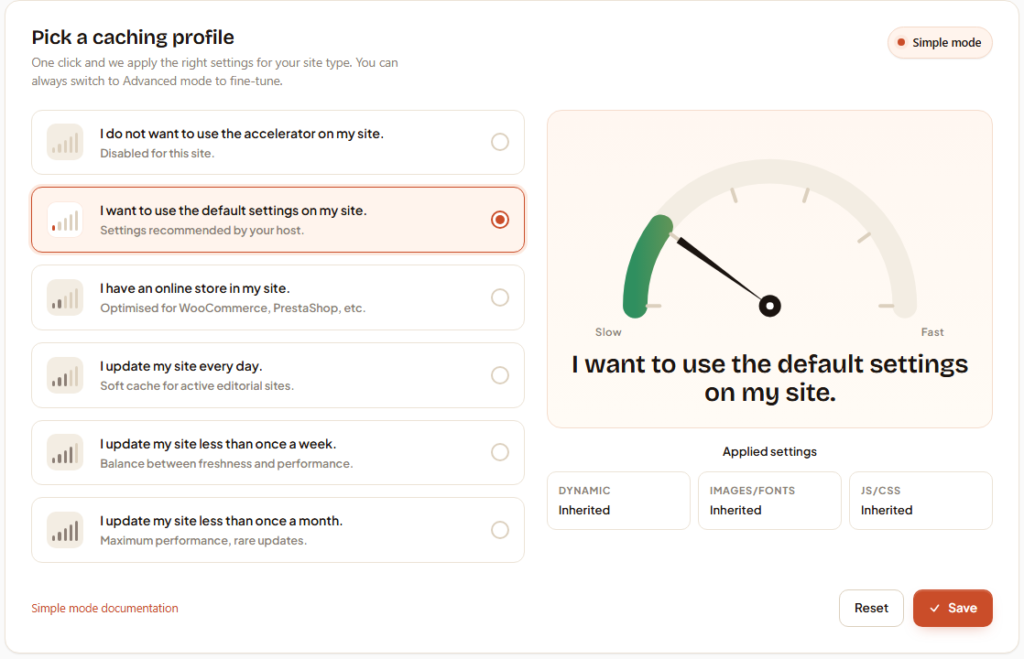
| Choice | Behaviour |
|---|---|
| Default | Server-wide settings (defined by the admin in WHM → Cache Configuration). |
| Disable | No cache — every request goes straight to Apache. Useful for debugging. |
| Cache for 1 month | Long cache durations: suitable for content rarely updated (brochure sites). |
| Cache for 1 week | Frequency/performance compromise — recommended default for most WordPress / content-driven e-commerce sites. |
| Cache for 1 day | Short cycle — editorial sites, high-frequency blogs. |
| Store (e-commerce) | E-commerce preset: long CSS/JS/Media cache, very short dynamic (1 min), cart/checkout/login URIs auto-bypassed. |
Compression indicator
In the top-right corner of the cPanel panel, a coloured dot (traffic-light style) shows the state of compression codecs:
- Brotli/Gzip — both codecs active (optimal)
- Brotli — Brotli only
- Gzip — gzip only
- (empty) — no compression
The indicator is read-only for the user; the setting is managed in WHM by the administrator.
Switch to Advance mode button
At the bottom of the Simple panel, a button switches the user to Advanced mode. Use it when the client needs per-domain/subdomain settings or wants to fine-tune TTLs individually.
Clear my cache button
Empties only the caches associated with the current user's domains (not other accounts'). Safe — the next request repopulates.